Best Web Hosting for Small Business: 4 Hosts Compared on Price and Features
Some links on this page are affiliate links. If you buy through them we may earn a commission, at no extra cost to you. It never changes our verdict. How we test and make money
On this page
Short answer: The best web hosting for small business is Hostinger for most owners. Its Premium plan costs $1.99 a month on the 48-month term, renews at $10.99, and includes a free domain for a year, free SSL, free business email and LiteSpeed caching. Pick SiteGround if you need daily backups on the smallest plan, and DreamHost or Bluehost if you want many sites on one cheap plan.
A small business website has one job: help customers find you, trust you and contact you. Your host decides how fast that site loads, how often it goes down and how much you pay after the first year. Choosing badly costs you sales and hours of support chats.
I compared the plans small businesses actually buy from four popular hosts: Hostinger, SiteGround, Bluehost and DreamHost. I looked at the price you pay today, the price you pay at renewal, the number of sites, storage, backups and the business features included in the box.
Best web hosting for small business at a glance
| Host | Best for | Entry price | Renews at | Sites | Backups |
|---|---|---|---|---|---|
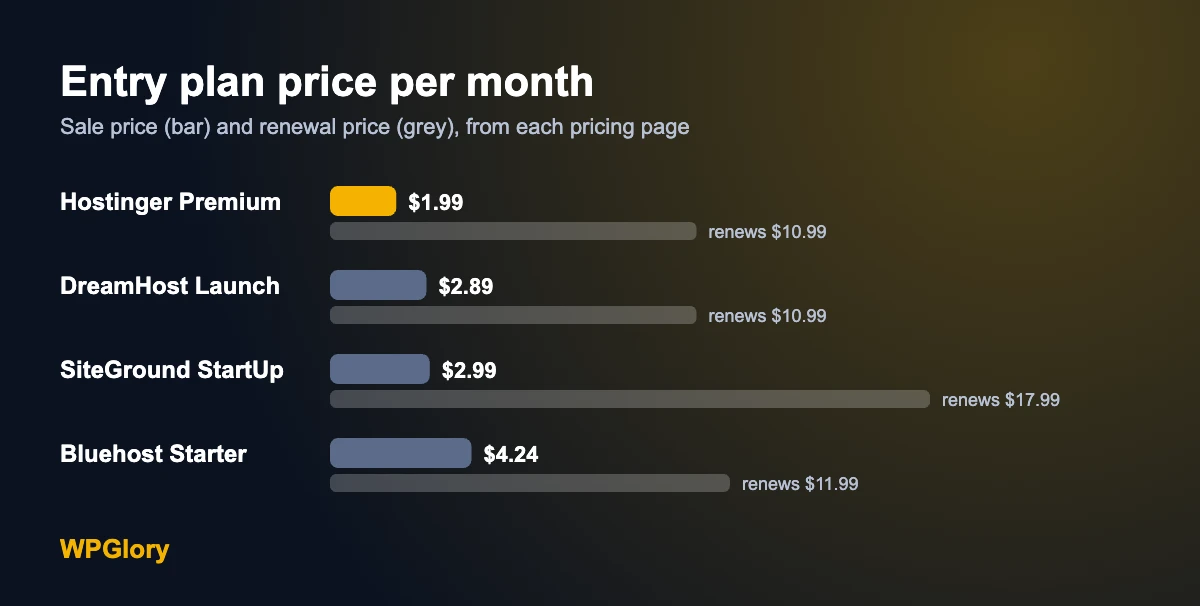
| Hostinger | Most small businesses | $1.99/mo (48 mo) | $10.99/mo | 3 | Weekly (daily on Unlimited) |
| SiteGround | Daily backups on the smallest plan | $2.99/mo (12 mo) | $17.99/mo | 1 | Daily |
| Bluehost | Many sites on a starter plan | $4.24/mo (12 mo) | $11.99/mo | 10 | Weekly |
| DreamHost | Low renewal price | $2.89/mo (first year) | $10.99/mo | 25 | See plan page |
What a small business needs from a web host
- Speed. A slow site loses visitors before they see your offer. Look for modern servers, built-in caching and a CDN.
- Uptime. Your site should be online when customers search for you. Most hosts promise 99.9%.
- A free domain and SSL. SSL (https) is required for trust and for Google. A free first-year domain saves you money at launch.
- Business email. name@yourbusiness.com looks more professional than a free email address.
- Backups. If an update breaks your site, a backup gets you back online in minutes.
- An honest renewal price. The first term is a discount. Plan your budget around the renewal price.
- Easy WordPress setup. One-click install, staging and automatic updates save time you would rather spend on your business.
Shared, cloud or managed: which type of hosting do you need?
Before you compare hosts, decide which type of hosting fits your business. Picking the wrong type is the most common reason owners overpay or outgrow a plan in a few months.
| Type | How it works | Good for | Example plan |
|---|---|---|---|
| Shared hosting | Your site shares a server with other sites. The host manages everything. | Brochure sites, local businesses, blogs and small lead-generation sites | Hostinger Premium |
| Cloud hosting | Your site gets its own share of resources in a cloud setup, still managed by the host. | Online stores, busy sites and businesses that run campaigns or ads | Hostinger Cloud Startup |
| Managed cloud or VPS | You get a server with more control. Some plans need technical skills. | Agencies, developers and sites with custom needs | Cloudways |
Most small businesses should start on shared hosting. It is the cheapest, the host handles the server, and a good shared plan is fast enough for thousands of visitors a month. Move to cloud hosting when your site slows down at busy times, when you start selling online, or when the host tells you that you are hitting your resource limits. On Hostinger, the upgrade from a shared plan to Cloud Startup happens inside hPanel, so you keep your site, domain and email.
Managed cloud and VPS hosting make sense once you have a developer or an agency looking after the site. They give you more control over the server, but you pay for that control in time or money.
1. Hostinger: best web hosting for most small businesses
Hostinger gives small businesses the most for the money. It is the cheapest host in this comparison for the first term, and its renewal price is in line with the others. Every plan runs on LiteSpeed web servers with smart caching, which pairs with the free LiteSpeed Cache plugin for WordPress.
| Plan | Price (48-month term) | Renews at | Websites | Storage | Backups | |
|---|---|---|---|---|---|---|
| Premium | $1.99/mo ($95.52 up front) | $10.99/mo | 3 | 20 GB SSD | Weekly | 2 mailboxes per site |
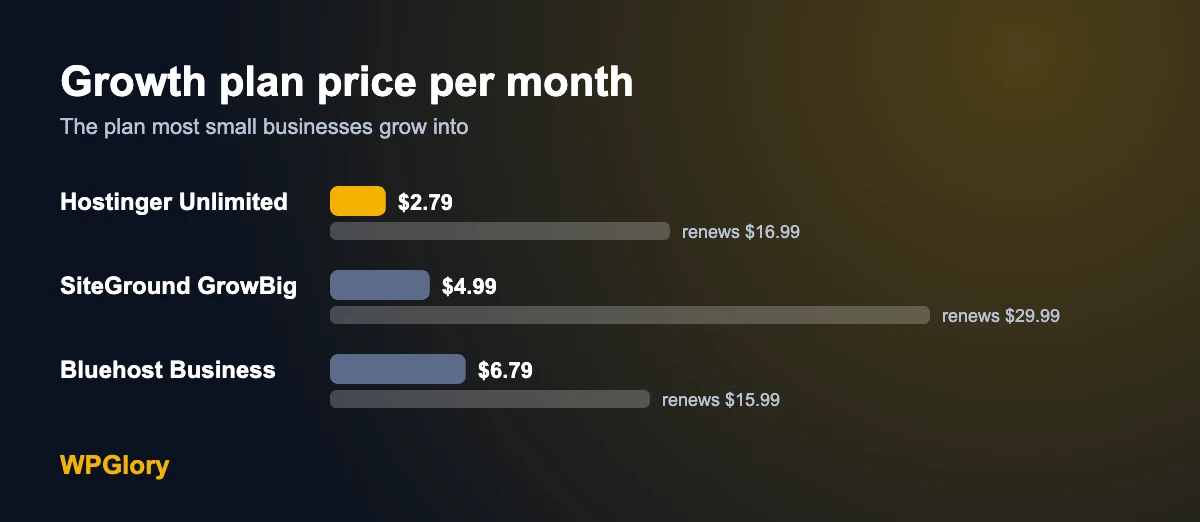
| Unlimited | $2.79/mo ($133.92 up front) | $16.99/mo | Unlimited | 50 GB NVMe | Daily | Unlimited mailboxes, free for 1 year |
| Cloud Startup | $7.99/mo ($383.52 up front) | $25.99/mo | Unlimited | 100 GB NVMe | Daily and on demand | Unlimited mailboxes, free for 1 year |
What you get on every Hostinger plan
- A free domain for the first year
- Free SSL for every site
- A CDN included
- One-click WordPress install and one-click staging
- A malware scanner
- AI tools for building and writing
- A 99.9% uptime guarantee and a 30-day money-back guarantee
Which Hostinger plan should a small business pick?
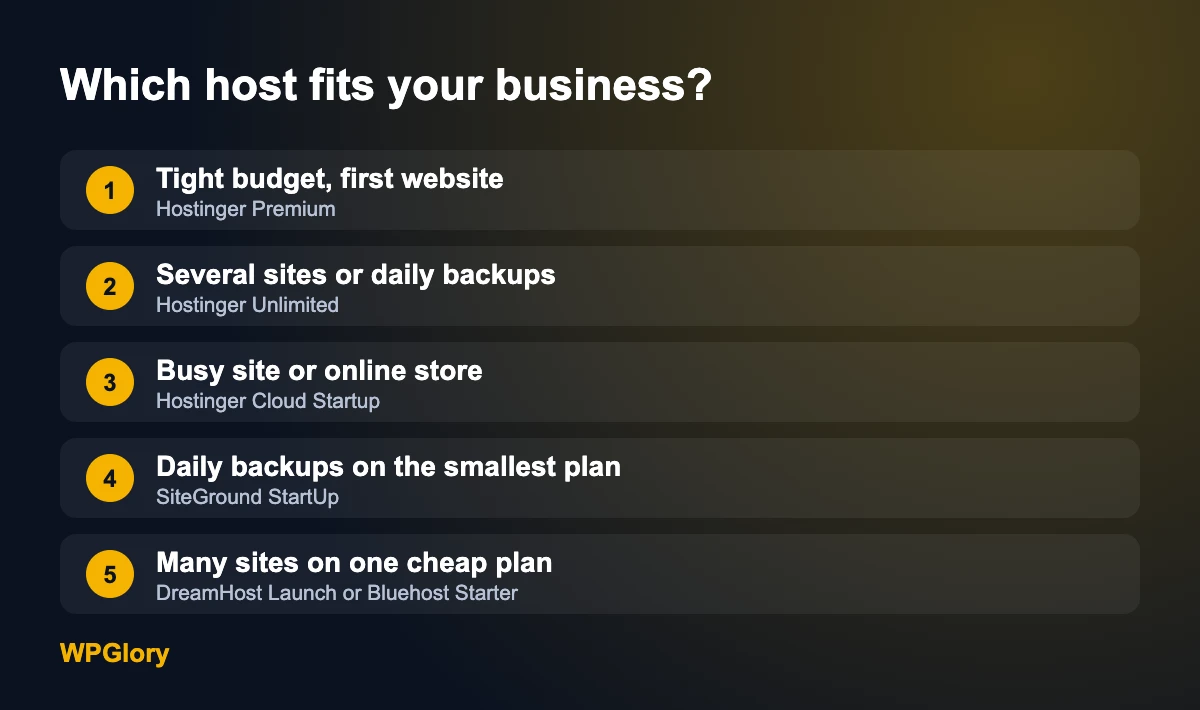
Premium fits a brochure site for one business, such as a plumber, a café or a consultant. It hosts three sites, so you can add a landing page or a second brand later. Choose Unlimited if you want daily backups, more storage or business email after year one is covered. Choose Cloud Startup for an online store or a site with steady traffic, because it gives you more resources and on-demand backups.
| Pros | Cons |
|---|---|
| Lowest first-term price in this test | The best price needs the 48-month term |
| LiteSpeed servers and built-in caching | Premium keeps weekly backups only |
| Free domain, SSL, CDN and email | Renewal is several times the sale price |
| Easy setup in hPanel with one-click staging |
2. SiteGround: best for daily backups on a small plan
SiteGround is a strong choice if backups matter more than price. Every plan includes daily backups and a free CDN, even StartUp. The catch is the renewal price, which is the highest in this comparison, and the StartUp plan hosts only one website.
| Plan | Sale price (12 months) | Renews at | Websites | Storage |
|---|---|---|---|---|
| StartUp | $2.99/mo | $17.99/mo | 1 | 10 GB |
| GrowBig | $4.99/mo | $29.99/mo | See plan page | See plan page |
| GoGeek | $7.99/mo | $44.99/mo | See plan page | See plan page |
Pick SiteGround if you run one important site and want daily backups without paying for a bigger plan. Skip it if you are on a tight budget after the first year.
3. Bluehost: best for many sites on a starter plan
Bluehost is one of the oldest names in WordPress hosting. Its Starter plan allows 10 websites, which is generous if you run several small brands. Backups are weekly, and the sale price applies to the first 12 months.
| Plan | Sale price (12 months) | Renews at | Websites | Storage |
|---|---|---|---|---|
| Starter | $4.24/mo | $11.99/mo | 10 | 10 GB |
| Business | $6.79/mo | $15.99/mo | 50 | 50 GB |
| eCommerce Essentials | $15.99/mo | $23.99/mo | See plan page | See plan page |
Pick Bluehost if you need many sites on one account. Skip it if you want the lowest start price, because Hostinger is cheaper for the first term.
4. DreamHost: best for a low renewal price
DreamHost Launch costs $2.89 a month for the first year and renews at $10.99, the same as Hostinger Premium. It allows 25 websites and 25 GB of NVMe storage. It is a good pick if you want a simple plan and a predictable renewal.
Other hosts worth a look
These hosts did not show clear plan prices on their pricing pages when I checked, so I have not listed numbers for them. Check their pages directly if you are interested.
- HostGator: a budget shared host owned by the same group as Bluehost.
- InMotion Hosting: US-based host with business-focused shared and VPS plans.
- Hosting.com (formerly A2 Hosting): known for speed-focused plans.
- Cloudways: managed cloud hosting for agencies and busy stores, billed monthly.
The real cost of small business hosting over four years
Hosting ads show the monthly sale price. What you pay over time depends on the term length and the renewal price. Here is a simple four-year estimate for each entry plan, using the prices above. For hosts with a 12-month sale, I added three years at the renewal price.
| Entry plan | Year 1 | Years 2 to 4 | Four-year total |
|---|---|---|---|
| Hostinger Premium (48-month term) | $23.88 | $71.64 | $95.52 |
| DreamHost Launch | $34.68 | $395.64 | $430.32 |
| Bluehost Starter | $50.88 | $431.64 | $482.52 |
| SiteGround StartUp | $35.88 | $647.64 | $683.52 |
This is where Hostinger pulls ahead. Because the 48-month term locks in the sale price, four years of Premium cost less than one year and a half on most other entry plans. You do pay the full amount up front, so make sure you are happy in the first 30 days, while the money-back guarantee still applies.
Watch out for add-ons at checkout. Hosts often pre-select extras such as paid backups, SEO tools or domain privacy. Remove anything you do not need before you pay. On Hostinger, the core features small businesses need are already included.
How to choose the right host for your business
- Count your sites. One brochure site needs less than a business with three brands and a shop.
- Set a four-year budget. Add the first-term price and three years of renewals. This is the real cost.
- Decide how often you need backups. If you update the site daily or run a store, choose daily backups.
- Check the business extras. Free domain, SSL, email and staging save money and time.
- Use the money-back window. Build your site in the first 30 days and test the speed and support before the refund period ends.
How to set up a small business website on Hostinger
Once you pick a plan, getting your business online takes about an hour. These are the steps I follow for a new client site:
- Buy the plan. Open the Hostinger hosting page, choose Premium or Unlimited and the 48-month term.
- Claim your free domain. Pick a short name that matches your business. Choose a .com or your country domain.
- Install WordPress. Hostinger offers it during setup, or add it later in hPanel under Websites.
- Create your business email. Set up name@yourbusiness.com in hPanel under Emails and connect it to your phone.
- Install a light theme. Kadence is free and fast. Add your logo, colors and contact details.
- Build five pages. Home, Services, About, Contact and Privacy Policy. Put your phone number and a contact form on every page.
- Turn on speed and safety. Activate LiteSpeed Cache, add a backup plugin such as UpdraftPlus if you are on weekly host backups, and install Rank Math for SEO.
- Connect Google. Add your site to Google Search Console and create a Google Business Profile so local customers can find you.
Use the one-click staging tool before big changes, such as a new theme. You can test on a copy of the site and push it live only when it works.
How I compared these hosts
I used the public pricing page of each host and recorded the sale price, the term needed for that price, the renewal price, the number of websites, storage and backup frequency. Where a page did not show a clear price, I left the host out of the price tables rather than guess. I did not include hosts that only offer custom quotes. I will update this page when the prices change.
Best web hosting for small business: my pick
For most small businesses, Hostinger is the best value. Premium covers a typical business site for $1.99 a month on the 48-month term, with a free domain, free SSL, business email, a CDN and LiteSpeed caching. When you grow, Unlimited adds daily backups and unlimited sites for $2.79 a month, and Cloud Startup handles busy stores.
Choose SiteGround if daily backups on a one-site plan are a must, and DreamHost or Bluehost if you need many sites on a starter plan.
Setting up your site? Follow my step-by-step guide on how to start a WordPress blog. The same steps work for a business site. Then add a contact form with one of the best free WordPress form plugins and speed it up with a cache plugin.
Frequently asked questions
What is the best web hosting for a small business?
Hostinger is the best value for most small businesses. Premium costs $1.99 a month on the 48-month term and renews at $10.99, with a free domain for a year, free SSL, email and LiteSpeed caching. SiteGround is better if you need daily backups on its smallest plan.
How much should a small business pay for web hosting?
For a typical business website, shared hosting costs about $2 to $5 a month for the first term and about $11 to $18 a month at renewal for the entry plans in this comparison. Online stores and busy sites need cloud plans that cost more.
Do I need a separate domain and email?
Not at first with Hostinger. Its plans include a free domain for the first year and business email, so you can use name@yourbusiness.com from day one.
Is shared hosting good enough for a small business?
Yes, for most brochure and lead-generation sites. Move to cloud hosting when you run an online store, get steady traffic or need more resources.
Can I switch hosts later?
Yes. Most hosts offer free or low-cost WordPress migration, and you can also move a site yourself with a migration or backup plugin. Keep your domain at a registrar you control to make the move easier.
Sources
- Hostinger web hosting plans
- SiteGround web hosting plans
- Bluehost shared hosting plans
- DreamHost shared hosting plans
- Google Search Central: page experience
Final verdict
Hostinger is the best web hosting for most small businesses
It has the lowest first-term price in this comparison, a fair renewal price, LiteSpeed speed features, and a free domain, SSL and email in the box. Start on Premium and upgrade as your business grows.