6 Best WordPress Cache Plugins (2026): Tested on the Same Site
Some links on this page are affiliate links. If you buy through them we may earn a commission, at no extra cost to you. It never changes our verdict. How we test and make money
On this page
Short answer: For most sites, WP Fastest Cache is the easiest of the free WordPress cache plugins we tested: 0.8 MB of extra memory, no tables, no notices and a one-screen setup. If your host runs LiteSpeed (Hostinger, many cPanel hosts), use LiteSpeed Cache instead, because its server-level page cache beats any PHP cache. WP Super Cache is the safe, simple choice from Automattic, and W3 Total Cache is for people who want every setting. Autoptimize is not a page cache: pair it with one.
WordPress cache plugins save a ready-made copy of each page so your server does not have to rebuild it with PHP and database queries for every visitor. They are the single biggest speed upgrade most WordPress sites can make. But they are not all equal: some add a lot of code to your server, some fill your dashboard with menus, and some only work on certain hosts.
We installed the six most popular free WordPress cache plugins on the same clean test site, one at a time, and measured what each one costs. All six have at least 800,000 active installs on WordPress.org.
Caching is not the whole story, though. WordPress cache plugins hide server cost from logged-out visitors, but logged-in users, carts, checkouts and search results are never cached. If your site is slow even with a cache, read our guide to finding slow WordPress plugins and our test of 33 lightweight WordPress plugins.
Our picks at a glance
1
WP Fastest CacheBest for most sites: simple and light
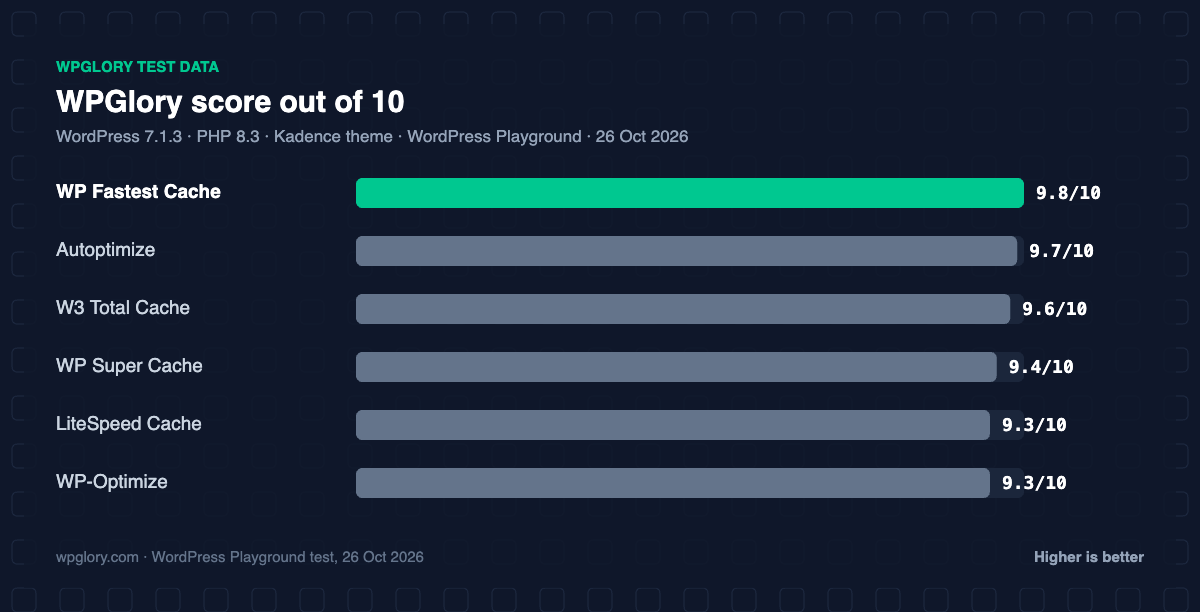
9.8/10
2
LiteSpeed CacheBest on LiteSpeed hosting
9.3/10
3
WP Super CacheSafest simple option, by Automattic
9.4/10
4
W3 Total CacheMost settings, for advanced users
9.6/10
5
WP-OptimizeCache plus database clean-up
9.3/10
6
AutoptimizeCSS/JS optimizer to pair with a cache
9.7/10
The order reflects what we would recommend for most sites, weighing features and hosting fit. The score measures only what each plugin costs your site.
WordPress cache plugins compared: our test results
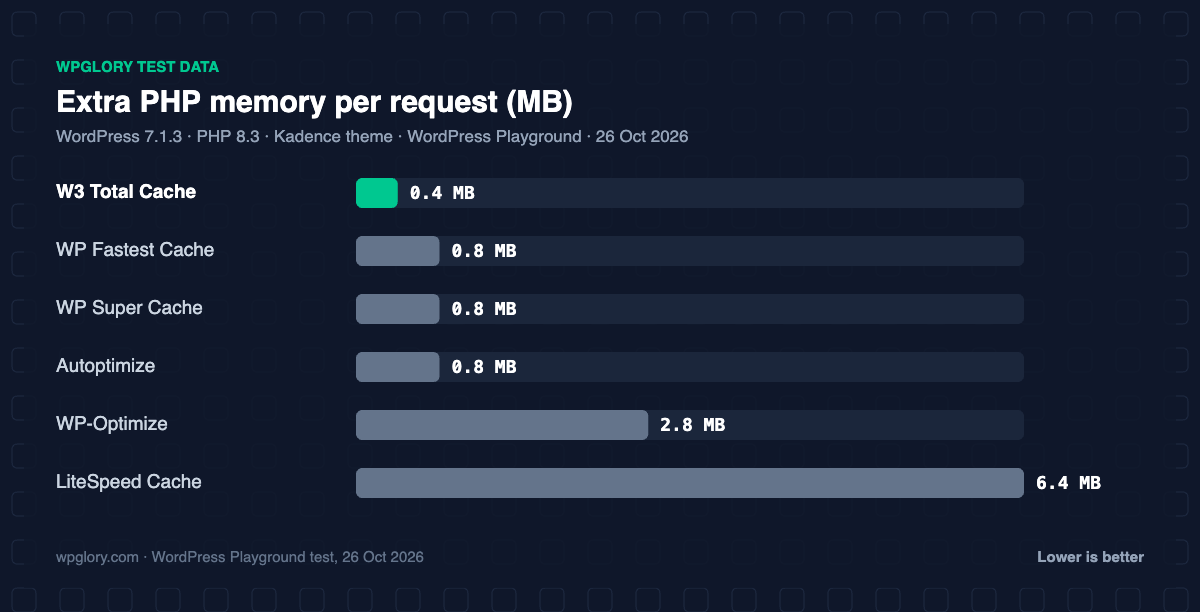
This table shows what each plugin added to a clean WordPress site straight after activation, before we changed any settings. Lower memory and fewer tables are better. None of the six added CSS or JavaScript for logged-out visitors, which is what you want from a cache plugin.
| Measurement | WP Fastest Cache | LiteSpeed Cache | WP Super Cache | W3 Total Cache | WP-Optimize | Autoptimize |
|---|---|---|---|---|---|---|
| Version tested | 1.5.3 | 7.9.2 | 3.1.4 | 2.11.0 | 4.7.0 | 3.1.17 |
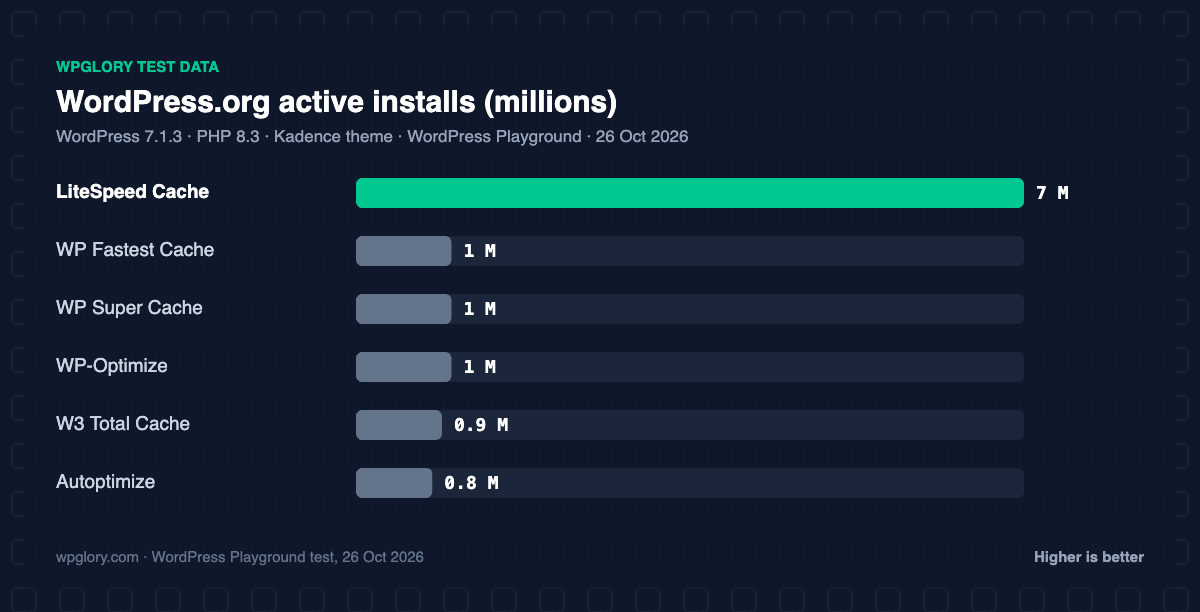
| Active installs | 1 million+ | 7 million+ | 1 million+ | 900,000+ | 1 million+ | 800,000+ |
| WordPress.org rating | 4.9 (4,227) | 4.8 (2,777) | 4.3 (1,346) | 4.4 (5,420) | 4.8 (2,616) | 4.7 (1,428) |
| CSS/JS added for visitors | 0 KB | 0 KB | 0 KB | 0 KB | 0 KB | 0 KB |
| Extra PHP memory | 0.8 MB | 6.4 MB | 0.8 MB | 0.4 MB | 2.8 MB | 0.8 MB |
| Database tables | 0 | 2 | 0 | 0 | 3 | 0 |
| Options saved | 0 | 193 | n/a | 14 | 26 | 2 |
| Admin menu | Top-level | Top-level (10 items) | Settings item | Top-level (19 items) | Top-level (9 items) | Settings item |
| Notices / redirects | None | None | setup notice | None | upsell notice | None |
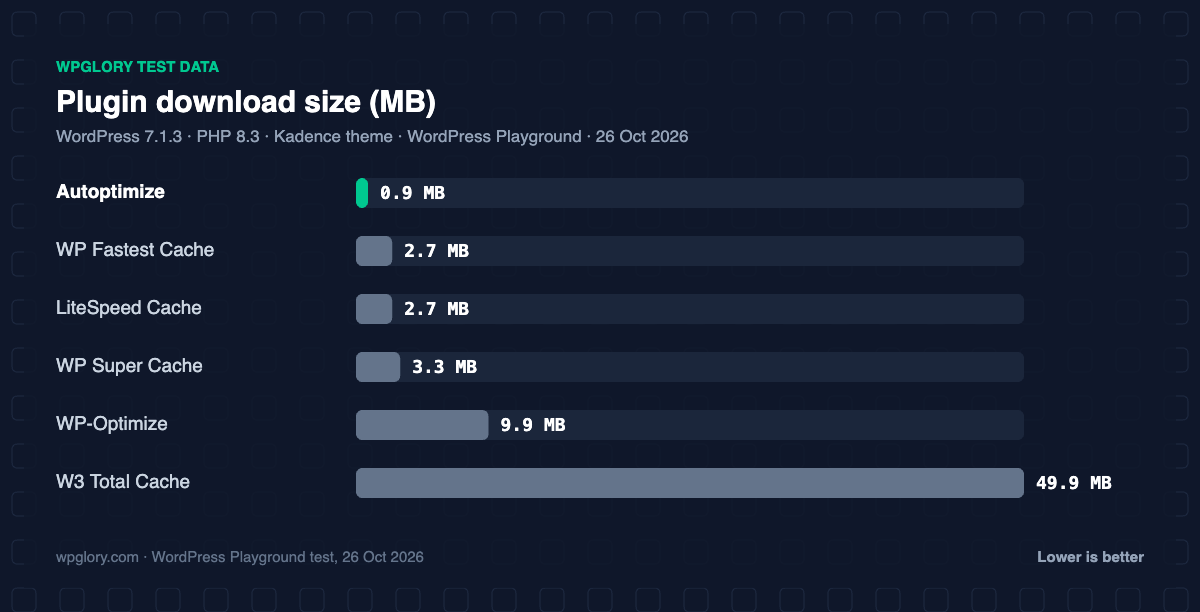
| Plugin size | 2.7 MB | 2.7 MB | 3.3 MB | 49.9 MB | 9.9 MB | 0.9 MB |
| WPGlory score | 9.8/10 | 9.3/10 | 9.4/10 | 9.6/10 | 9.3/10 | 9.7/10 |
Two results stand out. LiteSpeed Cache added the most memory (6.4 MB) and saved 193 options to the database, because it loads its full optimization suite even before you turn anything on. W3 Total Cache added only 0.4 MB of memory but is the largest download by far (49.9 MB) and added a 19-item Performance menu.
What our test can and cannot show
Our lab runs WordPress inside the browser with WordPress Playground. That is perfect for measuring what a plugin adds (memory, files, tables and menus), and every plugin is measured against the same baseline. It cannot show real page-cache speed, because Playground has no real web server: page caches work by letting Apache, Nginx or LiteSpeed serve a saved HTML file without starting PHP. So the numbers here tell you what these WordPress cache plugins cost your server, and the text tells you how each one caches. On a real host, any of these page caches will cut server response time for logged-out visitors dramatically.
1. WP Fastest Cache: best WordPress cache plugin for most sites
9.8/10 Free plan v1.5.3 · 1 million+ installs · 4.9★ on WordPress.org
WP Fastest Cache is the one we would install on a typical blog or small business site. In our test it added just 0.8 MB of PHP memory, created no tables, saved no options until you configure it and showed no notices or setup screens. Its rating is the highest of the group: 4.9 stars from 4,227 reviews, with more than 1 million active installs.
Setup is a single settings page with checkboxes: turn on the cache, choose whether logged-in users get cached pages, and add minify or combine options if you want them. It writes static HTML files that your web server can serve directly, which is the fastest kind of page cache on Apache. Among free WordPress cache plugins, it is the one we recommend first.
One thing to know: for logged-in admins it loads a small toolbar (CSS, JavaScript and jQuery, about 108 KB) on the front end so you can clear the cache from any page. Visitors never get these files.
Pros
- Lightest setup of the group: 0.8 MB memory, no tables
- Highest rating (4.9 stars)
- One-page settings, easy for beginners
- Static HTML cache served by the web server
Cons
- Some features (like image optimization and mobile cache) are in the paid version
- Admin toolbar adds about 108 KB for logged-in admins
2. LiteSpeed Cache: best WordPress cache plugin on LiteSpeed hosting
9.3/10 Free plan v7.9.2 · 7 million+ installs · 4.8★ on WordPress.org
LiteSpeed Cache is the most installed of all WordPress cache plugins, with more than 7 million active installs. Its page cache is built into the LiteSpeed web server itself, which is why it is so fast: the server answers before WordPress even starts. That page cache only works on hosts that run LiteSpeed or OpenLiteSpeed. On Apache or Nginx you still get the optimization features (CSS and JavaScript minify, image optimization through QUIC.cloud and more), but not the server cache.
It is also the heaviest plugin in this test. It added 6.4 MB of PHP memory, created 2 tables and saved 193 options straight after activation. For logged-in admins it adds an 88 KB stylesheet on the front end. On a LiteSpeed host the trade is worth it. On other hosts, a lighter plugin does the page-cache job with less overhead.
If you are not sure what your host runs, check its documentation or open your browser’s Network tab and look at the server response header of any page. If it does not say LiteSpeed, the page cache in this plugin will not switch on.
Pros
- Server-level page cache on LiteSpeed hosts: the fastest option there
- Huge feature set: CSS/JS, images, database, CDN
- Free, with 7 million+ installs and 4.8 stars
Cons
- Page cache does nothing on Apache or Nginx hosts
- Heaviest here: 6.4 MB memory, 193 options
- Many settings, easy to break a layout with CSS options
3. WP Super Cache: the safe, simple choice
9.4/10 Free plan v3.1.4 · 1 million+ installs · 4.3★ on WordPress.org
WP Super Cache is made by Automattic, the company behind WordPress.com. It turns pages into static HTML files and has been around for many years, which is why it is still on more than 1 million sites. In our test it added 0.8 MB of memory, no tables, and a single item under Settings.
After activation it does nothing until you enable caching, and it shows a notice on the Plugins screen saying so. That is a sensible default, but remember to turn it on. It changes your wp-config.php file to enable caching; in Playground the activation and deactivation steps reported an error once, because the test environment does not allow that file to be edited in the usual way. On normal hosting this is not a problem.
Pros
- By Automattic, very well maintained
- Light: 0.8 MB memory, no tables
- Simple mode is safe for beginners
Cons
- Caching is off until you enable it
- Fewer optimization features than the others
- Lowest rating in this group (4.3 stars)
4. W3 Total Cache: most control for advanced users
9.6/10 Free plan v2.11.0 · 900,000+ installs · 4.4★ on WordPress.org
W3 Total Cache covers every kind of caching: page, object, database and browser cache, plus minify and CDN support. If you know what Redis or Memcached is and want to use it, this is the plugin for you. Of all the WordPress cache plugins here, it gives you the most control. Surprisingly, it added the least memory of all six (0.4 MB) because it loads only what you turn on.
The price is complexity. It added a top-level Performance menu with 19 items, an admin-bar menu, and an advanced-cache.php drop-in file. It is also a 49.9 MB download, ten times bigger than most others here. When other cache plugins were installed on the same site, it warned that they are not compatible, which is correct: never run two page caches at once.
Pros
- Lowest memory in our test (0.4 MB)
- Page, object, database and browser cache in one plugin
- CDN and Redis/Memcached support
Cons
- 19-item menu: steep learning curve
- 49.9 MB download
- Easy to misconfigure
5. WP-Optimize: cache plus database clean-up
9.3/10 Free plan v4.7.0 · 1 million+ installs · 4.8★ on WordPress.org
WP-Optimize, from the team behind UpdraftPlus, combines three tools: a page cache, a database cleaner and image compression. If your database is full of old revisions, spam comments and expired transients, it cleans them up on a schedule.
It is heavier than the simpler WordPress cache plugins. It added 2.8 MB of memory, 3 tables, 26 options and 4 scheduled cron jobs, and showed a “thank you” notice that promotes the premium version. If you only want a page cache, WP Fastest Cache is lighter; if you want one plugin for cache and clean-up, WP-Optimize is a good choice.
Pros
- Page cache, database clean-up and image compression together
- From the UpdraftPlus team, well supported
- 4.8 stars from 2,600+ reviews
Cons
- Upsell notice after activation
- 2.8 MB memory, 3 tables and 4 cron jobs
6. Autoptimize: optimizes CSS and JavaScript (pair it with a cache)
9.7/10 Free plan v3.1.17 · 800,000+ installs · 4.7★ on WordPress.org
Autoptimize is not one of the WordPress cache plugins in the strict sense: it has no page cache, so do not use it alone. It minifies and combines CSS and JavaScript, can defer scripts and inline critical CSS, and works well next to a page cache such as WP Super Cache or WP Fastest Cache.
It is very light: 0.8 MB of memory, no tables and 2 options. With its default settings on our test site it moved about 9.5 KB of inline scripts into separate data URIs, so the page size stayed the same. Most of its benefit comes after you switch on CSS and JavaScript optimization and test your pages.
Pros
- Very light: 0.8 MB, smallest download (0.9 MB)
- Strong CSS and JavaScript optimization
- Works with any page cache
Cons
- Not a page cache on its own
- Aggressive settings can break layouts; test after each change
Which WordPress cache plugin should you choose?
The right choice among WordPress cache plugins depends mostly on your hosting, then on how much control you want:
- Your host runs LiteSpeed: LiteSpeed Cache, and nothing else for page caching.
- Your host has its own cache (many managed WordPress hosts do): you may not need a page cache plugin at all. Ask your host first, then add Autoptimize for CSS and JavaScript if needed.
- Shared Apache or Nginx hosting: WP Fastest Cache or WP Super Cache, plus Autoptimize if you want to optimize files.
- Busy sites with Redis or Memcached: W3 Total Cache, configured carefully.
- Messy, old database: WP-Optimize for cache and clean-up in one plugin.
Whichever you choose, use only one page cache. Two WordPress cache plugins fighting over the same pages cause blank pages, stale content and very confusing bugs.
How to set up WordPress cache plugins safely
- Take a backup first. We use UpdraftPlus on this site; any backup plugin that stores a copy off your server will do.
- Deactivate any other cache plugin and clear its cache.
- Install one plugin and turn on only the page cache.
- Open your site in a private window and check a few pages, forms and the cart if you have a shop.
- Turn on minify and combine options one at a time and test after each change.
- Measure before and after with a tool such as PageSpeed Insights and compare server response time.
How we tested
Every plugin was installed from WordPress.org on a clean WordPress 7.1.3 site (PHP 8.3, Kadence theme) in WordPress Playground on 26 October 2026. We activated one plugin at a time, measured the site, then deactivated it again, so each result is compared with the same clean baseline. We loaded the home page as a logged-out visitor three times and kept the median PHP peak memory, counted the CSS and JavaScript the plugin added, and recorded database tables, options, scheduled cron jobs, admin menus, notices, dashboard widgets and any redirect on the first admin visit. Ratings, installs and versions come from the WordPress.org plugin directory on the same day. Because Playground has no real web server, we did not time page-cache delivery; the scores reflect each plugin’s cost and admin experience.
The WPGlory score rates what a plugin costs your site, not how many features it has: front-end weight 30%, server cost 20%, admin clutter 20%, WordPress.org rating 20% (weighted by the number of reviews) and maintenance 10%. Features are covered in the text. Read the full method.
FAQ
Do I need a cache plugin for WordPress?
Most sites do, unless your host already caches pages at the server level. Ask your host, or check the response headers of your pages for a cache status.
Which is the fastest WordPress cache plugin?
On LiteSpeed hosting, LiteSpeed Cache, because the server serves the cached page directly. On Apache or Nginx, static file caches such as WP Fastest Cache and WP Super Cache are very fast and light.
Can I use two WordPress cache plugins together?
Do not run two page caches. You can combine one page cache with an optimizer such as Autoptimize, as long as you turn off overlapping features like minify in one of them.
Do WordPress cache plugins work with WooCommerce?
Yes, as long as cart, checkout and account pages are not cached. Most WordPress cache plugins detect WooCommerce and skip those pages; always test them after you turn caching on.
Are free WordPress cache plugins good enough?
Yes. All six in this test are free and all include a working page cache, except Autoptimize, which optimizes files instead.
Final verdict
WP Fastest Cache for most sites, LiteSpeed Cache on LiteSpeed hosts
Of the WordPress cache plugins we tested, WP Fastest Cache gave the best balance: light, simple and highly rated. On LiteSpeed hosting, LiteSpeed Cache is the clear winner thanks to its server-level cache.
9.8/10