Best Free Elementor Addons in 2026: 4 Popular Packs Tested
Some links on this page are affiliate links. If you buy through them we may earn a commission, at no extra cost to you. It never changes our verdict. How we test and make money
On this page
Short answer: ElementsKit Lite added nothing to a page that wasn’t built with Elementor and asked for nothing beyond one upsell notice. Essential Addons loaded 5 files (170 KB, including jQuery) on that same page. Happy Addons and Premium Addons were light but both pushed setup wizards and promo notices.
Do Elementor addons slow down websites?
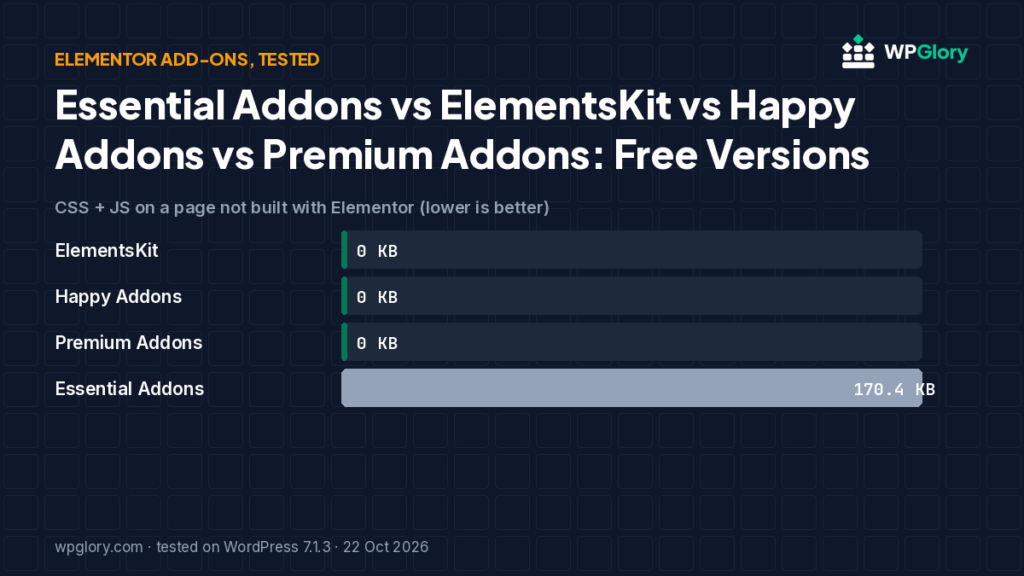
They can. Essential Addons loaded 170 KB (including jQuery) on a page not built with Elementor in our test, while ElementsKit Lite loaded nothing there.
Can I use two Elementor addons packs together?
You can, but it adds memory and duplicate widgets. Pick the one that covers the widgets you need.
Elementor addons add extra widgets to the page builder, but each pack also adds code to your site. We installed four popular free Elementor addons one at a time and measured what they load on pages that are not built with Elementor.
Elementor add-on packs add extra widgets. We installed Elementor, then each add-on one at a time, and looked at a page that was not built with Elementor — the kind of page where an add-on should load nothing.
| Measurement | ElementsKit | Premium Addons | Happy Addons | Essential Addons |
|---|---|---|---|---|
| Version tested | 4.0.9 | 4.11.114 | 3.50.1 | 6.8.7 |
| Active installs | 1 million+ | 600,000+ | 400,000+ | 1 million+ |
| WordPress.org rating | 4.9 (2,049 reviews) | 4.9 (1,680 reviews) | 4.8 (489 reviews) | 4.9 (4,130 reviews) |
| Extra CSS/JS on pages that don’t use it | 0 files, 0 KB | 1 file, 0 KB | 0 files, 0 KB | 5 files, 170.4 KB |
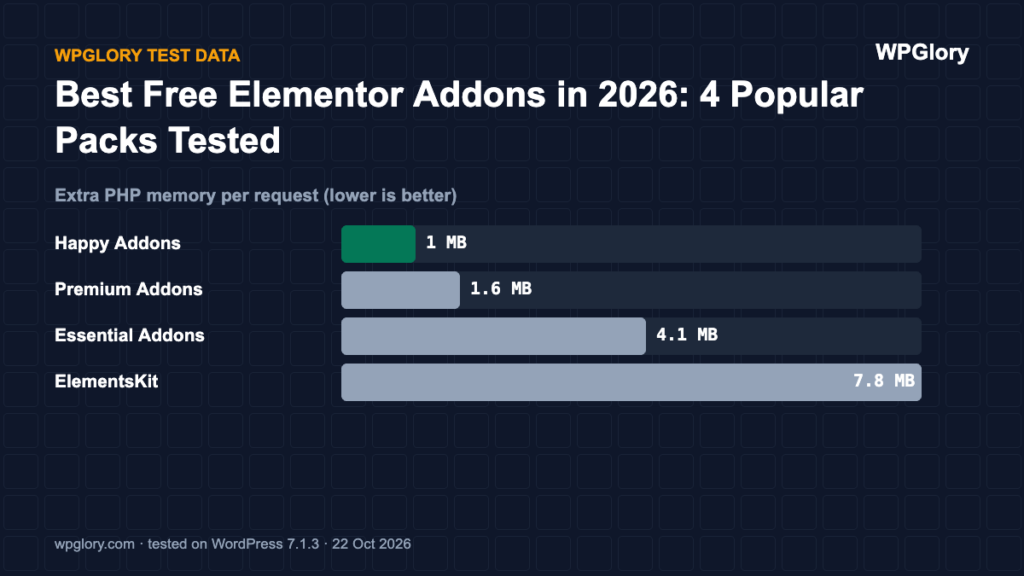
| Extra PHP memory | 7.8 MB | 1.6 MB | 1.0 MB | 4.1 MB |
| Database tables created | 0 | 0 | 0 | 0 |
| Notices / redirects after activation | 1 upsell | 1 upsell, setup screen | 1 upsell, setup screen | 1 upsell |
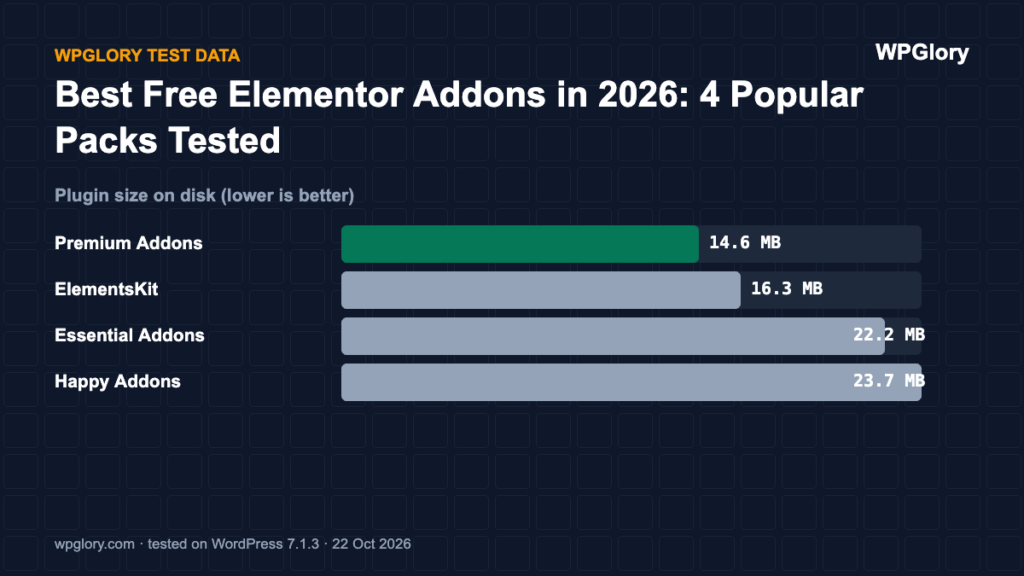
| Plugin size | 16.3 MB | 14.6 MB | 23.7 MB | 22.2 MB |
| WPGlory test score | 9.0/10 | 9.1/10 | 9.0/10 | 7.2/10 |
CSS + JS added to a non-Elementor page (KB, lower is better)
Essential Addons loaded jQuery (87.5 KB) and jQuery Migrate among its 5 files.
Best free Elementor addons: our picks at a glance
1
ElementsKitBest free Elementor add-on pack
9.0/10
2
Premium AddonsLight, many widgets
9.1/10
3
Happy AddonsLightest on the server
9.0/10
1. ElementsKit — best free Elementor add-on pack
9.0/10 Free plan v4.0.9 · 1 million+ installs · 4.9★ on WordPress.org
ElementsKit Lite added nothing to our non-Elementor page and 7.8 MB of memory. It showed one notice inviting you to upgrade. Its header and footer builder is in the free version.
Pros
- Nothing on non-Elementor pages
- Free header/footer builder
- 4.9★ from 2,049 reviews
Cons
- Upgrade notice after activation
2. Premium Addons — light, with many widgets
9.1/10 Free plan v4.11.114 · 600,000+ installs · 4.9★ on WordPress.org
Premium Addons was light (1.6 MB) but redirected to its setup wizard and showed a promo notice about connecting ChatGPT/Claude to your site.
Pros
- Light on the server
- Large widget set
Cons
- Setup wizard redirect
- Promo notice
3. Happy Addons — lightest on the server
9.0/10 Free plan v3.50.1 · 400,000+ installs · 4.8★ on WordPress.org
Happy Addons used the least memory (1.0 MB), but redirected to a setup wizard, asked to collect usage data in a notice and added an admin-bar item. It also requires PHP 8.1 or newer according to its WordPress.org listing.
Pros
- Lowest memory cost
- Nothing on non-Elementor pages
Cons
- Setup wizard redirect
- Data-sharing notice
- Needs PHP 8.1+
4. Essential Addons — most popular, but heavier
7.2/10 Free plan v6.8.7 · 1 million+ installs · 4.9★ on WordPress.org
Essential Addons has the best rating of the four, but on our non-Elementor page it loaded 5 files (170 KB), including jQuery and jQuery Migrate. It also showed a Halloween sale notice on the dashboard and Plugins screen.
Pros
- 1 million+ installs, excellent rating
- Huge widget library
Cons
- 170 KB on pages not built with Elementor
- Sale notice
How to choose Elementor addons
- Install one addon pack, not three. Most widgets overlap.
- Use the pack’s widget manager to switch off every widget you do not use.
- Check a page that is not built with Elementor: good Elementor addons load nothing there.
- Watch for setup wizards and promo notices; they tell you how the free version is maintained.
- Prefer packs updated in the last month and tested with the current WordPress version.
Do you still need Elementor addons in 2026?
Elementor itself now includes many of the widgets addon packs were created for. Before adding Elementor addons, check whether core Elementor already covers your layout. Fewer plugins means fewer updates and a faster site.
Score breakdown: where each plugin gained and lost points
Our test score adds up five criteria. The table shows each plugin’s points per criterion (out of 10), followed by what we measured. A higher number is always better here.
| Criterion | ElementsKit | Happy Addons | Premium Addons | Essential Addons |
|---|---|---|---|---|
| Front-end weight (30%) | 10.0 | 10.0 | 10.0 | 3.2 |
| Server cost (20%) | 7.3 | 9.7 | 9.4 | 8.6 |
| Admin clutter (20%) | 8.0 | 6.0 | 6.5 | 8.0 |
| WordPress.org trust (20%) | 9.8 | 9.5 | 9.7 | 9.8 |
| Maintenance (10%) | 10.0 | 10.0 | 10.0 | 10.0 |
| Total score | 9.0/10 | 9.0/10 | 9.1/10 | 7.2/10 |
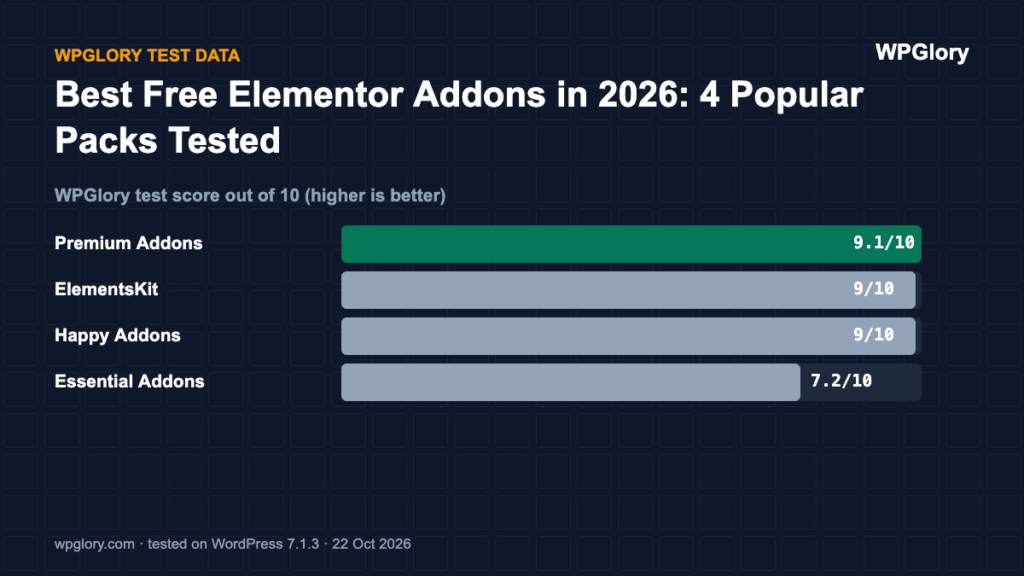
Front-end weight (30%)
We loaded a normal page that does not use the plugin and counted the extra CSS and JavaScript files. Every 25 KB costs one point. ElementsKit and Happy Addons added nothing to that page. Premium Addons added 1 file of under 0.1 KB. Essential Addons added 5 files (170.4 KB).
Server cost (20%)
Extra PHP memory per request ranged from 1 MB (Happy Addons) to 7.8 MB (ElementsKit). Memory matters on shared hosting, where every visitor request runs the plugin code. Database tables created: ElementsKit 0, Happy Addons 0, Premium Addons 0 and Essential Addons 0. We deduct 0.35 points per MB of memory and 0.1 points per table.
Admin clutter (20%)
We counted what appeared in the dashboard right after activation. ElementsKit added 1 upsell notice. Happy Addons added an admin-bar menu, 1 upsell notice and a setup screen on activation. Premium Addons added 1 upsell notice and a setup screen on activation. Essential Addons added 1 upsell notice.
WordPress.org trust (20%)
This is the WordPress.org rating, pulled toward 8/10 when a plugin has few reviews so that a handful of five-star ratings cannot win on its own. ElementsKit: 4.9 stars from 2,049 reviews, 1 million+ active installs. Happy Addons: 4.8 stars from 489 reviews, 400,000+ active installs. Premium Addons: 4.9 stars from 1,680 reviews, 600,000+ active installs. Essential Addons: 4.9 stars from 4,130 reviews, 1 million+ active installs.
Maintenance (10%)
ElementsKit 4.0.9 was last updated 2 days before our test and is marked as tested up to WordPress 7.1.3. Happy Addons 3.50.1 was last updated 17 days before our test and is marked as tested up to WordPress 7.1.3. Premium Addons 4.11.114 was last updated 3 days before our test and is marked as tested up to WordPress 7.1.3. Essential Addons 6.8.7 was last updated 3 days before our test and is marked as tested up to WordPress 7.1.3. Plugins tested with the current WordPress version get full points; an update older than six months costs three points.
Which Elementor addon pack we would install today
Every Elementor addon pack in this test added widgets you may never use, so start by asking which widget you are missing. Install one pack for that widget, not four.
ElementsKit Lite was our pick because it loaded nothing on pages not built with Elementor and had no setup screen. Happy Addons and Premium Addons were also light on the front end but showed a setup screen and an upsell notice after activation.
Essential Addons is popular and well rated, but in our test it loaded 170 KB on pages that do not use Elementor at all. If you use it, switch off the widgets you do not need in its settings so it loads less.
How we tested
Every plugin was installed from WordPress.org on a clean WordPress 7.1.3 site (PHP 8.3, Kadence theme, default content) in WordPress Playground on 22 October 2026. We took a snapshot before and after activating each plugin, one plugin at a time, and compared them: CSS and JavaScript added to a logged-out page that doesn’t use the plugin, extra PHP memory to load WordPress, database tables, and every admin notice, dashboard widget and setup redirect. Directory facts (version, installs, rating) come from the WordPress.org API on the same day.
The WPGlory test score rates what a plugin costs your site, not how many features it has: front-end weight 30%, server cost 20%, admin clutter and upsells 20%, WordPress.org rating 20%, maintenance 10%. Features are covered in the text. Full method.
Final verdict
ElementsKit Lite.
It kept non-Elementor pages clean and had the least admin noise.
9.0/10