Lightweight WordPress Plugins: We Measured 33 Popular Plugins (2026)
Some links on this page are affiliate links. If you buy through them we may earn a commission, at no extra cost to you. It never changes our verdict. How we test and make money
On this page
Short answer: Of the 33 popular plugins we measured, 20 added no CSS or JavaScript to pages that do not use them. The lightest overall were Bit Form, MailerLite’s and ActiveCampaign’s form plugins (0.1 MB of memory each), FluentSMTP (0.8 MB) and Happy Addons (1 MB). The heaviest were MailPoet (27.9 MB, 40 tables), Kadence Blocks (19.8 MB) and WPForms Lite (16.7 MB). MetForm loaded 922 KB on every page.
Lightweight WordPress plugins are the ones you never notice: they add nothing for visitors, very little work for your server and no clutter in your dashboard. To find them, we installed 33 popular free plugins one at a time on the same test site and measured what each one really costs. This page collects every number, so you can compare lightweight WordPress plugins across categories, not just inside one review.
How we measured 33 plugins
Every plugin was tested in WordPress Playground running WordPress 7.1.3 and PHP 8.3 with the free Kadence theme. Before each plugin we took a snapshot of the site, activated the plugin, took a second snapshot and then deactivated it again. The difference between the two snapshots is the plugin’s cost. Full details are on our How we test page.
- Front-end weight: extra CSS and JavaScript on a normal page that does not use the plugin, loaded as a logged-out visitor.
- Server cost: extra PHP peak memory when WordPress loads, and the number of database tables created.
- Admin clutter: dashboard widgets, admin-bar menus, notices and setup screens that appear after activation.
- Trust and maintenance: the WordPress.org rating, review count and how recently the plugin was updated.
Playground runs WordPress in the browser, so timings are only useful for comparison. Memory, file counts and table counts do not depend on the speed of the machine, which is why we rely on them.
The 10 lightest WordPress plugins we tested
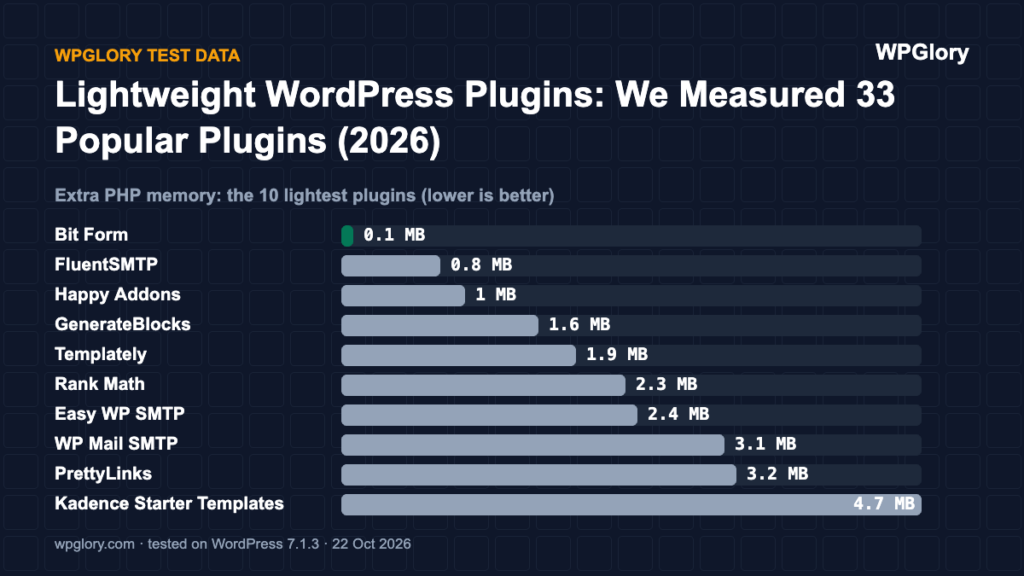
These ten loaded nothing on pages that do not use them and added the least PHP memory. If you are looking for lightweight WordPress plugins, this is the shortlist:
| Plugin | Category | Extra memory | Files on other pages | Tables | Our score |
|---|---|---|---|---|---|
| Bit Form | Forms | 0.1 MB | 0 | 11 | 9.6/10 |
| FluentSMTP | SMTP | 0.8 MB | 0 | 1 | 9.5/10 |
| Happy Addons | Elementor add-on | 1 MB | 0 | 0 | 9.0/10 |
| GenerateBlocks | Blocks | 1.6 MB | 0 | 0 | 9.7/10 |
| Templately | Templates | 1.9 MB | 0 | 0 | 9.7/10 |
| Rank Math | SEO | 2.3 MB | 0 | 2 | 9.4/10 |
| Easy WP SMTP | SMTP | 2.4 MB | 0 | 2 | 9.3/10 |
| WP Mail SMTP | SMTP | 3.1 MB | 0 | 2 | 9.5/10 |
| PrettyLinks | Links | 3.2 MB | 0 | 11 | 9.3/10 |
| Kadence Starter Templates | Templates | 4.7 MB | 0 | 0 | 8.7/10 |
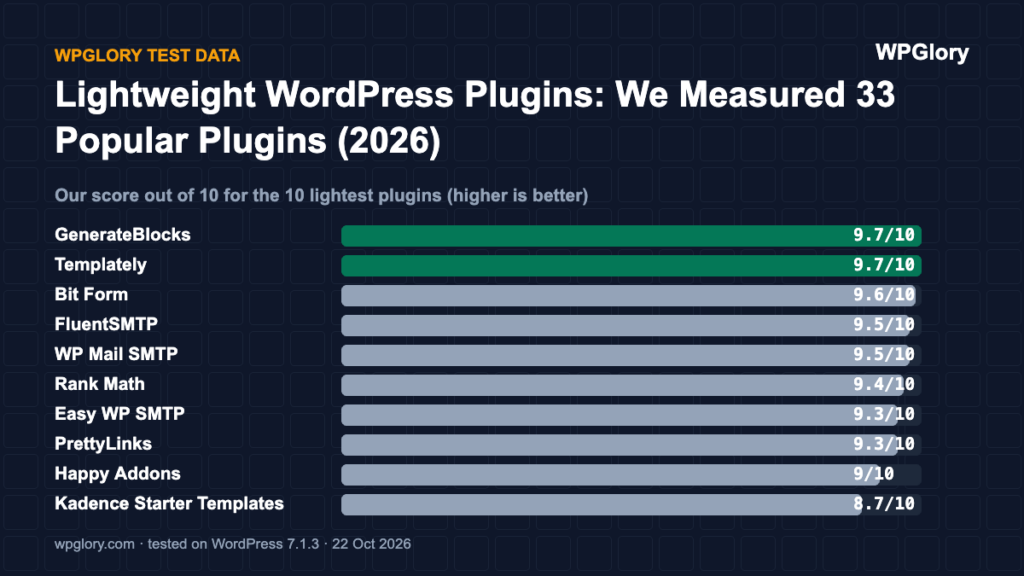
Two things stand out. First, light plugins exist in almost every category, so you rarely have to accept a heavy plugin to get a feature. Second, the size of the plugin folder tells you very little: FluentSMTP is 7.3 MB on disk but added only 0.8 MB of memory, while Kadence Blocks is 45.6 MB on disk and added 19.8 MB.
The heaviest plugins on the server
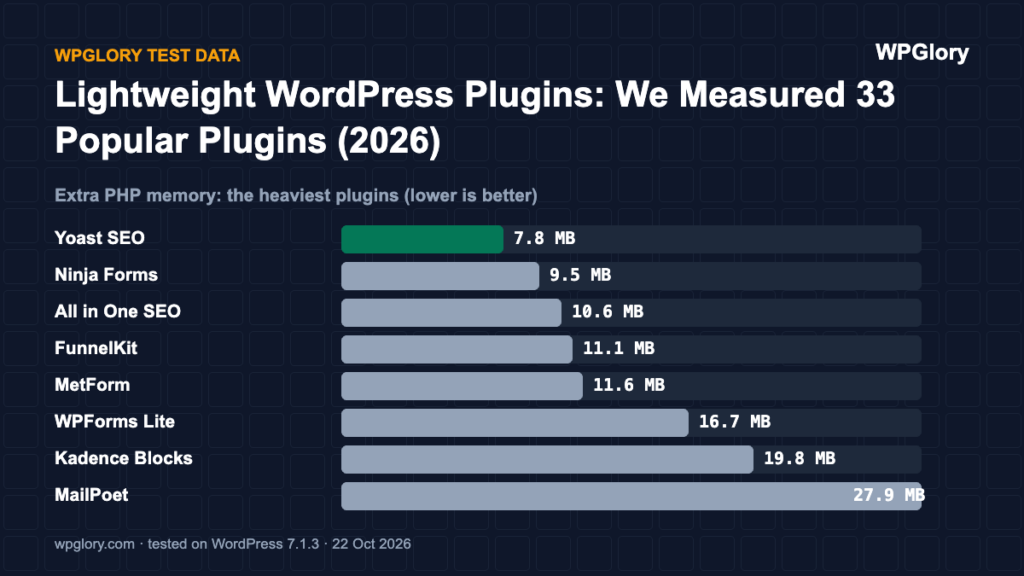
Server cost is invisible to visitors at first, but every request pays it, including requests from bots and logged-in admins. On cheap shared hosting, a few heavy plugins together can push you into memory limits and slow time to first byte.
| Plugin | Category | Extra memory | Tables |
|---|---|---|---|
| MailPoet | Newsletter | 27.9 MB | 40 |
| Kadence Blocks | Blocks | 19.8 MB | 4 |
| WPForms Lite | Forms | 16.7 MB | 7 |
| MetForm | Forms | 11.6 MB | 0 |
| FunnelKit | Funnels | 11.1 MB | 9 |
| All in One SEO | SEO | 10.6 MB | 9 |
| Ninja Forms | Forms | 9.5 MB | 11 |
| Yoast SEO | SEO | 7.8 MB | 6 |
MailPoet was in a class of its own: 27.9 MB of extra memory and 40 database tables, because it runs a full email marketing system inside WordPress. That is not a bug; it is the price of sending newsletters from your own server. If you only need a sign-up form, the MailerLite or ActiveCampaign form plugins did the job for 0.1 MB.
Plugins that load files on every page
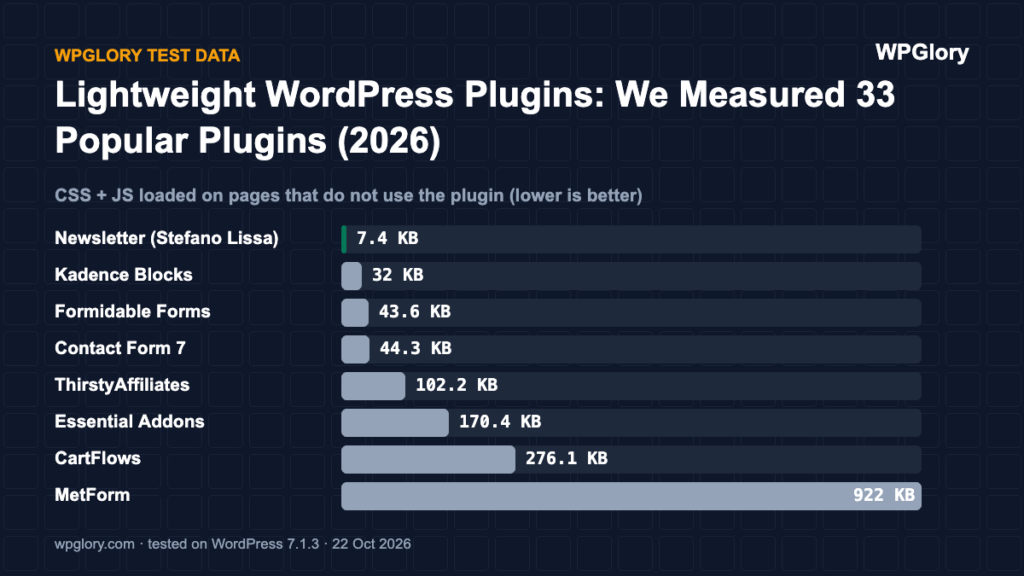
This is the cost your visitors feel. A plugin that loads its CSS and JavaScript on pages where it is not used makes every page heavier. In our test, only these plugins added files to a page that did not use them:
- MetForm (Forms): 922 KB in 18 files
- CartFlows (Funnels): 276.1 KB in 9 files
- Essential Addons (Elementor add-on): 170.4 KB in 5 files
- ThirstyAffiliates (Links): 102.2 KB in 3 files
- Contact Form 7 (Forms): 44.3 KB in 5 files
- Formidable Forms (Forms): 43.6 KB in 1 file
- Kadence Blocks (Blocks): 32 KB of inline CSS
- Newsletter (Stefano Lissa) (Newsletter): 7.4 KB in 2 files
- Starter Templates (Astra) (Templates): 7.3 KB in 2 files
- ActiveCampaign (Newsletter): 1 KB in 1 file
- Spectra (Legacy) (Blocks): 1 KB of inline CSS
- MailerLite (Newsletter): 0.8 KB in 1 file
MetForm, CartFlows, Essential Addons and ThirstyAffiliates were the ones that matter most. MetForm loaded 922 KB in 18 files even on pages without a form. CartFlows loaded 276 KB of WooCommerce files on a plain blog post. Contact Form 7 is small on the server (1.6 MB) but loads its files everywhere, which is why many speed guides tell you to limit it to the contact page.
Database tables: the hidden cost
Tables do not slow a site by themselves, but they grow your database, your backups and the clean-up you need when you uninstall. Many plugins leave their tables behind after deletion unless you tick a “delete data” option first.
| Plugin | Category | Tables created |
|---|---|---|
| MailPoet | Newsletter | 40 |
| FluentCRM | Newsletter | 17 |
| Ninja Forms | Forms | 11 |
| Bit Form | Forms | 11 |
| PrettyLinks | Links | 11 |
| All in One SEO | SEO | 9 |
| FunnelKit | Funnels | 9 |
| Fluent Forms | Forms | 8 |
Thirteen of the 33 plugins created no tables at all, including GenerateBlocks, Templately, Contact Form 7 and all four Elementor add-on packs. They store their settings in the normal WordPress options table.
Why lightweight WordPress plugins matter on cheap hosting
On a large server, a few extra megabytes of memory per request go unnoticed. On a typical shared hosting plan they do not. Many plans give each site a PHP memory limit of 128 MB or 256 MB and a small number of PHP workers. When several heavy plugins run on every request, each request takes longer and holds a worker for longer, so traffic spikes queue up sooner.
Lightweight WordPress plugins also make caching more forgiving. Cached pages hide server cost for anonymous visitors, but logged-in users, checkout pages, search results and admin screens are never cached. Those are exactly the pages where a heavy plugin is felt, and where a light one keeps your site responsive.
The lightest pick in each category
Lightest is not always best: a plugin also has to do what you need. These are the lightest options per category from our data, with a link to the full review where we explain the trade-offs.
- SEO: Rank Math, 2.3 MB of memory, nothing on unrelated pages (full SEO review)
- Forms: Bit Form, 0.1 MB of memory, nothing on unrelated pages (full forms review)
- SMTP: FluentSMTP, 0.8 MB of memory, nothing on unrelated pages (full SMTP review)
- Newsletter: MailerLite, 0.1 MB of memory, 0.8 KB on unrelated pages (full newsletter review)
- Blocks: GenerateBlocks, 1.6 MB of memory, nothing on unrelated pages (full blocks review)
- Templates: Templately, 1.9 MB of memory, nothing on unrelated pages (full templates review)
- Links: PrettyLinks, 3.2 MB of memory, nothing on unrelated pages (full links review)
- Elementor add-on: Happy Addons, 1 MB of memory, nothing on unrelated pages (full Elementor add-on review)
- Funnels: FunnelKit, 11.1 MB of memory, nothing on unrelated pages (full funnels review)
What makes WordPress plugins lightweight
After 33 tests the pattern was clear. Lightweight WordPress plugins share four habits:
- They load CSS and JavaScript only where their feature appears, for example only on the page with the form.
- They load their admin code only in the admin, so visitors never run it.
- They store data in a few tables, or in the options table when the data is small.
- They do not add dashboard widgets, upsell notices or setup screens you did not ask for.
None of this depends on how many features a plugin has. Fluent Forms has a large feature set and still loaded nothing on pages without a form. The difference is engineering, not size.
How to keep your own site light
- List your active plugins and remove the ones you no longer use. Deactivated plugins cost nothing at runtime, but they still need updates.
- Open a page that does not use a plugin, check the Network tab in your browser and look for files from that plugin.
- Install Query Monitor on a staging copy to see memory and database queries per page.
- Replace heavy plugins with lighter ones from the table above when the features match.
- Re-test after major updates. Plugins change, and the numbers in this article are from 22 October 2026.
If you want to run the same checks on your own plugins, our guide to finding slow WordPress plugins walks through each step.
FAQ
Do more plugins always mean a slower site?
No. In our test, 20 plugins added nothing for visitors and several added under 2 MB of memory. Ten light plugins can cost less than one heavy one.
Which kind of plugin was the heaviest?
Plugins that run a whole system inside WordPress: email marketing (MailPoet), page building (Kadence Blocks) and form builders with many features (WPForms Lite).
Are lightweight WordPress plugins less capable?
Not necessarily. Several of the lightest plugins, such as Fluent Forms and Rank Math, have large feature sets. They simply load their code only where it is needed.