CartFlows vs FunnelKit (2026): Which WooCommerce Funnel Builder Is Better?
Some links on this page are affiliate links. If you buy through them we may earn a commission, at no extra cost to you. It never changes our verdict. How we test and make money
On this page
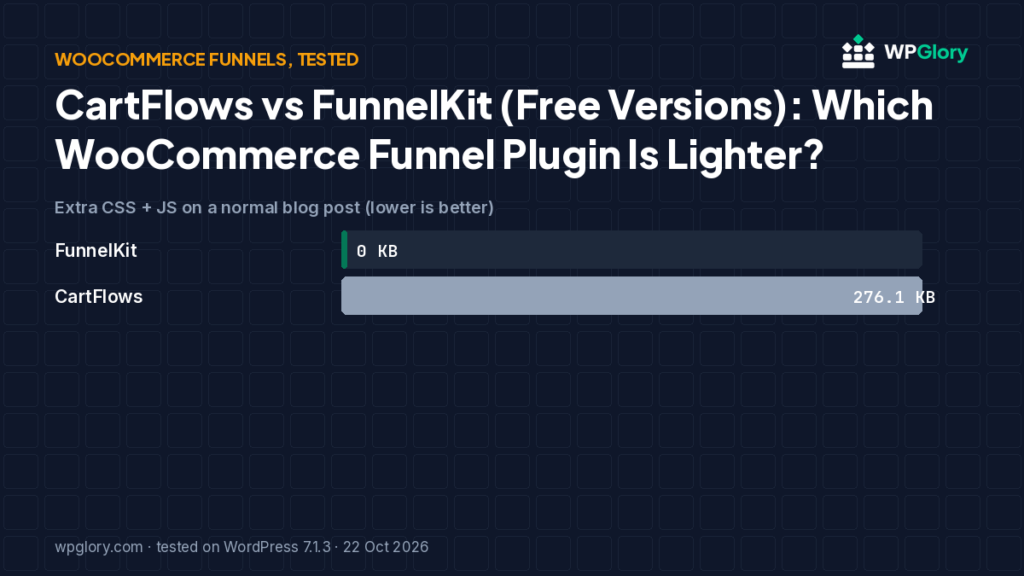
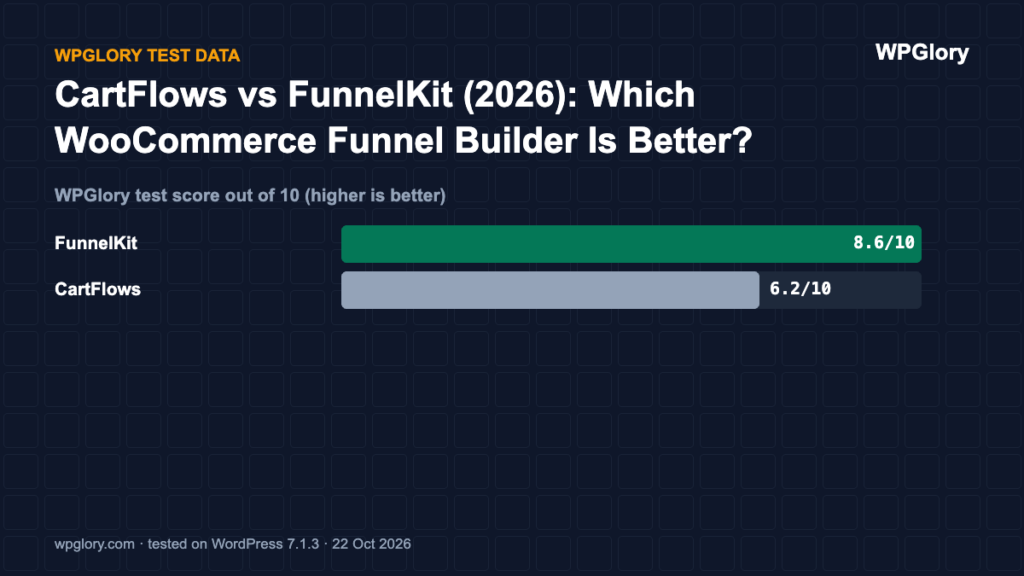
Short answer: FunnelKit scored higher in our test (8.6/10 vs 6.2/10). With CartFlows active, an ordinary blog post loaded 9 extra WooCommerce files (276 KB) that WooCommerce alone did not load there. FunnelKit added nothing to that post, but used more memory (11.1 MB vs 5.7 MB).
CartFlows vs FunnelKit is the main decision for WooCommerce stores that want custom checkouts, order bumps and upsells. We tested the free versions of both on the same WooCommerce site.
CartFlows and FunnelKit (formerly WooFunnels) both replace the WooCommerce checkout with sales funnels: landing page, checkout, order bumps and upsells. We tested both free versions on a site with WooCommerce active and compared against WooCommerce alone.
| Measurement | FunnelKit | CartFlows |
|---|---|---|
| Version tested | 3.17.0.1 | 3.3.0 |
| Active installs | 30,000+ | 200,000+ |
| WordPress.org rating | 5.0 (1,026 reviews) | 4.8 (517 reviews) |
| Extra CSS/JS on pages that don’t use it | 0 files, 0 KB | 9 files, 276.1 KB |
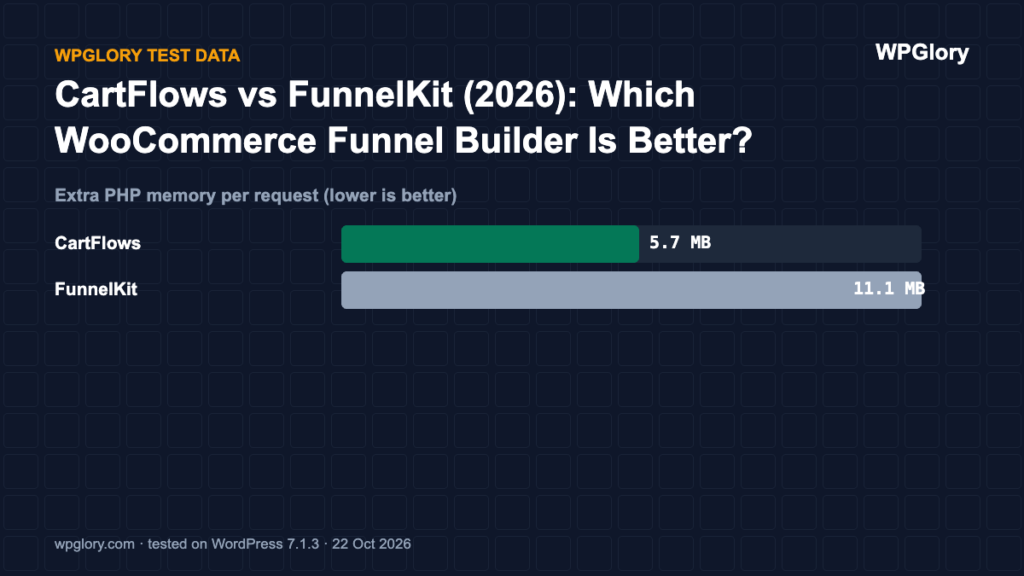
| Extra PHP memory | 11.1 MB | 5.7 MB |
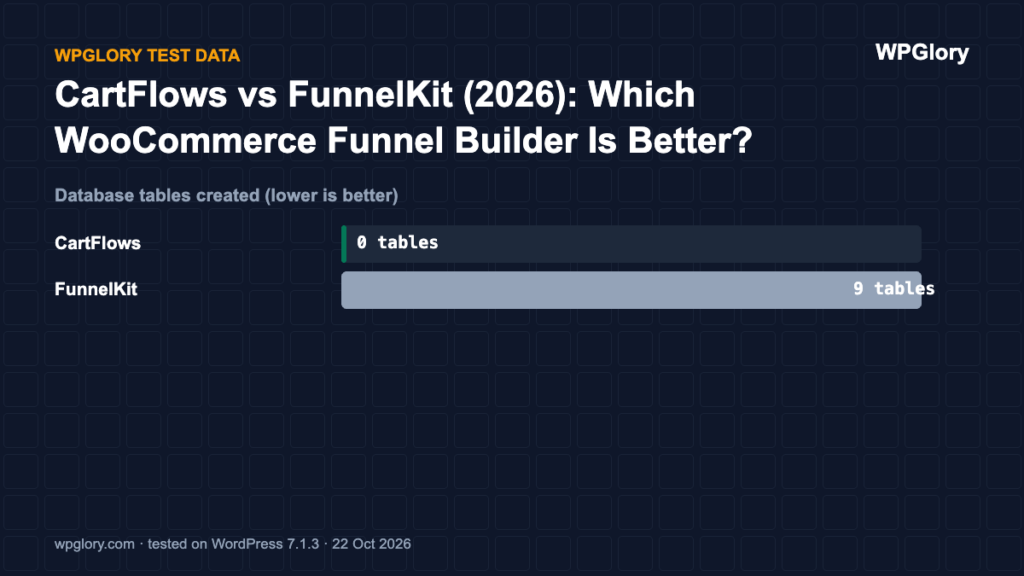
| Database tables created | 9 | 0 |
| Notices / redirects after activation | 1 setup reminder | setup screen |
| Plugin size | 22.4 MB | 41.5 MB |
| WPGlory test score | 8.6/10 | 6.2/10 |
CartFlows vs FunnelKit: our pick at a glance
1
FunnelKitBest free funnel builder for WooCommerce
8.6/10
2
CartFlowsBest if you build pages with a page builder
6.2/10
1. FunnelKit — best free funnel builder
8.6/10 Free plan v3.17.0.1 · 30,000+ installs · 5.0★ on WordPress.org
FunnelKit added nothing to our blog post, but cost 11.1 MB of memory, created 9 tables and showed a “Quick Setup” notice on the dashboard and Plugins screen. Its WordPress.org rating is the highest in this whole test (5.0★ from 1,026 reviews).
FunnelKit Basic was $99.50/year (normally $129) on funnelkit.com when we checked.
Pros
- Nothing added to normal posts
- Excellent reviews
- Checkout, order bumps and analytics
Cons
- 11 MB extra memory
- Setup notice until configured
2. CartFlows — best with page builders
6.2/10 Free plan v3.3.0 · 200,000+ installs · 4.8★ on WordPress.org
CartFlows sent us to its onboarding screen after activation. Memory cost was moderate (5.7 MB). The surprise: our plain blog post loaded 9 extra WooCommerce files — jQuery, the cart and add-to-cart scripts, cookies and order attribution — 276.1 KB that were not there with WooCommerce alone.
CartFlows Starter was $99 for the first year (renews at $149/year, 1 site) on cartflows.com when we checked.
Pros
- Works with Elementor, Divi, Beaver Builder and blocks
- Good template library
Cons
- 276 KB of WooCommerce scripts on normal posts in our test
- Onboarding redirect
CartFlows vs FunnelKit: features in the free versions
- Checkout: both replace the default WooCommerce checkout with a custom, conversion-focused checkout page.
- Builders: CartFlows works with Elementor, Divi, Beaver Builder and the block editor. FunnelKit works with the block editor and popular builders too.
- Order bumps and upsells: both reserve one-click upsells and most order-bump features for their paid plans.
- Weight: FunnelKit kept normal posts clean in our test; CartFlows caused 276 KB of WooCommerce scripts to load on a plain blog post.
How to build your first WooCommerce funnel
- Back up your store and test on staging if you can.
- Install the funnel plugin and run its setup wizard.
- Import a checkout template and connect it to one product.
- Add an order bump with a low-price add-on.
- Place a test order with a payment gateway in test mode.
- Check that order emails, stock and analytics still work.
Score breakdown: where each plugin gained and lost points
Our test score adds up five criteria. The table shows each plugin’s points per criterion (out of 10), followed by what we measured. A higher number is always better here.
| Criterion | FunnelKit | CartFlows |
|---|---|---|
| Front-end weight (30%) | 10.0 | 0.0 |
| Server cost (20%) | 5.2 | 8.0 |
| Admin clutter (20%) | 7.8 | 8.5 |
| WordPress.org trust (20%) | 9.9 | 9.5 |
| Maintenance (10%) | 10.0 | 10.0 |
| Total score | 8.6/10 | 6.2/10 |
Front-end weight (30%)
We loaded a normal page that does not use the plugin and counted the extra CSS and JavaScript files. Every 25 KB costs one point. FunnelKit added nothing to that page. CartFlows added 9 files (276.1 KB).
Server cost (20%)
Extra PHP memory per request ranged from 5.7 MB (CartFlows) to 11.1 MB (FunnelKit). Memory matters on shared hosting, where every visitor request runs the plugin code. Database tables created: FunnelKit 9 and CartFlows 0. We deduct 0.35 points per MB of memory and 0.1 points per table.
Admin clutter (20%)
We counted what appeared in the dashboard right after activation. FunnelKit added 1 dashboard widget, an admin-bar menu and a setup reminder. CartFlows added a setup screen on activation.
WordPress.org trust (20%)
This is the WordPress.org rating, pulled toward 8/10 when a plugin has few reviews so that a handful of five-star ratings cannot win on its own. FunnelKit: 5.0 stars from 1,026 reviews, 30,000+ active installs. CartFlows: 4.8 stars from 517 reviews, 200,000+ active installs.
Maintenance (10%)
FunnelKit 3.17.0.1 was last updated 1 day before our test and is marked as tested up to WordPress 7.1.3. CartFlows 3.3.0 was last updated 17 days before our test and is marked as tested up to WordPress 7.1.3. Plugins tested with the current WordPress version get full points; an update older than six months costs three points.
Which funnel builder we would install today
Both funnel builders need WooCommerce, and both do the main job: a custom checkout, order bumps and thank-you pages. The difference in our test was what they cost the rest of the site.
FunnelKit loaded nothing on a normal blog post. It used more server memory (11.1 MB) and added 9 tables, but that cost is invisible to visitors. CartFlows loaded 9 files (276 KB) on a plain blog post, which is weight every reader pays for.
If your store is also a blog, FunnelKit is the better fit. If you only sell and you like CartFlows’ templates, it is still a solid tool; just test your page speed after you activate it.
Price matters too. Both plugins have free versions on WordPress.org, but the features most stores want, such as one-click upsells after checkout and A/B testing, sit in the paid plans. Compare the current prices on each vendor site before you build a funnel, because moving a finished funnel from one builder to the other means rebuilding every step by hand.
How to check what a funnel builder costs your own store
Our numbers come from a clean test site. Your theme and plugins will change them, so check your own store before and after you activate a funnel builder:
- Pick a plain blog post or product page that is not part of a funnel.
- Open it in a private window, open the browser developer tools and note the number of CSS and JS files and their total size on the Network tab.
- Activate the funnel builder, clear any cache and load the same page again. Any new files are what every visitor now downloads.
- Run PageSpeed Insights on that page before and after, and compare Largest Contentful Paint and Total Blocking Time rather than the overall score alone.
- If the funnel builder loads files where it is not used, ask its support how to limit them, or use a script manager to unload them on non-store pages.
How we tested
Every plugin was installed from WordPress.org on a clean WordPress 7.1.3 site (PHP 8.3, Kadence theme, default content) in WordPress Playground on 22 October 2026. We took a snapshot before and after activating each plugin, one plugin at a time, and compared them: CSS and JavaScript added to a logged-out page that doesn’t use the plugin, extra PHP memory to load WordPress, database tables, and every admin notice, dashboard widget and setup redirect. Directory facts (version, installs, rating) come from the WordPress.org API on the same day.
The WPGlory test score rates what a plugin costs your site, not how many features it has: front-end weight 30%, server cost 20%, admin clutter and upsells 20%, WordPress.org rating 20%, maintenance 10%. Features are covered in the text. Full method.
FAQ
Do I need a funnel plugin for WooCommerce?
Only if you want custom checkout pages, order bumps or one-click upsells. The default WooCommerce checkout works without one.
Is CartFlows free?
Yes, CartFlows has a free version. Pro plans started at $99 for the first year (1 site) on cartflows.com when we checked.
Which is better, CartFlows vs FunnelKit?
In our CartFlows vs FunnelKit test, FunnelKit scored higher because it added nothing to normal posts and has the stronger WordPress.org rating. CartFlows is a good choice if you design everything in a page builder.
Final verdict
FunnelKit, unless you build everything in a page builder.
It kept normal posts clean and has the best reviews. CartFlows is fine if you already design with Elementor or Divi.
8.6/10