Best Free WordPress Form Plugins in 2026: 7 Tested for Speed
Some links on this page are affiliate links. If you buy through them we may earn a commission, at no extra cost to you. It never changes our verdict. How we test and make money
On this page
Short answer: Fluent Forms is our pick for most sites: it loaded nothing on pages without a form, kept memory moderate (4.9 MB) and showed no nags. Bit Form scored highest on our cost score (9.6/10) thanks to almost zero memory use. Avoid MetForm if speed matters: it loaded 18 files (922 KB) on every page, form or no form.
Most reviews of WordPress form plugins list features. We installed seven of the most popular free WordPress form plugins on the same Kadence site and measured what each one adds to pages that do not even have a form.
A form plugin should only load its code on the page that has the form. Several don’t. We installed seven free form builders one at a time on the same Kadence test site, then looked at a normal page with no form on it, the server memory each plugin costs, the tables it creates and what it does to your dashboard.
| Measurement | Fluent Forms | Bit Form | Formidable Forms | Contact Form 7 | Ninja Forms | WPForms Lite | MetForm |
|---|---|---|---|---|---|---|---|
| Version tested | 6.2.16 | 3.3.3 | 7.0 | 6.2.3 | 3.15.6 | 2.0.2.2 | 4.3.3 |
| Active installs | 800,000+ | 10,000+ | 300,000+ | 10 million+ | 500,000+ | 5 million+ | 600,000+ |
| WordPress.org rating | 4.8 (806 reviews) | 5.0 (260 reviews) | 4.8 (1,384 reviews) | 4.0 (2,184 reviews) | 4.4 (1,397 reviews) | 4.8 (14,385 reviews) | 4.7 (510 reviews) |
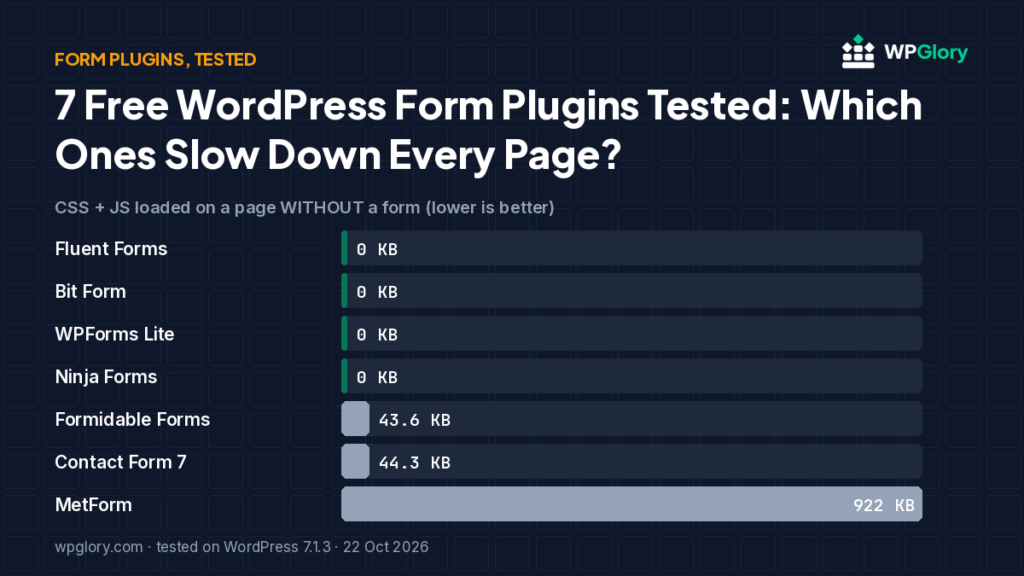
| Extra CSS/JS on pages that don’t use it | 0 files, 0 KB | 0 files, 0 KB | 1 file, 43.6 KB | 5 files, 44.3 KB | 0 files, 0 KB | 0 files, 0 KB | 18 files, 922 KB |
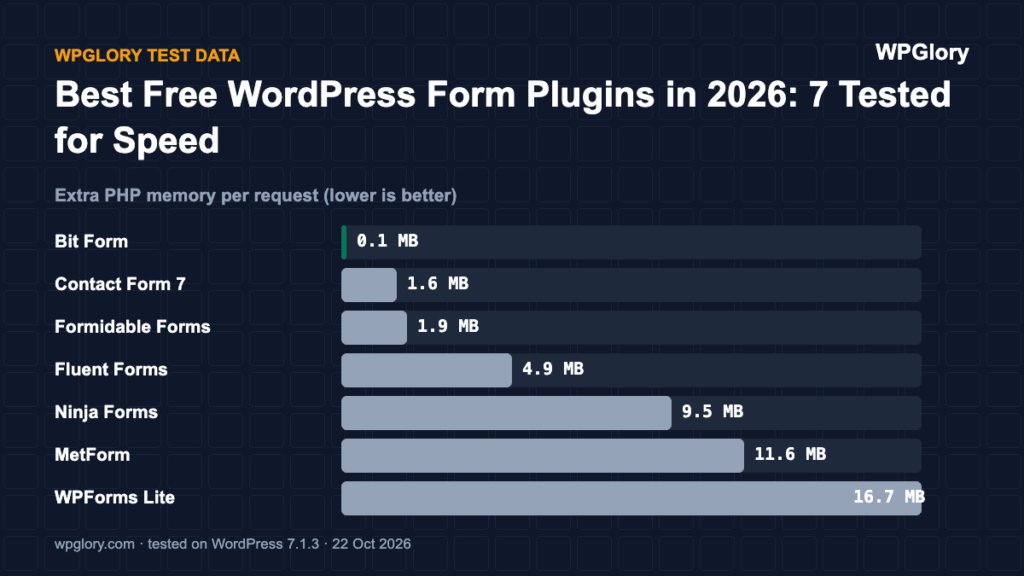
| Extra PHP memory | 4.9 MB | 0.1 MB | 1.9 MB | 1.6 MB | 9.5 MB | 16.7 MB | 11.6 MB |
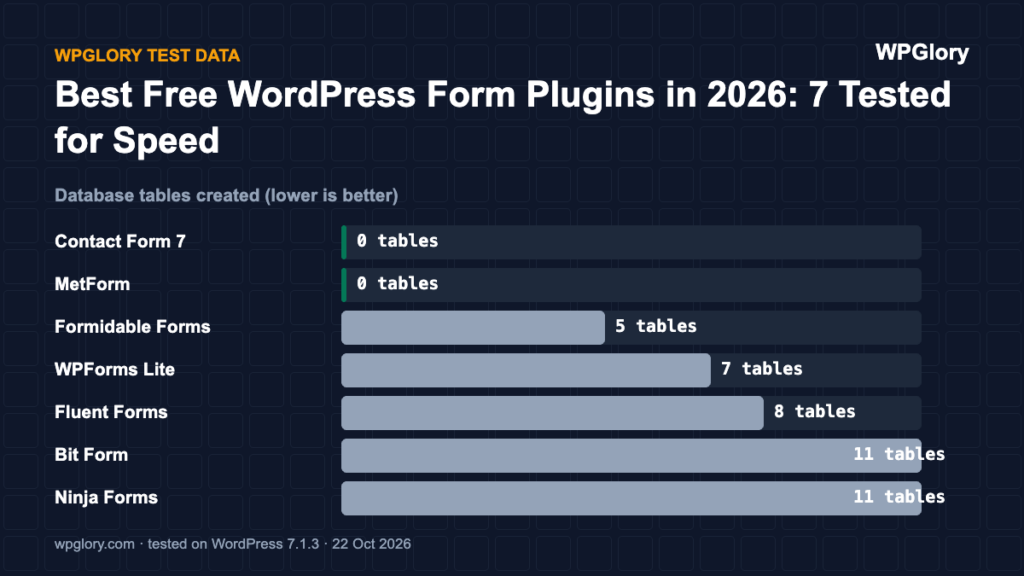
| Database tables created | 8 | 11 | 5 | 0 | 11 | 7 | 0 |
| Notices / redirects after activation | None | None | None | None | 1 upsell | setup screen | 1 upsell |
| Plugin size | 34.1 MB | 22.0 MB | 12.5 MB | 1.0 MB | 20.1 MB | 31.7 MB | 15.0 MB |
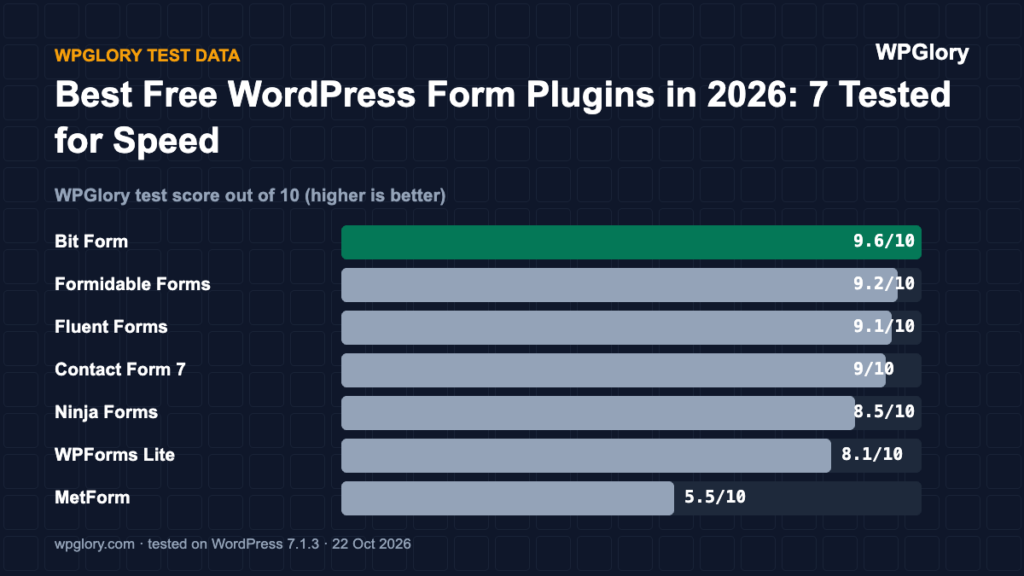
| WPGlory test score | 9.1/10 | 9.6/10 | 9.2/10 | 9.0/10 | 8.5/10 | 8.1/10 | 5.5/10 |
CSS + JS loaded on a page WITHOUT a form (KB, lower is better)
Uncompressed size of the extra files a logged-out visitor downloads on a page that has no form. 0 means the plugin only loads its files where a form is used.
Best free WordPress form plugins: our picks at a glance
1
Fluent FormsBest free form plugin for most sites
9.1/10
2
Bit FormLightest on the server
9.6/10
3
Formidable FormsBest for calculators and data-heavy forms
9.2/10
4
Contact Form 7Best for a single, simple contact form
9.0/10
1. Fluent Forms — best free form plugin for most sites
9.1/10 Free plan v6.2.16 · 800,000+ installs · 4.8★ on WordPress.org
Fluent Forms added no CSS or JavaScript to pages without a form and showed no notices or redirects after activation. It cost 4.9 MB of memory and created 8 database tables (forms, entries and logs are stored in their own tables, which is a good thing on busy sites).
It adds one dashboard widget with form stats and an admin-bar shortcut. Fluent Forms Pro was $63/year for one site on fluentforms.com when we checked (a lifetime option is also listed).
Pros
- Zero front-end weight on pages without a form
- No upsell notices or setup redirect
- 800,000+ installs, 4.8★ from 806 reviews
Cons
- 8 database tables
- Dashboard widget you may want to hide
- Plugin folder is large (34 MB)
2. Bit Form — lightest on the server
9.6/10 Free plan v3.3.3 · 10,000+ installs · 5.0★ on WordPress.org
Bit Form was the surprise of the test: only 0.1 MB of extra memory, nothing loaded on pages without a form, and no notices. It does create 11 tables.
It is much smaller than the others (10,000+ installs) but holds a 5.0★ rating from 260 reviews. If you want a light form builder and don’t mind a smaller community, it is worth a look.
Pros
- Almost no memory cost
- Nothing loaded on pages without a form
- No nags after activation
Cons
- 11 database tables
- Much smaller user base than the big names
- Admin-bar item added
3. Formidable Forms — best for calculators and data-heavy forms
9.2/10 Free plan v7.0 · 300,000+ installs · 4.8★ on WordPress.org
Formidable loaded one stylesheet (43.6 KB) on every page, even without a form. Server cost was low (1.9 MB) and there were no notices or redirects.
If you only need a contact form this is more than you need, but its free version handles calculations and views better than most.
Pros
- Low memory cost
- No nags in our test
- Strong for calculators and data display
Cons
- 44 KB stylesheet on every page
- Larger autoloaded options than most
4. Contact Form 7 — best for one simple contact form
9.0/10 Free plan v6.2.3 · 10 million+ installs · 4.0★ on WordPress.org
Contact Form 7 is tiny (1.0 MB on disk) and cheap on the server (1.6 MB), with no tables, notices or widgets. But it loads 5 files (44.3 KB) on every page of your site, not just the contact page.
Its WordPress.org rating (4.0★) is lower than the others in this test.
Pros
- Smallest plugin in the test
- No tables, widgets or notices
- 10 million+ installs
Cons
- Loads 5 files on every page
- Lower rating than the alternatives
- Forms are written as text tags, not built visually
5. Ninja Forms — drag-and-drop with add-ons
8.5/10 Free plan v3.15.6 · 500,000+ installs · 4.4★ on WordPress.org
Ninja Forms loaded nothing on pages without a form, but it was one of the heavier plugins on the server (9.5 MB, 11 tables) and showed a “How’s it going?” review request on the dashboard right after activation.
Pros
- Nothing loaded on pages without a form
- Visual builder
Cons
- Review request notice straight after install
- 11 tables and 9.5 MB extra memory
6. WPForms Lite — the most popular builder
8.1/10 Free plan v2.0.2.2 · 5 million+ installs · 4.8★ on WordPress.org
WPForms Lite loaded nothing for visitors on pages without a form, but it cost the most memory of the standalone builders (16.7 MB) and sent us to a getting-started screen the first time we opened the dashboard.
WPForms Basic was $49.50/year (normally $99) on wpforms.com when we checked.
Pros
- Nothing loaded on pages without a form
- Most popular form builder, 5 million+ installs
Cons
- Highest memory cost of the standalone builders
- Setup redirect after activation
7. MetForm — only if you already build with Elementor
5.5/10 Free plan v4.3.3 · 600,000+ installs · 4.7★ on WordPress.org
MetForm needs Elementor. With both active, a page that had no form and wasn’t built with Elementor loaded 18 extra files — 922 KB, including React and a 531 KB script. That was by far the heaviest result in the test.
It also showed a “Save $4,102 on our All-in-One Lifetime Bundle” sale banner on the dashboard.
Pros
- Built for Elementor users
- Many form templates
Cons
- 922 KB on every page in our test
- Sale banner on the dashboard
- Requires Elementor
What to look for in WordPress form plugins
A contact form looks simple, but WordPress form plugins differ a lot in how they treat the rest of your site. These are the things we check before recommending one:
- Conditional loading: the plugin should load its CSS and JavaScript only on pages that contain a form. Four of the seven plugins in our test did this.
- Entries stored in your database: if your email fails, you still have the message. Fluent Forms, Formidable, Ninja Forms and Bit Form store entries in the free version; Contact Form 7 does not without an add-on.
- Spam protection: look for honeypot, Cloudflare Turnstile or reCAPTCHA support in the free plan.
- Email delivery: pair any form plugin with an SMTP plugin so notifications reach your inbox.
- Upsells: a free plan that keeps showing upgrade banners costs you time every day.
How to set up a fast contact form in 10 minutes
This is the setup we use with Fluent Forms, but the same steps work with most WordPress form plugins:
- Install the plugin from Plugins → Add New and activate it.
- Create a new form from the built-in contact form template.
- Turn on the honeypot or Turnstile spam check in the form settings.
- Set the email notification to go to an address you check, and send a test.
- Install an SMTP plugin such as FluentSMTP so the notification is delivered.
- Add the form block to your contact page only, then test the page speed of a page without the form to confirm nothing extra loads.
Free vs paid: when to upgrade
You need the paid version of most WordPress form plugins only for payments, advanced integrations (CRMs, Zapier-style automation), multi-step forms or file uploads on some plugins. For contact, quote and newsletter sign-up forms, every free plan in this test is enough.
Score breakdown: where each plugin gained and lost points
Our test score adds up five criteria. The table shows each plugin’s points per criterion (out of 10), followed by what we measured. A higher number is always better here.
| Criterion | Fluent Forms | Bit Form | WPForms Lite | Ninja Forms | Formidable Forms | Contact Form 7 | MetForm |
|---|---|---|---|---|---|---|---|
| Front-end weight (30%) | 10.0 | 10.0 | 10.0 | 10.0 | 8.3 | 8.2 | 0.0 |
| Server cost (20%) | 7.5 | 8.9 | 3.5 | 5.6 | 8.8 | 9.4 | 5.9 |
| Admin clutter (20%) | 8.8 | 9.5 | 7.2 | 8.0 | 10.0 | 10.0 | 7.2 |
| WordPress.org trust (20%) | 9.5 | 9.7 | 9.6 | 8.8 | 9.5 | 8.0 | 9.3 |
| Maintenance (10%) | 10.0 | 10.0 | 10.0 | 10.0 | 10.0 | 10.0 | 10.0 |
| Total score | 9.1/10 | 9.6/10 | 8.1/10 | 8.5/10 | 9.2/10 | 9.0/10 | 5.5/10 |
Front-end weight (30%)
We loaded a normal page that does not use the plugin and counted the extra CSS and JavaScript files. Every 25 KB costs one point. Fluent Forms, Bit Form, WPForms Lite and Ninja Forms added nothing to that page. Formidable Forms added 1 file (43.6 KB). Contact Form 7 added 5 files (44.3 KB). MetForm added 18 files (922 KB).
Server cost (20%)
Extra PHP memory per request ranged from 0.1 MB (Bit Form) to 16.7 MB (WPForms Lite). Memory matters on shared hosting, where every visitor request runs the plugin code. Database tables created: Fluent Forms 8, Bit Form 11, WPForms Lite 7, Ninja Forms 11, Formidable Forms 5, Contact Form 7 0 and MetForm 0. We deduct 0.35 points per MB of memory and 0.1 points per table.
Admin clutter (20%)
We counted what appeared in the dashboard right after activation. Fluent Forms added 1 dashboard widget and an admin-bar menu. Bit Form added an admin-bar menu. WPForms Lite added 1 dashboard widget, an admin-bar menu and a setup screen on activation. Ninja Forms added 1 upsell notice. Formidable Forms added nothing beyond its own menu. Contact Form 7 added nothing beyond its own menu. MetForm added 1 dashboard widget and 1 upsell notice.
WordPress.org trust (20%)
This is the WordPress.org rating, pulled toward 8/10 when a plugin has few reviews so that a handful of five-star ratings cannot win on its own. Fluent Forms: 4.8 stars from 806 reviews, 800,000+ active installs. Bit Form: 5.0 stars from 260 reviews, 10,000+ active installs. WPForms Lite: 4.8 stars from 14,385 reviews, 5 million+ active installs. Ninja Forms: 4.4 stars from 1,397 reviews, 500,000+ active installs. Formidable Forms: 4.8 stars from 1,384 reviews, 300,000+ active installs. Contact Form 7: 4.0 stars from 2,184 reviews, 10 million+ active installs. MetForm: 4.7 stars from 510 reviews, 600,000+ active installs.
Maintenance (10%)
Fluent Forms 6.2.16 was last updated 6 days before our test and is marked as tested up to WordPress 7.1.3. Bit Form 3.3.3 was last updated 9 days before our test and is marked as tested up to WordPress 7.1.3. WPForms Lite 2.0.2.2 was last updated 16 days before our test and is marked as tested up to WordPress 7.1.3. Ninja Forms 3.15.6 was last updated 7 days before our test and is marked as tested up to WordPress 7.1.3. Formidable Forms 7.0 was last updated 6 days before our test and is marked as tested up to WordPress 7.1.3. Contact Form 7 6.2.3 was last updated 1 day before our test and is marked as tested up to WordPress 7.1.3. MetForm 4.3.3 was last updated 2 days before our test and is marked as tested up to WordPress 7.1.3. Plugins tested with the current WordPress version get full points; an update older than six months costs three points.
Which form plugin we would install today
For a normal contact form, install Fluent Forms. It loaded nothing on pages without a form, it stayed moderate on memory and it did not nag us. Bit Form is the lightest on the server, but it has a much smaller user base, so check that the fields you need exist before you commit.
Contact Form 7 is still fine for a single simple contact form, but remember that it loads its CSS and JavaScript on every page. If you keep it, use a small snippet or a performance plugin to load those files only on the contact page.
Avoid MetForm unless you already build everything in Elementor and accept the extra weight: it loaded 18 files on every page in our test, even pages without a form.
How we tested
Every plugin was installed from WordPress.org on a clean WordPress 7.1.3 site (PHP 8.3, Kadence theme, default content) in WordPress Playground on 22 October 2026. We took a snapshot before and after activating each plugin, one plugin at a time, and compared them: CSS and JavaScript added to a logged-out page that doesn’t use the plugin, extra PHP memory to load WordPress, database tables, and every admin notice, dashboard widget and setup redirect. Directory facts (version, installs, rating) come from the WordPress.org API on the same day.
The WPGlory test score rates what a plugin costs your site, not how many features it has: front-end weight 30%, server cost 20%, admin clutter and upsells 20%, WordPress.org rating 20%, maintenance 10%. Features are covered in the text. Full method.
FAQ
Which free form plugin is the lightest?
On pages without a form, Fluent Forms, Bit Form, Ninja Forms and WPForms Lite loaded nothing. Contact Form 7 loaded 44.3 KB, Formidable 43.6 KB and MetForm 922 KB. On the server, Bit Form used the least memory.
Is Contact Form 7 still good in 2026?
It works and it is tiny, but it loads its files on every page and is less pleasant to use than visual builders. For one contact form on a small site it is fine.
Do form plugins slow down WordPress?
Only if they load their files everywhere or use a lot of memory. Check our table: four of the seven loaded nothing on pages without a form.
Which free form plugin loads the least code?
Fluent Forms, Bit Form, Ninja Forms and WPForms Lite loaded no CSS or JavaScript on pages without a form in our test.
Can I use two form plugins at once?
You can, but there is little reason to. Each extra plugin adds memory to every request. Pick one and migrate old forms.
Final verdict
Use Fluent Forms. Use Bit Form if your hosting is tight.
Both loaded nothing on pages without a form and showed no nags. Fluent Forms has the bigger community; Bit Form used almost no memory.
9.1/10