Rank Math vs Yoast vs AIOSEO: We Installed All Three (2026 Test)
Some links on this page are affiliate links. If you buy through them we may earn a commission, at no extra cost to you. It never changes our verdict. How we test and make money
On this page
Short answer: Rank Math is the best free SEO plugin in our test (9.4/10). It added the least memory (2.3 MB) and gave the most complete output for free, but you must click past its “Connect FREE Account” screen before it does anything. Yoast (8.7/10) is the safest pick if you want it to work the second you activate it.
This Rank Math vs Yoast comparison (with All in One SEO as the third option) is based on a real install, not on feature lists. We measured what each free plugin costs your site and what it outputs for Google before you touch a single setting.
All three plugins are free on WordPress.org and all three have paid upgrades. We installed each one on the same clean Kadence site, one at a time, and checked what it actually changes: the code it adds to your pages, the memory it costs on every request, the database tables it creates, the nags it shows, and the SEO tags it outputs on a normal blog post with zero setup.
| Measurement | Rank Math | Yoast SEO | All in One SEO |
|---|---|---|---|
| Version tested | 1.0.280 | 28.7 | 5.0.3 |
| Active installs | 4 million+ | 10 million+ | 2 million+ |
| WordPress.org rating | 4.8 (7,515 reviews) | 4.8 (27,820 reviews) | 4.7 (5,227 reviews) |
| Extra CSS/JS on pages that don’t use it | 0 files, 0 KB | 0 files, 0 KB | 0 files, 0 KB |
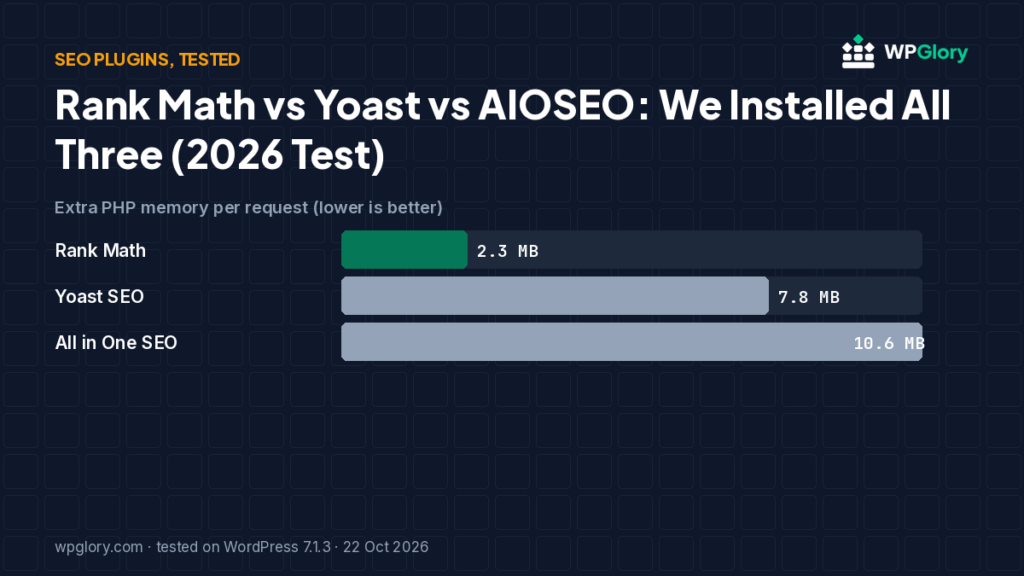
| Extra PHP memory | 2.3 MB | 7.8 MB | 10.6 MB |
| Database tables created | 2 | 6 | 9 |
| Notices / redirects after activation | setup screen | 1 setup reminder | None |
| Plugin size | 11.9 MB | 15.8 MB | 21.7 MB |
| WPGlory test score | 9.4/10 | 8.7/10 | 8.4/10 |
Extra PHP memory per request (MB, lower is better)
Measured as the peak memory of loading WordPress with only this plugin active, minus the same number with no plugin. Median of three runs.
Rank Math vs Yoast: our picks at a glance
1
Rank MathBest free SEO plugin overall
9.4/10
2
Yoast SEOBest if you want zero setup
8.7/10
3
All in One SEOBest automatic meta descriptions out of the box
8.4/10
Rank Math vs Yoast vs AIOSEO: what each outputs with zero setup
| On a normal blog post | Rank Math | Yoast SEO | AIOSEO |
|---|---|---|---|
| Schema (JSON-LD) | None until you skip the account screen, then BlogPosting, WebPage, WebSite, Person, Organization | Article, WebPage, BreadcrumbList, WebSite, Person | BlogPosting, BreadcrumbList, Organization, Person, WebPage, WebSite |
| Open Graph tags | 0 → 6 after skipping | 6 | 6 |
| Twitter tags | 0 → 7 after skipping | 3 | 3 |
| Automatic meta description | Yes (after skipping) | No | Yes |
1. Rank Math — best free SEO plugin overall
9.4/10 Free plan v1.0.280 · 4 million+ installs · 4.8★ on WordPress.org
Rank Math was the lightest of the three on the server: 2.3 MB of extra memory against 7.8 MB for Yoast and 10.6 MB for AIOSEO. It added no CSS or JavaScript for visitors and no dashboard widgets.
The catch: after activation Rank Math sends you to a “Connect FREE Account” screen, and until you either connect or press Skip Step it outputs nothing at all on the front end. We checked: no schema, no Open Graph tags, no meta description. Skip the step (no account needed) and it outputs the fullest set of tags in this test, including an automatic meta description.
Rank Math PRO was €7.99/month billed yearly (ex VAT) on rankmath.com when we checked, renewing at €8.99/month. Most blogs never need it.
Pros
- Lowest memory cost of the three
- Full schema, Open Graph and Twitter tags in the free plugin
- No dashboard widgets or admin-bar clutter
- 4 million+ active installs, 4.8★ from 7,515 reviews
Cons
- Does nothing until you pass the account screen
- Lots of settings for a first-time user
- PRO renews higher than the first-year price
2. Yoast SEO — best if you want zero setup
8.7/10 Free plan v28.7 · 10 million+ installs · 4.8★ on WordPress.org
Yoast is the only one of the three that produced complete schema, Open Graph tags and an XML sitemap index the moment we activated it, with no wizard. It did not write an automatic meta description for our test post, so you still need to write those yourself.
It cost 7.8 MB of extra memory and created 6 database tables. On the dashboard it added two widgets, an admin-bar menu and a “First-time SEO configuration” notice.
Yoast SEO Premium was $118.80 a year (ex VAT) on yoast.com when we checked.
Pros
- Works fully the second you activate it
- Most installs and reviews on WordPress.org
- Clear, guided settings
Cons
- No automatic meta description in our test
- Two dashboard widgets and a setup notice
- Redirect manager is a Premium feature
3. All in One SEO — best automatic meta descriptions out of the box
8.4/10 Free plan v5.0.3 · 2 million+ installs · 4.7★ on WordPress.org
AIOSEO also worked straight away and, unlike Yoast, filled in a meta description from the post’s opening text. Its schema graph was the largest of the three with zero setup.
It was the heaviest on the server (10.6 MB extra, 9 tables) and added three dashboard widgets. Logged-in admins also load 13 CSS and 2 JavaScript files (about 247 KB) on every front-end page for its admin-bar SEO preview. Visitors don’t get those files.
Pros
- Automatic meta descriptions with zero setup
- Biggest schema graph out of the box
- No upsell notices in our test
Cons
- Highest memory cost of the three
- Three dashboard widgets
- ~247 KB of extra front-end files for logged-in admins
Rank Math vs Yoast: free features that matter
Both plugins handle the basics well: SEO titles, meta descriptions, XML sitemaps, canonical URLs, breadcrumbs and schema. The Rank Math vs Yoast decision usually comes down to a few extras and to how much setup you want to do.
- Redirections: Rank Math includes a redirect manager and a 404 monitor in the free plugin. In Yoast, the redirect manager is part of Yoast SEO Premium.
- Focus keywords: Yoast free analyses one focus keyword per post. Rank Math free lets you add more than one.
- Setup: Yoast works the moment you activate it. Rank Math asks you to connect a free account or skip that step first, and in our test it output nothing until we did.
- Weight: in our test Rank Math added 2.3 MB of PHP memory per request, Yoast 7.8 MB and AIOSEO 10.6 MB. None of them added CSS or JavaScript for visitors.
- Dashboard clutter: Yoast added two dashboard widgets, an admin-bar menu and a setup notice. Rank Math added only its own menu.
How to switch from Yoast to Rank Math without losing rankings
Moving between SEO plugins is safe if you do it in order. These are the steps we use on client sites when the Rank Math vs Yoast question is settled in Rank Math’s favour:
- Take a full backup (files and database) before you change anything.
- Install and activate Rank Math. Leave Yoast active for now.
- Open the Rank Math setup wizard. It detects Yoast and offers to import titles, meta descriptions, focus keywords, redirects and schema settings. Run the import.
- Open five or six important posts and compare the SEO title and meta description with what Yoast showed. They should match.
- Deactivate Yoast. Never run two SEO plugins at once: you get duplicate meta tags and two sets of schema.
- Check your sitemap (Rank Math uses /sitemap_index.xml, the same address Yoast used) and resubmit it in Google Search Console.
Who should pick which plugin
There is no single winner for everyone. Use the test numbers above and match them to your site:
- Pick Rank Math if you want the most features for free and you are happy to spend ten minutes in a setup wizard.
- Pick Yoast SEO if you want a plugin that works out of the box, with the biggest community and documentation.
- Pick All in One SEO if you want automatic meta descriptions and you are on hosting with memory to spare.
How we tested
Every plugin was installed from WordPress.org on a clean WordPress 7.1.3 site (PHP 8.3, Kadence theme, default content) in WordPress Playground on 22 October 2026. We took a snapshot before and after activating each plugin, one plugin at a time, and compared them: CSS and JavaScript added to a logged-out page that doesn’t use the plugin, extra PHP memory to load WordPress, database tables, and every admin notice, dashboard widget and setup redirect. Directory facts (version, installs, rating) come from the WordPress.org API on the same day.
The WPGlory test score rates what a plugin costs your site, not how many features it has: front-end weight 30%, server cost 20%, admin clutter and upsells 20%, WordPress.org rating 20%, maintenance 10%. Features are covered in the text. Full method.
FAQ
Which free SEO plugin is the fastest?
None of the three added CSS or JavaScript for visitors in our test. On the server, Rank Math added the least memory (2.3 MB), then Yoast (7.8 MB) and AIOSEO (10.6 MB).
Do I need a Rank Math account?
No. Press Skip Step on the Connect FREE Account screen. You only need the account for Content AI and keyword suggestions. But until you connect or skip, Rank Math outputs no SEO tags at all.
Can I run two SEO plugins together?
No. You would get duplicate titles, meta tags and schema. Pick one and use its import tool to bring over your settings.
Can I switch from Yoast to Rank Math?
Yes. Rank Math’s setup wizard detects Yoast and AIOSEO and can import titles, descriptions and settings. Back up first and spot-check a few posts afterwards.
Is Rank Math better than Yoast in 2026?
In our Rank Math vs Yoast test, Rank Math was lighter on the server (2.3 MB vs 7.8 MB) and offers more in its free version, such as redirects. Yoast is easier to start with because it works without any setup.
Will I lose SEO data if I switch plugins?
Not if you import before you deactivate the old plugin. Both Rank Math and AIOSEO can import Yoast titles, descriptions and redirects.
Final verdict
Start with Rank Math Free and press Skip Step.
It was the lightest plugin with the most complete free output in our test. If you don’t want to touch a single setting, Yoast is the safer choice.
9.4/10