Best Stripe Plugin for WooCommerce (2026): 3 Free Gateways Tested
Some links on this page are affiliate links. If you buy through them we may earn a commission, at no extra cost to you. It never changes our verdict. How we test and make money
On this page
Short answer: The best Stripe plugin for WooCommerce for most stores is FunnelKit Stripe Gateway: cards, wallets, Klarna, Affirm and 15+ local methods, nothing added to shop pages after activation, and a 4.9-star rating. WooCommerce Stripe (the official plugin) is the safe default with 700,000+ installs and in-person payments, and Payment Plugins for Stripe has the best express checkout buttons on product and cart pages.
Stripe is the most popular way to take card payments in WooCommerce, but you have a choice of plugin. All three below are free, connect to the same Stripe account and pay Stripe’s standard fees (2.9% + $0.30 per US card charge, per FunnelKit’s FAQ, with no setup or monthly fee). The difference is in payment methods, checkout design, upsell support and what each one loads.
We installed the three leading Stripe plugins on the same WooCommerce store and measured them on the home, shop and cart pages. Here is the best Stripe plugin for WooCommerce, and when to choose each.
Our picks at a glance
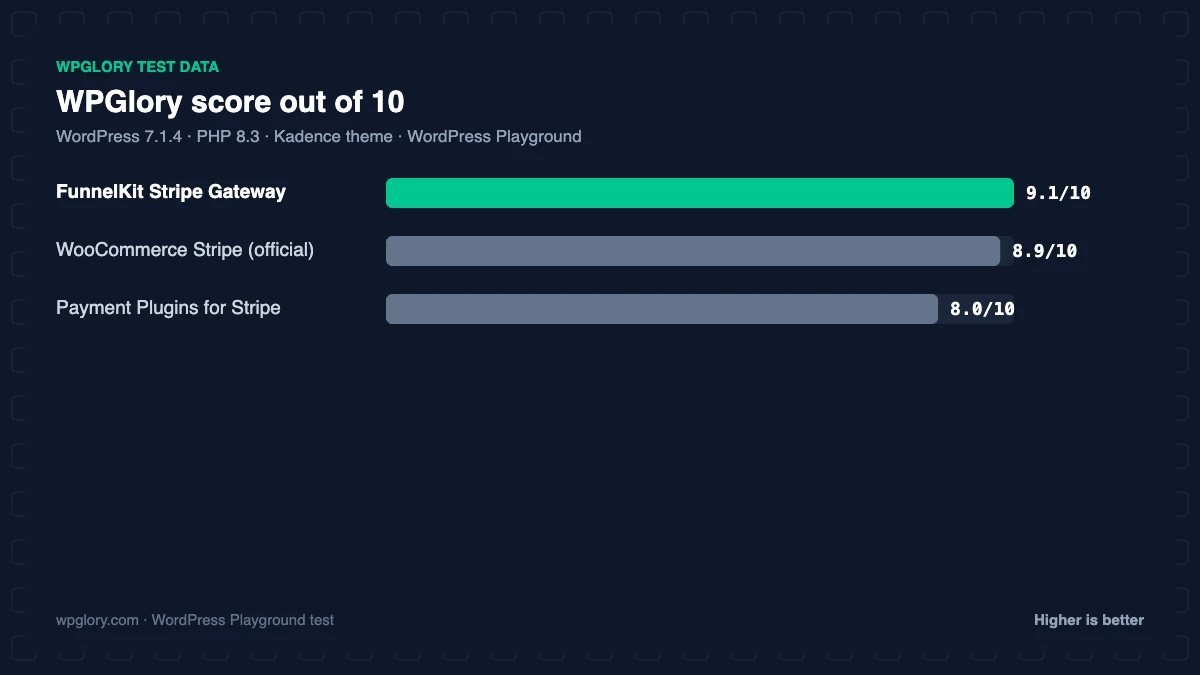
1
FunnelKit Stripe GatewayBest overall, best for upsells
9.1/10
2
WooCommerce Stripe (official)Official plugin, in-person payments
8.9/10
3
Payment Plugins for StripeBest express buttons on product pages
8.0/10
The order is our recommendation for most sites, weighing features and fit. The score measures only what each plugin costs your site.
Stripe plugins for WooCommerce compared: test results
| Measurement | WooCommerce Stripe (official) | Payment Plugins for Stripe | FunnelKit Stripe Gateway |
|---|---|---|---|
| Version tested | 11.1.1 | 4.0.19 | 1.16.0 |
| Active installs | 700,000+ | 100,000+ | 20,000+ |
| WordPress.org rating | 3.1 (237) | 4.8 (303) | 4.9 (53) |
| CSS/JS added for visitors | 0.2 KB | 97 KB | 0.3 KB |
| Extra PHP memory (front end) | 6.2 MB | 6.3 MB | 6.9 MB |
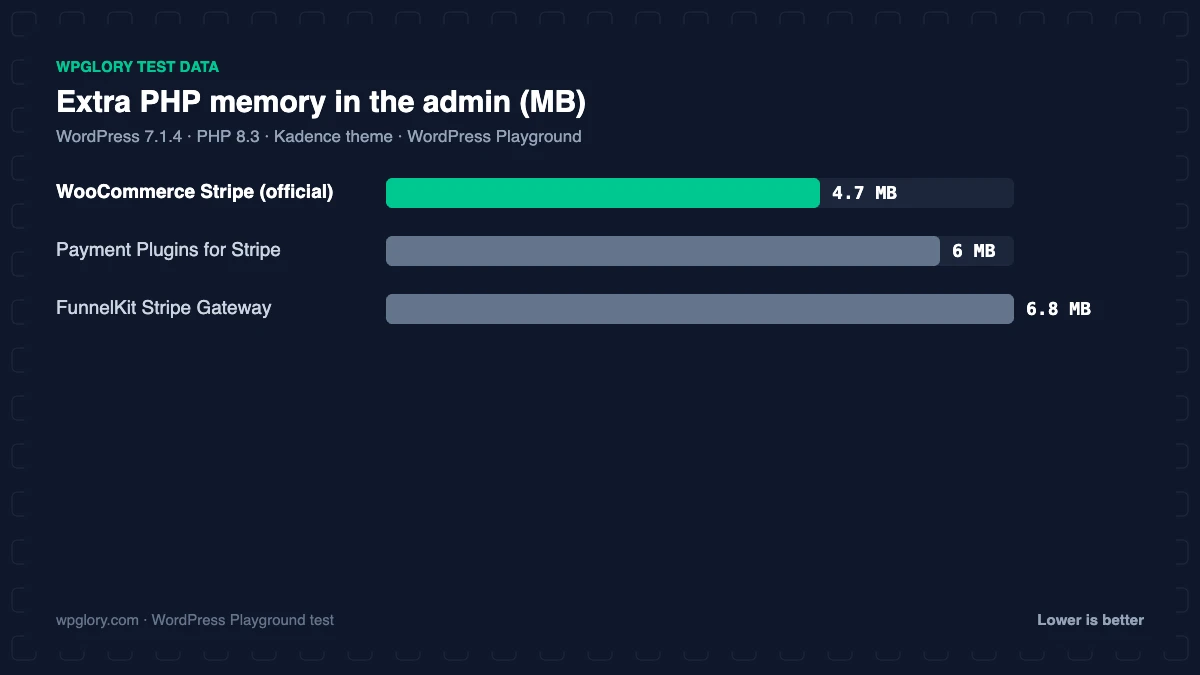
| Extra PHP memory (admin) | 4.7 MB | 6.0 MB | 6.8 MB |
| Database tables | 0 | 0 | 0 |
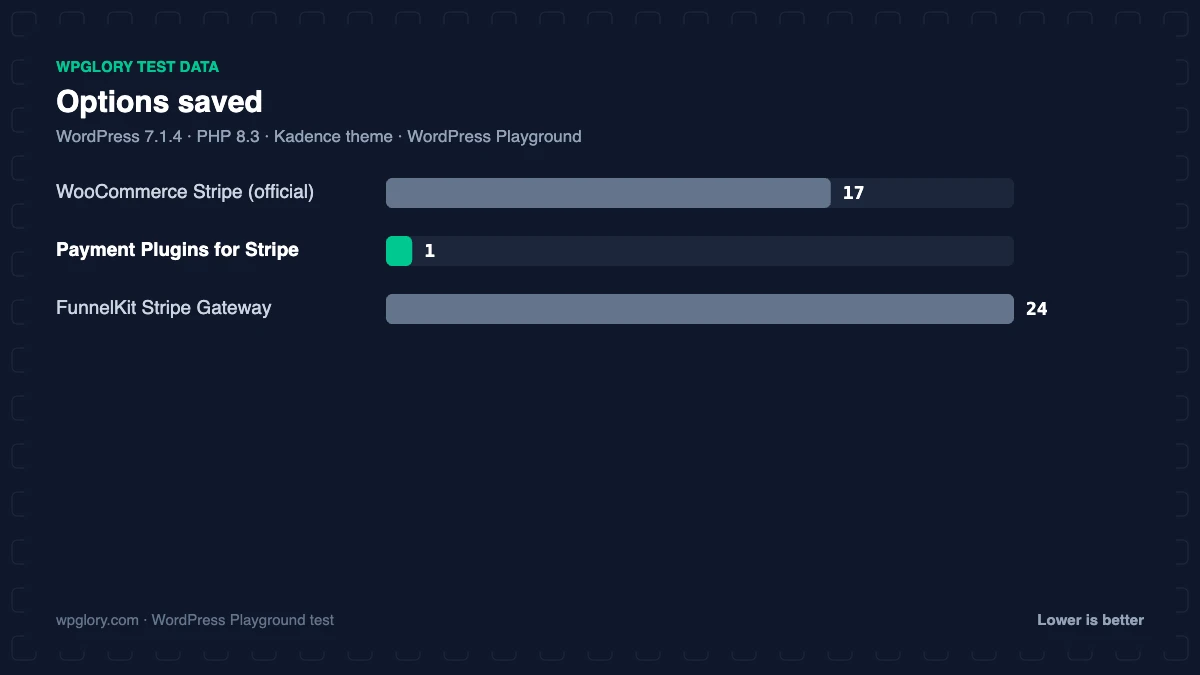
| Options saved | 17 | 1 | 24 |
| Notices / redirects | None | setup redirect | setup notice |
| Plugin size | 4.9 MB | 6.4 MB | 4.1 MB |
| WPGlory score | 8.9/10 | 8.0/10 | 9.1/10 |
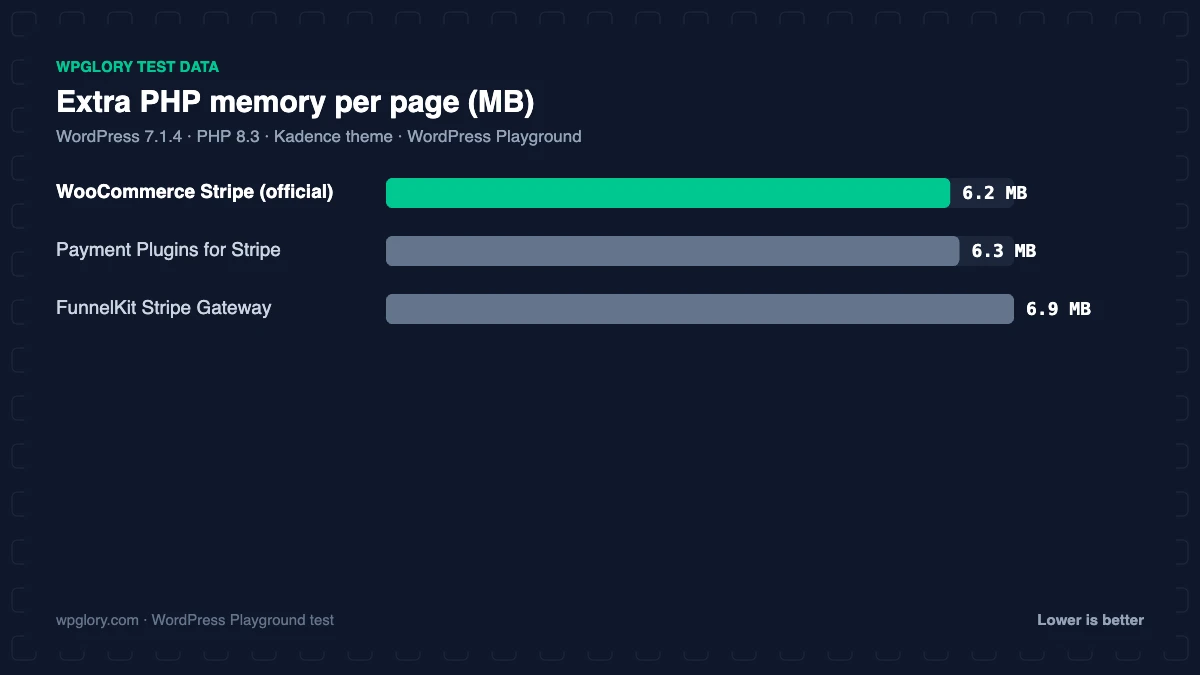
None of the three added files to the home or shop page. On the cart page, Payment Plugins for Stripe loaded 67 KB of files and 30 KB of inline code for its express payment buttons (Apple Pay, Google Pay), even before we entered API keys. The official plugin and FunnelKit added under 1 KB there. On the server, all three used about 6 to 7 MB of extra memory. FunnelKit and Payment Plugins pointed to their setup screens after activation; the official plugin stayed quiet.
Important: only run one Stripe plugin at a time. Two Stripe gateways can register the same webhooks and payment methods and cause failed or duplicate payments.
1. FunnelKit Stripe Gateway: best Stripe plugin for WooCommerce overall
9.1/10 Free plan v1.16.0 · 20,000+ installs · 4.9★ on WordPress.org
FunnelKit’s free Stripe gateway connects to your Stripe account in a couple of clicks (keys and webhooks are set up for you) and supports cards, Apple Pay, Google Pay, Link, Amazon Pay, Klarna, Affirm, Afterpay, SEPA, iDEAL, Bancontact, P24, ACH and more. Test mode is visible only to admins, so live customers are never affected.
Its standout feature is one-click upsells: if you use FunnelKit Funnel Builder Pro, post-purchase offers charge the saved card without asking for details again. In our test it added 6.9 MB of memory, 24 options and a “quick set up” notice. It is rated 4.9 stars.
Free download: FunnelKit Stripe Gateway on WordPress.org (version 1.16.0, last updated 12 October 2026).
Pros
- Cards, wallets, BNPL and 15+ local methods
- Automatic webhooks, admin-only test mode
- Built for one-click upsells
- Nothing added to shop pages
Cons
- Smallest user base (20,000+)
- Setup notice after activation
2. WooCommerce Stripe (official): the official plugin
8.9/10 Free plan v11.1.1 · 700,000+ installs · 3.1★ on WordPress.org
WooCommerce Stripe Payment Gateway is built by WooCommerce and Stripe and has 700,000+ active installs. It supports 23 payment methods, Stripe Radar fraud protection, Adaptive Pricing in 150+ countries, WooCommerce Subscriptions and in-person payments with WooCommerce POS (Stripe Terminal or Tap to Pay).
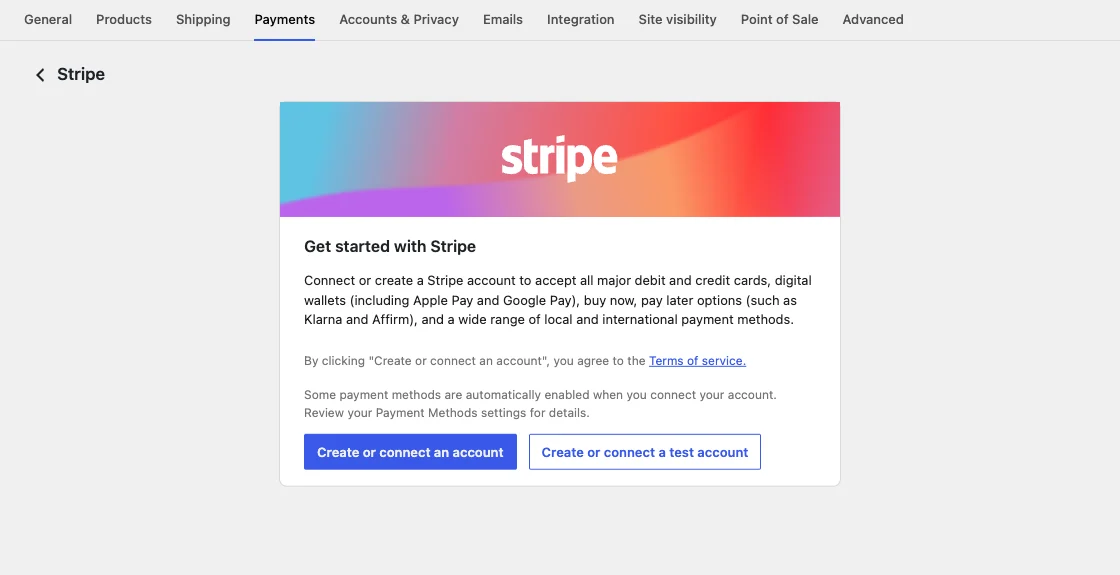
It was the quietest in our test: no notices, no redirect, 6.2 MB of memory and 0.2 KB of inline code on the cart page. Its WordPress.org rating is low (3.1 stars from 237 reviews), mostly from past update problems, but it is the reference implementation that every hosting and theme company tests against.
Free download: WooCommerce Stripe (official) on WordPress.org (version 11.1.1, last updated 16 October 2026).
Pros
- Official: built by WooCommerce with Stripe
- In-person payments and Adaptive Pricing
- No notices or redirect
Cons
- Lowest rating (3.1 stars)
- Fewer express-checkout placement options
3. Payment Plugins for Stripe: best express checkout buttons
8.0/10 Free plan v4.0.19 · 100,000+ installs · 4.8★ on WordPress.org
Payment Plugins for Stripe shows Apple Pay, Google Pay and buy-now-pay-later messaging on product, cart and checkout pages, supports the WooCommerce block checkout, Subscriptions, Pre-Orders and installments, and integrates with CheckoutWC. Its description sums it up: everything “all in one plugin for free”.
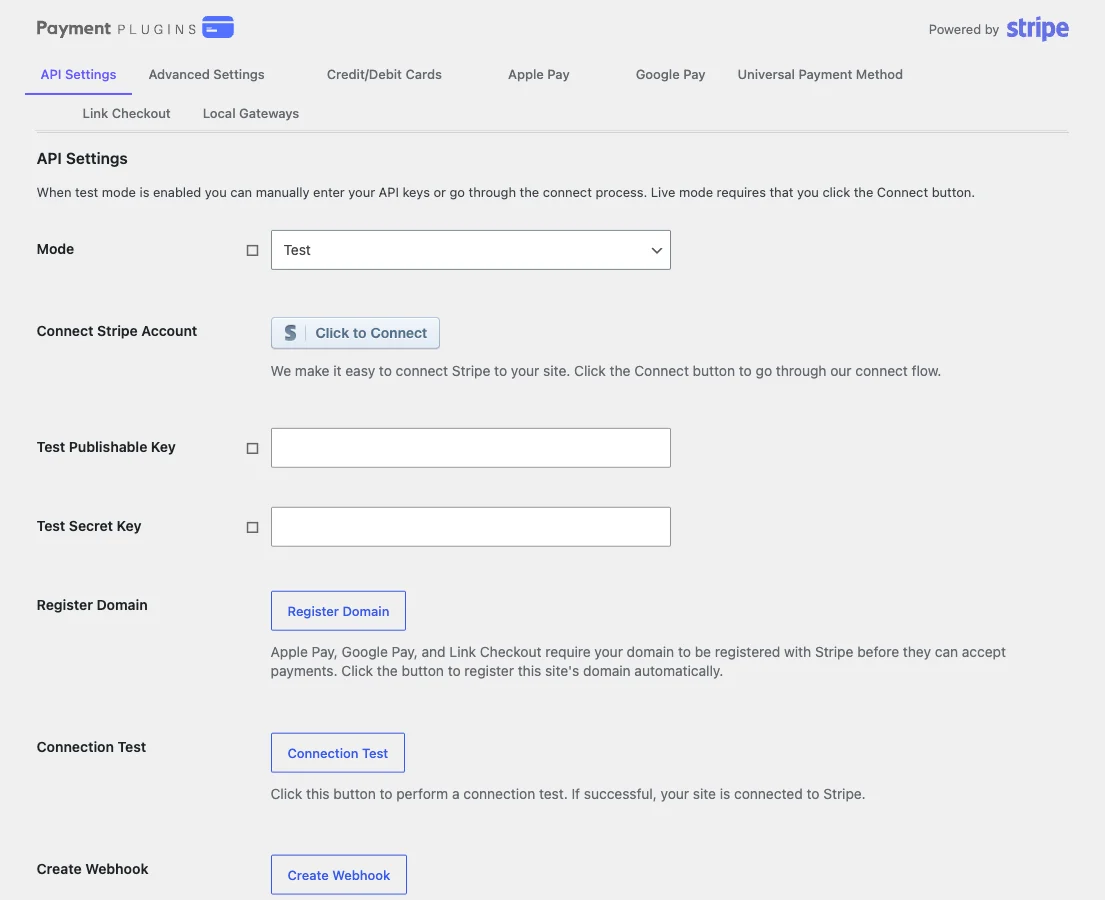
It redirected to its own settings screen after activation and, in our test, loaded 97 KB of code on the cart page for its express buttons. It is rated 4.8 stars from 303 reviews.
Free download: Payment Plugins for Stripe on WordPress.org (version 4.0.19, last updated 22 October 2026).
Pros
- Express buttons on product and cart pages
- Strong BNPL support
- Works with block checkout and CheckoutWC
Cons
- Loads 97 KB on the cart page
- Setup redirect after activation
How to choose the best Stripe plugin for WooCommerce
- You use FunnelKit or want one-click upsells: FunnelKit Stripe Gateway.
- You want the official, most widely tested option or sell in person: WooCommerce Stripe.
- Apple Pay and Google Pay on product pages matter most: Payment Plugins for Stripe.
A faster checkout gets more out of any gateway; see our WooCommerce funnel builder test.
What to look for in the best Stripe plugin for WooCommerce
All Stripe plugins charge cards through the same Stripe account. These are the differences that matter.
- Payment methods: wallets (Apple Pay, Google Pay, Link), buy now pay later and local methods for your markets.
- Express buttons: where they appear (product, cart, checkout) and how much code they load.
- Subscriptions and upsells: saved-card support for WooCommerce Subscriptions and one-click upsells.
- Setup: automatic key and webhook setup saves mistakes.
- Fees: the plugin should not add its own fee on top of Stripe’s.
How we tested
Every plugin was installed from WordPress.org on a clean WordPress 7.1.4 site (PHP 8.3, Kadence theme) in WordPress Playground in November 2026. We activated one plugin at a time, measured the site, then deactivated it again, so each result is compared with the same baseline.
We loaded the home page and a normal blog post as a logged-out visitor three times and kept the median PHP peak memory, added up the CSS and JavaScript files the plugin added, and recorded database tables, options, scheduled cron jobs, admin menus, notices, dashboard widgets and any redirect on the first admin visit.
Screenshots were taken on the same test site right after activation. Ratings, installs and versions come from the WordPress.org plugin directory on the same day. WooCommerce 11.2.2 was active with four sample products, and we measured the home page, shop page, cart page and a blog post. No Stripe keys were entered, so the numbers show what each plugin adds before setup.
The WPGlory score rates what a plugin costs your site, not how many features it has: front-end weight 30%, server cost 20%, admin clutter 20%, WordPress.org rating 20% (weighted by the number of reviews) and maintenance 10%. Features are covered in the text. Read the full method.
FAQ
What is the best Stripe plugin for WooCommerce?
FunnelKit Stripe Gateway for most stores, especially with upsells. The official WooCommerce Stripe plugin is the safe default.
Do Stripe plugins charge extra fees?
None of the three lists a fee of its own. Stripe charges its standard processing fee, 2.9% + $0.30 per US card charge.
Can I use two Stripe plugins together?
No. Run one Stripe gateway at a time to avoid duplicate webhooks and payment methods.
Can I switch Stripe plugins without losing subscriptions?
Often, yes, because saved cards live in Stripe, but test on staging first and check each plugin’s migration notes.
Do I need SSL for Stripe?
Yes. Live Stripe payments require HTTPS.
Final verdict
FunnelKit Stripe Gateway is the best Stripe plugin for WooCommerce
It supports cards, wallets and 15+ local methods, sets itself up, keeps shop pages clean and is built for one-click upsells. Use the official plugin if you sell in person.
9.1/10