Best WordPress Membership Plugin (2026): 4 Free Plugins Tested
Some links on this page are affiliate links. If you buy through them we may earn a commission, at no extra cost to you. It never changes our verdict. How we test and make money
On this page
Short answer: The best WordPress membership plugin for most membership sites is Simple Membership: free membership levels, content protection and PayPal/Stripe payments, with the lowest server load in our test. Kadence Memberships (formerly Restrict Content) is the lightest for visitors, Paid Member Subscriptions has the best free payment features, and Ultimate Member is for community and profile sites, but it loaded 811 KB of files on every page.
A membership plugin lets you lock posts, pages or downloads behind a login or a paid subscription, manage member levels and take recurring payments. Choosing the best WordPress membership plugin depends on what you sell: premium articles, a community with profiles, or paid access to resources.
We installed four popular free membership plugins on the same clean WordPress site, one at a time, measured what each one adds, and captured the first screen each one shows.
Our picks at a glance
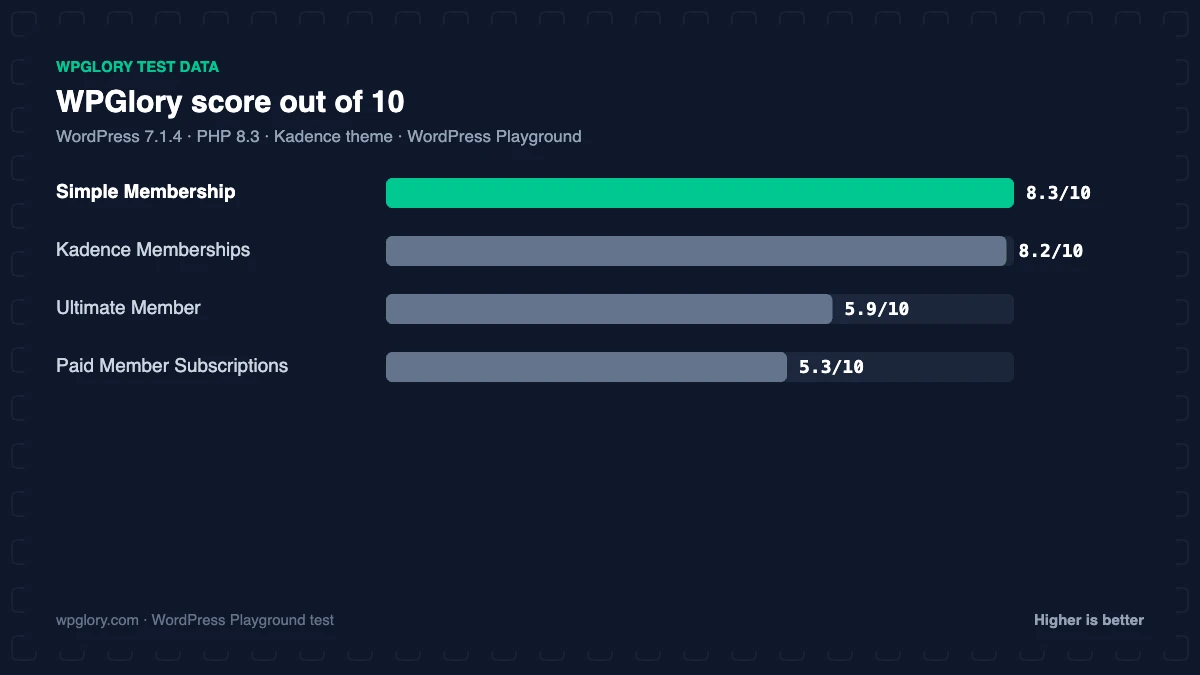
1
Simple MembershipBest overall for paid content
8.3/10
2
Kadence MembershipsLightest for visitors
8.2/10
3
Paid Member SubscriptionsBest free payment features
5.3/10
4
Ultimate MemberBest for profiles and communities
5.9/10
The order is our recommendation for most sites, weighing features and fit. The score measures only what each plugin costs your site.
WordPress membership plugins compared: test results
| Measurement | Simple Membership | Kadence Memberships | Paid Member Subscriptions | Ultimate Member |
|---|---|---|---|---|
| Version tested | 4.8.7 | 4.0.5 | 3.1.4 | 2.14.2 |
| Active installs | 40,000+ | 8,000+ | 10,000+ | 200,000+ |
| WordPress.org rating | 4.6 (476) | 3.1 (100) | 4.7 (270) | 4.4 (1,445) |
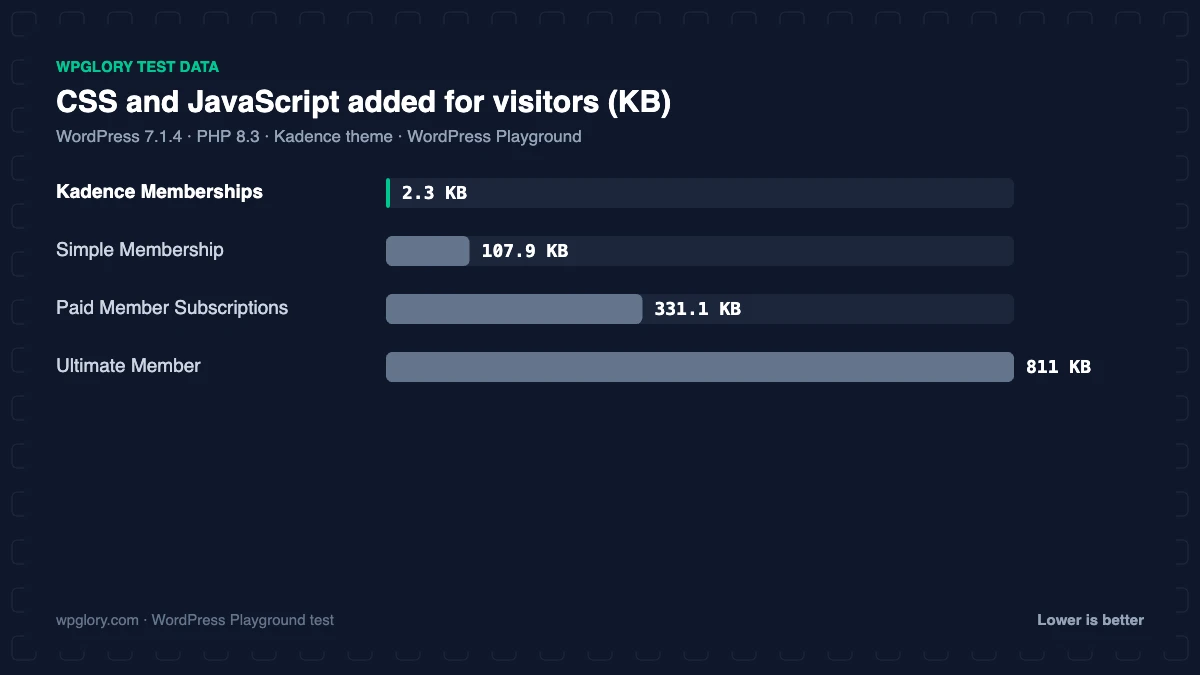
| CSS/JS added for visitors | 107.9 KB | 2.3 KB | 331.1 KB | 811 KB |
| Extra PHP memory (front end) | 2.4 MB | 4.3 MB | 13.8 MB | 5.3 MB |
| Extra PHP memory (admin) | 2.5 MB | 6.5 MB | 14.5 MB | 7.7 MB |
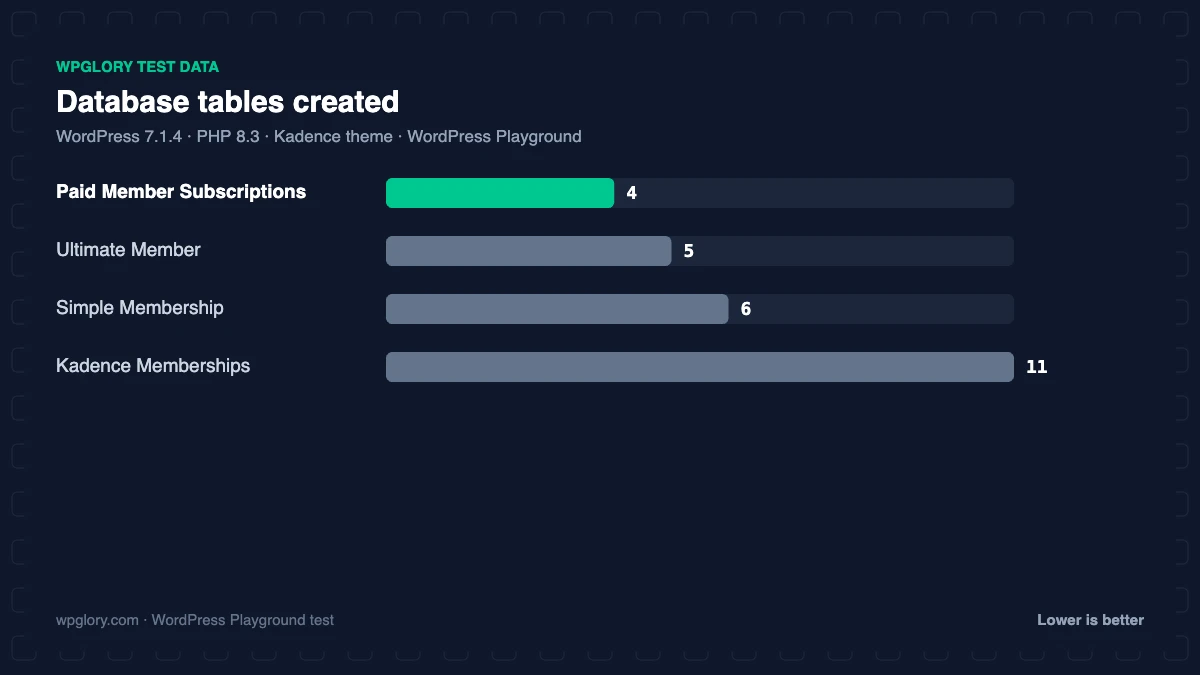
| Database tables | 6 | 11 | 4 | 5 |
| Files added to every page | 1 CSS, 2 JS | 1 CSS, 0 JS | 3 CSS, 6 JS | 22 CSS, 28 JS |
| Pages created | 6 | 0 | 0 | 0 |
| Notices / redirects | None | upsell notice, setup redirect | setup redirect, dashboard widget, admin-bar item | setup notice |
| Plugin size | 11.1 MB | 12.5 MB | 13.2 MB | 13.5 MB |
| WPGlory score | 8.3/10 | 8.2/10 | 5.3/10 | 5.9/10 |
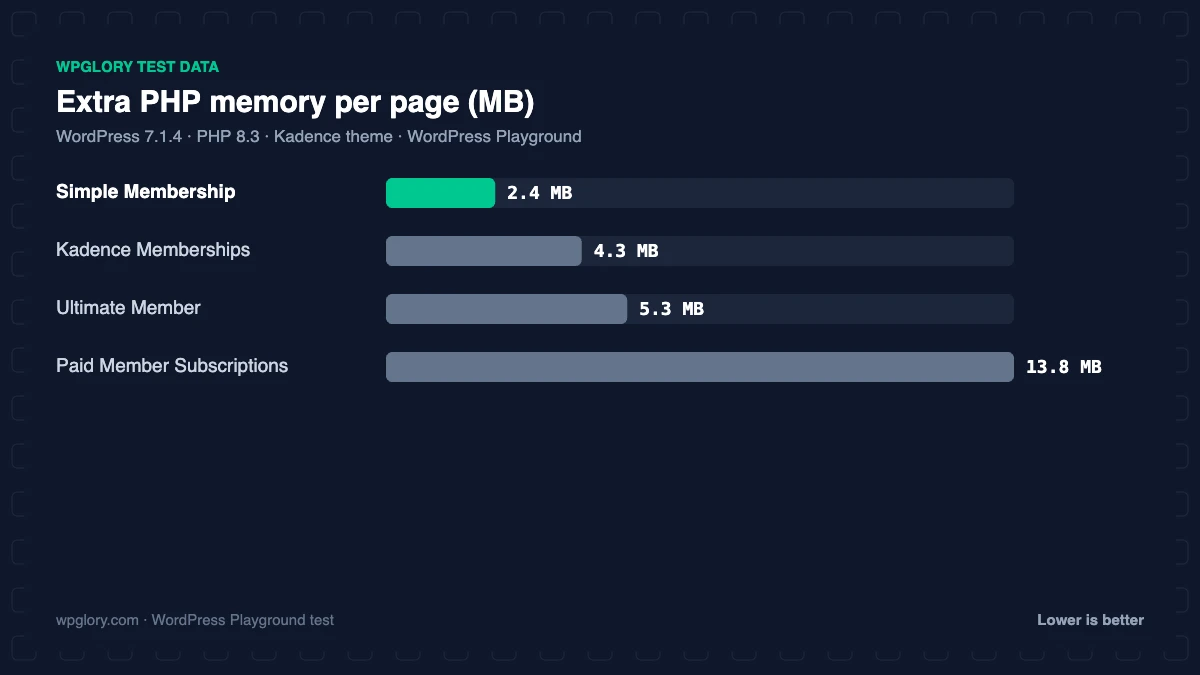
Ultimate Member stood out for the wrong reason: 22 stylesheets and 28 scripts, 811 KB in total, on every page for logged-out visitors, plus three notices after activation. Paid Member Subscriptions loaded 331.1 KB including Stripe’s script from js.stripe.com and used the most memory (13.8 MB). Kadence Memberships added just 2.3 KB, and Simple Membership 107.9 KB with only 2.4 MB of memory.
1. Simple Membership: best WordPress membership plugin overall
8.3/10 Free plan v4.8.7 · 40,000+ installs · 4.6★ on WordPress.org
Simple Membership does what the name says: free and paid membership levels, content protection for posts, pages and categories, member login and registration, and payments through PayPal, Stripe and Braintree buttons. It has 40,000+ active installs and 4.6 stars.
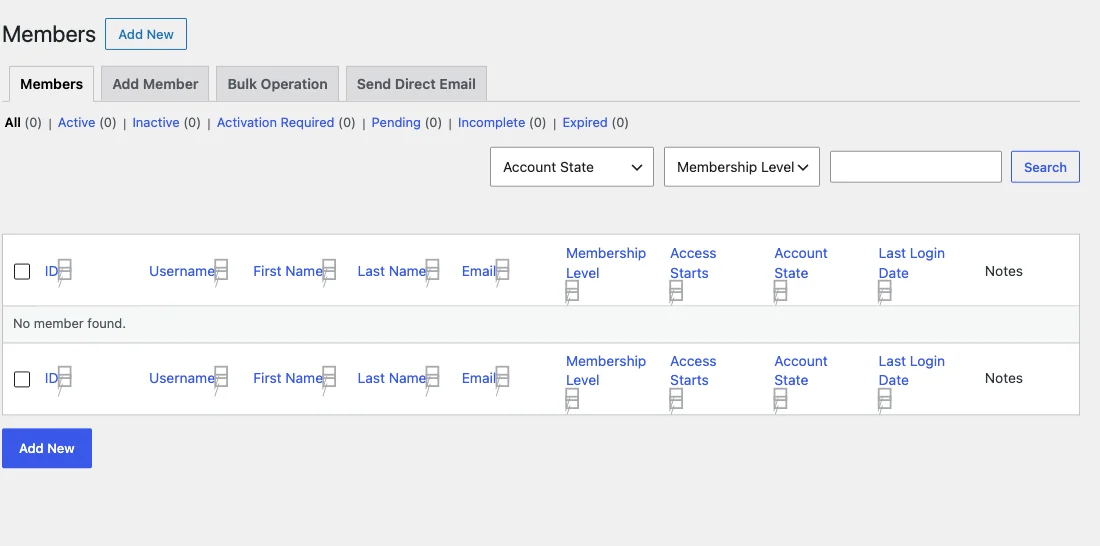
It was the lightest on the server: 2.4 MB of extra memory, 6 tables, 4 cron jobs and no notices. It created 6 pages (login, registration, profile, password reset and so on) and loaded 107.9 KB of CSS and JavaScript on every page. Many extras (MailChimp, form builder, WooCommerce) are paid add-ons.
Free download: Simple Membership on WordPress.org (version 4.8.7, last updated 3 November 2026).
Pros
- Lowest server load: 2.4 MB memory
- Payments in the free version
- No notices, creates the pages for you
Cons
- Dated admin design
- 108 KB of CSS/JS on every page
2. Kadence Memberships: lightest for visitors
8.2/10 Free plan v4.0.5 · 8,000+ installs · 3.1★ on WordPress.org
Kadence Memberships is the new name for Restrict Content; both Kadence and Restrict Content belong to StellarWP. It restricts content by membership level, handles registration and login, and accepts Stripe payments for memberships in the free version.
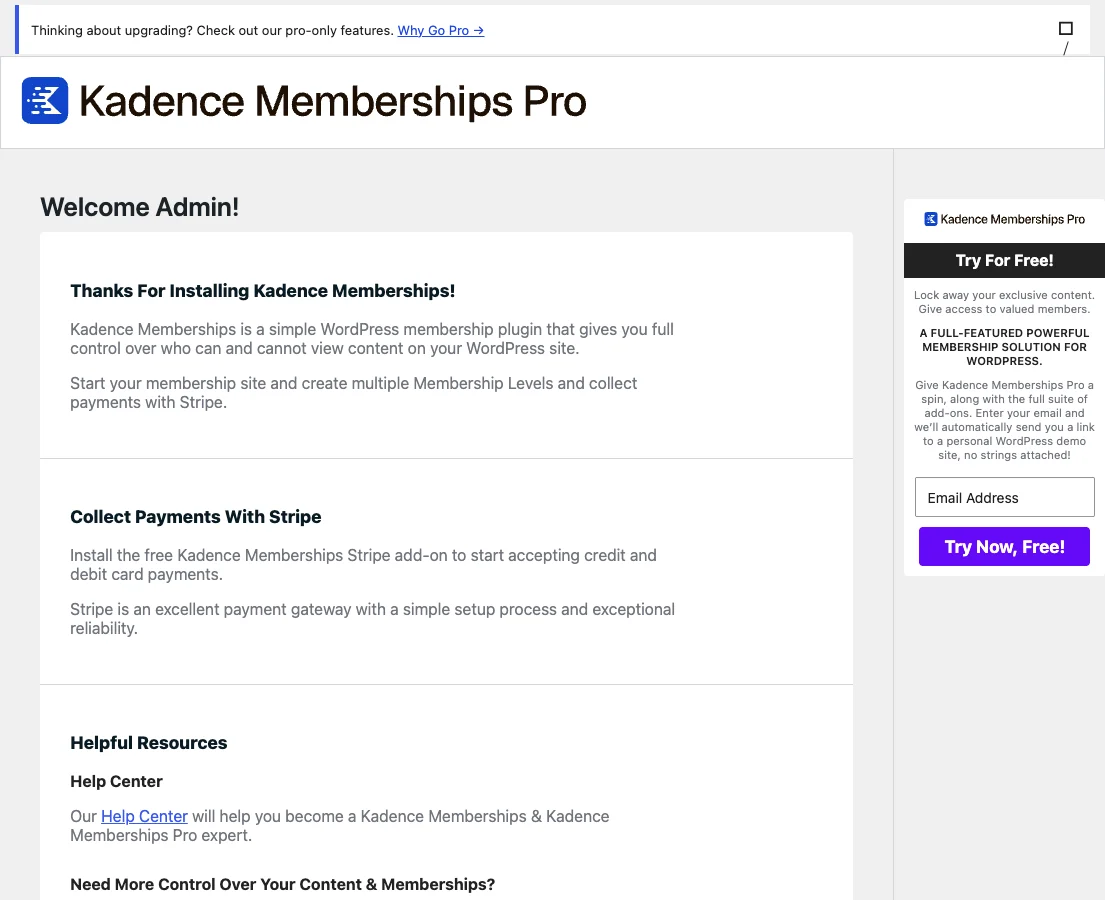
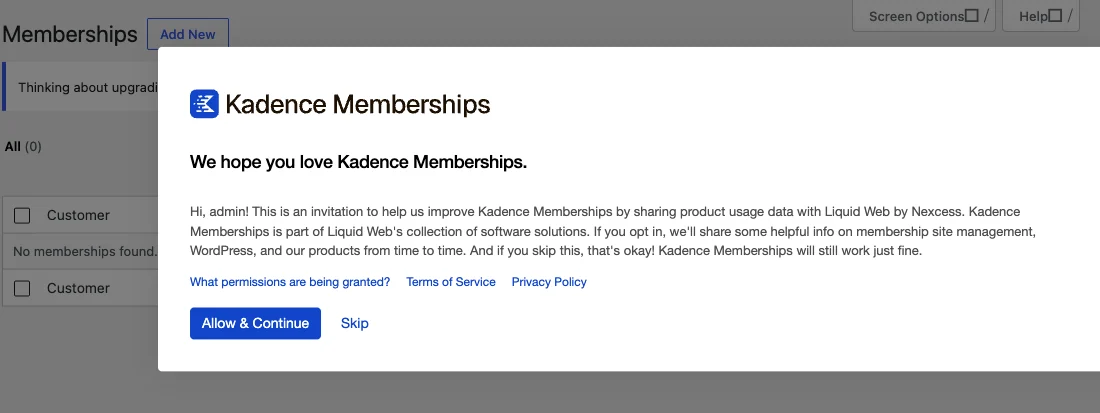
It added only 2.3 KB of CSS for visitors and 4.3 MB of memory, but 11 tables. Activation redirected to a welcome screen and it showed a “Why Go Pro” upsell notice. Its WordPress.org rating is low (3.1 stars), largely from older versions.
Free download: Kadence Memberships on WordPress.org (version 4.0.5, last updated 14 October 2026).
Pros
- Lightest for visitors: 2.3 KB
- Stripe payments free
- Now part of Kadence
Cons
- Upsell notice and welcome redirect
- Low rating (3.1 stars)
- 11 tables
3. Paid Member Subscriptions: best free payment features
5.3/10 Free plan v3.1.4 · 10,000+ installs · 4.7★ on WordPress.org
Paid Member Subscriptions from Cozmoslabs (the Profile Builder team) includes subscription plans, free trials, sign-up fees, content restriction, member management and Stripe and PayPal payments in the free version, with a setup wizard to get you started.

It was the heaviest on the server: 13.8 MB of memory and 14.5 MB in the admin, plus 331.1 KB of front-end files including Stripe’s script on every page. It added a dashboard widget and an admin-bar item.
Free download: Paid Member Subscriptions on WordPress.org (version 3.1.4, last updated 2 November 2026).
Pros
- Trials, sign-up fees and recurring plans free
- Setup wizard
- Stripe and PayPal built in
Cons
- 13.8 MB of extra memory per page
- Loads Stripe.js on every page
4. Ultimate Member: best for profiles and communities
5.9/10 Free plan v2.14.2 · 200,000+ installs · 4.4★ on WordPress.org
Ultimate Member is the most installed plugin here (200,000+). It is a community toolkit rather than a paywall: front-end registration and login forms, user profiles, member directories, account pages and content restriction by role.
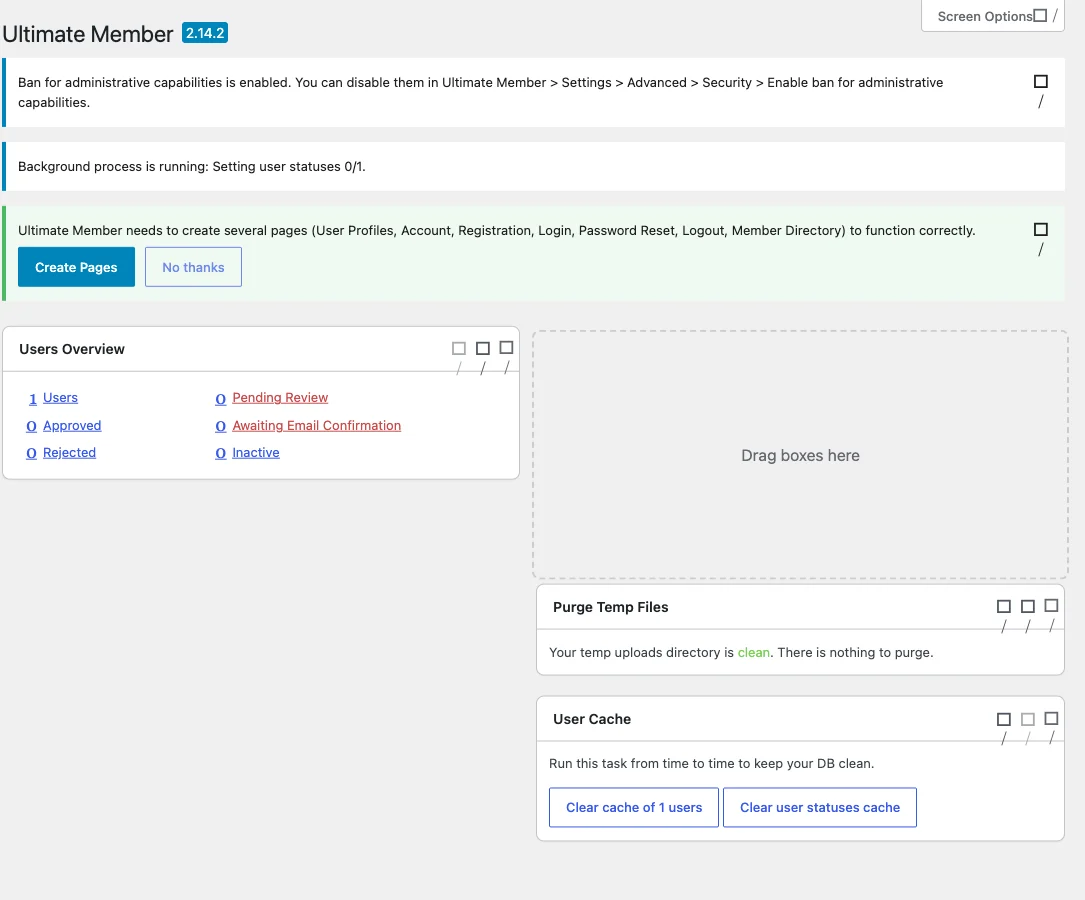
It was by far the heaviest for visitors: 811 KB across 50 files on every page. It also showed three notices: one about a capability ban for administrators, one for a background process, and one asking to create its pages (profile, account, registration, login and more). Paid memberships need extensions.
Free download: Ultimate Member on WordPress.org (version 2.14.2, last updated 2 November 2026).
Pros
- Best profiles and member directories
- Front-end forms and account pages
- 200,000+ installs
Cons
- 811 KB of CSS/JS on every page
- Three notices after activation
- Payments need paid extensions
How to choose the best WordPress membership plugin
- Paid articles, downloads or resources: Simple Membership.
- You use the Kadence theme and want the lightest front end: Kadence Memberships.
- Trials and recurring subscriptions without add-ons: Paid Member Subscriptions.
- A community with profiles and a member directory: Ultimate Member, with its files unloaded on public pages.
Selling courses instead? See our best WordPress LMS plugin test, where LifterLMS includes memberships for free.
What to look for in the best WordPress membership plugin
A membership site runs for years, so choose carefully. Check these points.
- What you restrict: posts and pages, categories, downloads or partial content.
- Payments: one-time, recurring, trials and which gateways are free.
- Member experience: login, account and password reset pages that match your theme.
- Page weight: some membership plugins load heavy files on every public page.
- Emails: welcome, renewal and failed-payment emails.
How we tested
Every plugin was installed from WordPress.org on a clean WordPress 7.1.4 site (PHP 8.3, Kadence theme) in WordPress Playground in November 2026. We activated one plugin at a time, measured the site, then deactivated it again, so each result is compared with the same baseline.
We loaded the home page and a normal blog post as a logged-out visitor three times and kept the median PHP peak memory, added up the CSS and JavaScript files the plugin added, and recorded database tables, options, scheduled cron jobs, admin menus, notices, dashboard widgets and any redirect on the first admin visit.
Screenshots were taken on the same test site right after activation. Ratings, installs and versions come from the WordPress.org plugin directory on the same day.
The WPGlory score rates what a plugin costs your site, not how many features it has: front-end weight 30%, server cost 20%, admin clutter 20%, WordPress.org rating 20% (weighted by the number of reviews) and maintenance 10%. Features are covered in the text. Read the full method.
FAQ
What is the best WordPress membership plugin?
Simple Membership for most paid-content sites: free levels, protection and payments with the lowest server load in our test.
Is there a free membership plugin for WordPress?
Yes. Simple Membership, Kadence Memberships, Paid Member Subscriptions and Ultimate Member are all free on WordPress.org.
Do membership plugins slow down WordPress?
Some do. Ultimate Member loaded 811 KB of CSS and JavaScript on every page in our test; Kadence Memberships added 2.3 KB.
Can I take recurring payments for free?
Yes. Paid Member Subscriptions includes recurring plans with Stripe and PayPal, and Simple Membership supports subscription payment buttons.
Can I sell courses with a membership plugin?
Yes, by restricting lesson pages, but an LMS adds progress tracking and quizzes.
Do membership plugins work with page caching?
Yes, but logged-in members bypass the cache, so server performance still matters.
Final verdict
Simple Membership is the best WordPress membership plugin for paid content
It protects content, takes payments and stays light on the server. Choose Ultimate Member only if profiles and directories are the point of your site.
8.3/10