Tutor LMS vs LearnPress (2026): Tested on the Same Site
Some links on this page are affiliate links. If you buy through them we may earn a commission, at no extra cost to you. It never changes our verdict. How we test and make money
On this page
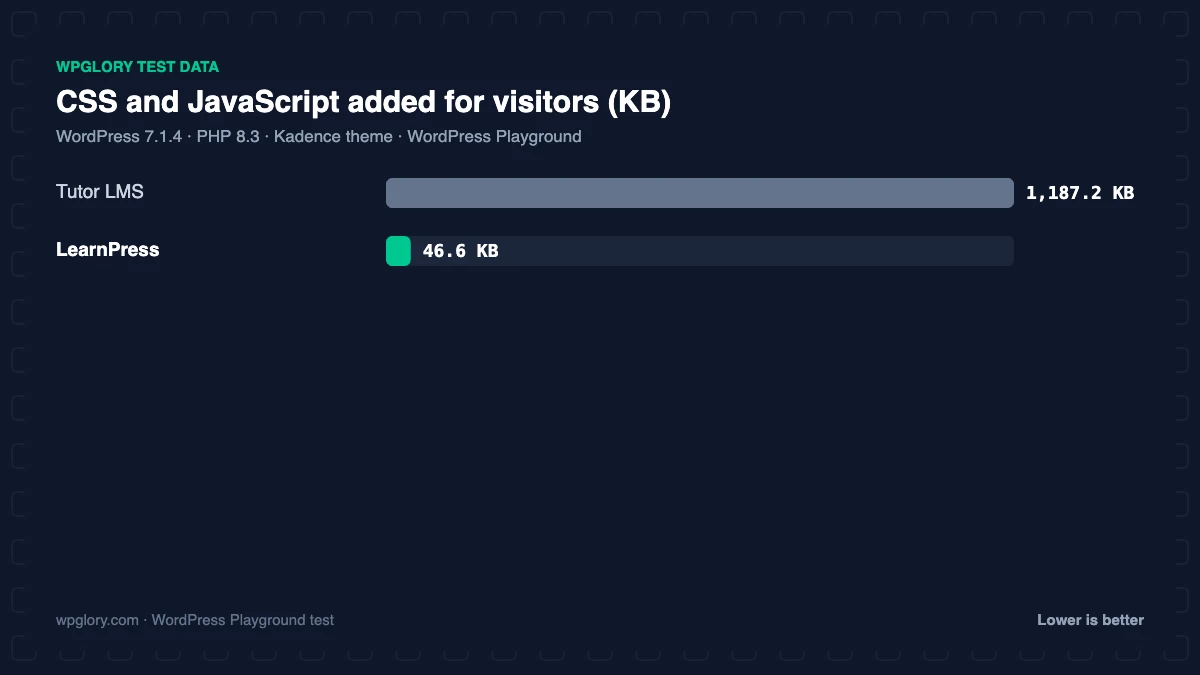
Short answer: Tutor LMS vs LearnPress: Tutor LMS has the better free course builder, quizzes and native checkout; LearnPress is far lighter for visitors (46.6 KB of CSS/JS vs 1187.2 KB on every page in our test) but used twice the PHP memory. Pick Tutor LMS for a dedicated course site, LearnPress if courses share a site with your blog or shop.
Tutor LMS and LearnPress are the two most popular free LMS plugins on WordPress.org, with 100,000+ and 70,000+ active installs. Both create courses, lessons and quizzes, both can sell courses without extra plugins, and both have paid upgrades. We installed them on the same clean WordPress site, measured what each one adds, and compared the free features side by side.
Tutor LMS vs LearnPress at a glance
| Tutor LMS | LearnPress | |
|---|---|---|
| Best for | Dedicated course sites | Courses on a blog or shop site |
| Course builder | All-in-one frontend-style builder | Classic curriculum editor plus course builder |
| Quiz types (free) | True/false, single and multiple choice, matching, fill in the blanks | True/false, single and multiple choice, fill in the blanks |
| Sell courses (free) | Native checkout or WooCommerce | Built-in payment methods (offline, PayPal) |
| Certificates | Pro | Paid add-on |
| Assignments | Pro | Paid add-on |
| Paid model | Tutor LMS Pro plans | Individual add-ons or Pro Bundle |
| Active installs | 100,000+ | 70,000+ |
| Rating | 4.4 (590) | 4.3 (597) |
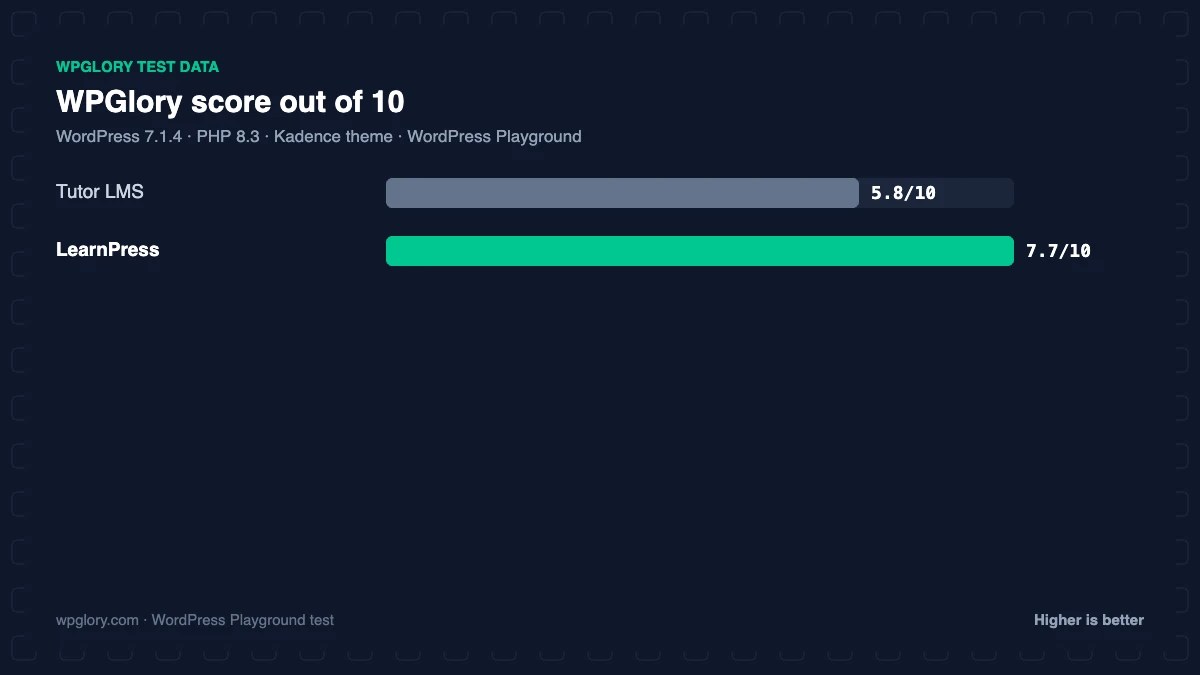
| WPGlory score | 5.8/10 | 7.7/10 |
Performance: Tutor LMS vs LearnPress
| Measurement | Tutor LMS | LearnPress |
|---|---|---|
| Version tested | 4.2.0 | 4.4.13 |
| Active installs | 100,000+ | 70,000+ |
| WordPress.org rating | 4.4 (590) | 4.3 (597) |
| CSS/JS added for visitors | 1187.2 KB | 46.6 KB |
| Extra PHP memory (front end) | 5.9 MB | 12.0 MB |
| Extra PHP memory (admin) | 7.6 MB | 14.7 MB |
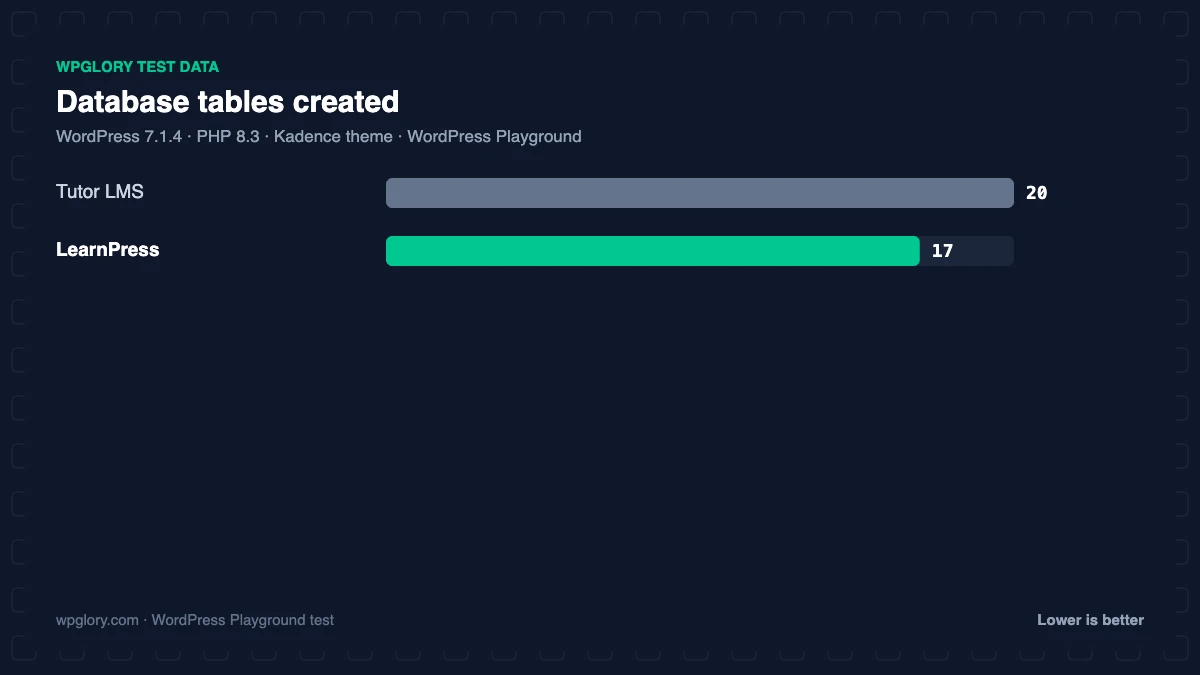
| Database tables | 20 | 17 |
| Files added to every page | 5 CSS, 18 JS | 2 CSS, 2 JS |
| Pages created | 5 | 7 |
| Notices / redirects | setup redirect | dashboard widget, admin-bar item |
| Plugin size | 20.4 MB | 37.3 MB |
| WPGlory score | 5.8/10 | 7.7/10 |
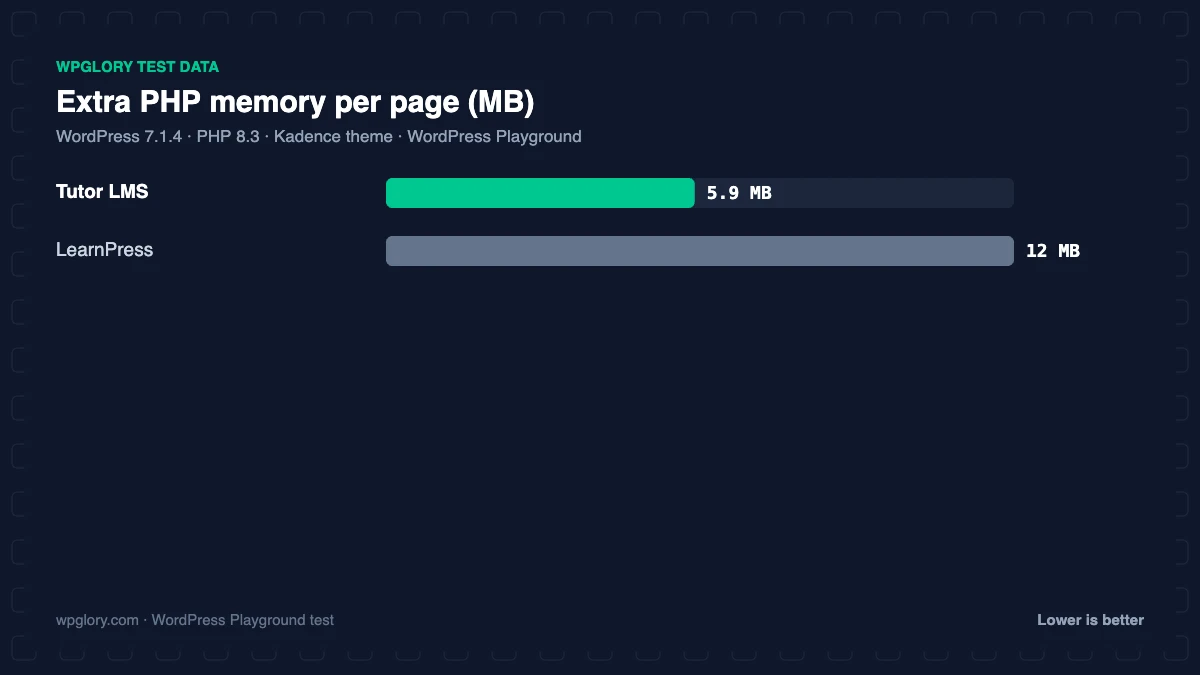
The two plugins make opposite trade-offs. Tutor LMS loaded 5 stylesheets and 18 scripts (1187.2 KB) on every page for logged-out visitors, including a normal blog post, but used only 5.9 MB of extra PHP memory. LearnPress loaded 4 files (46.6 KB) but used 12 MB of memory on every page and 14.7 MB in the admin. Page weight affects every visitor’s download; memory affects your server. On a busy blog, LearnPress’s approach is kinder to visitors.
Setup and first impressions
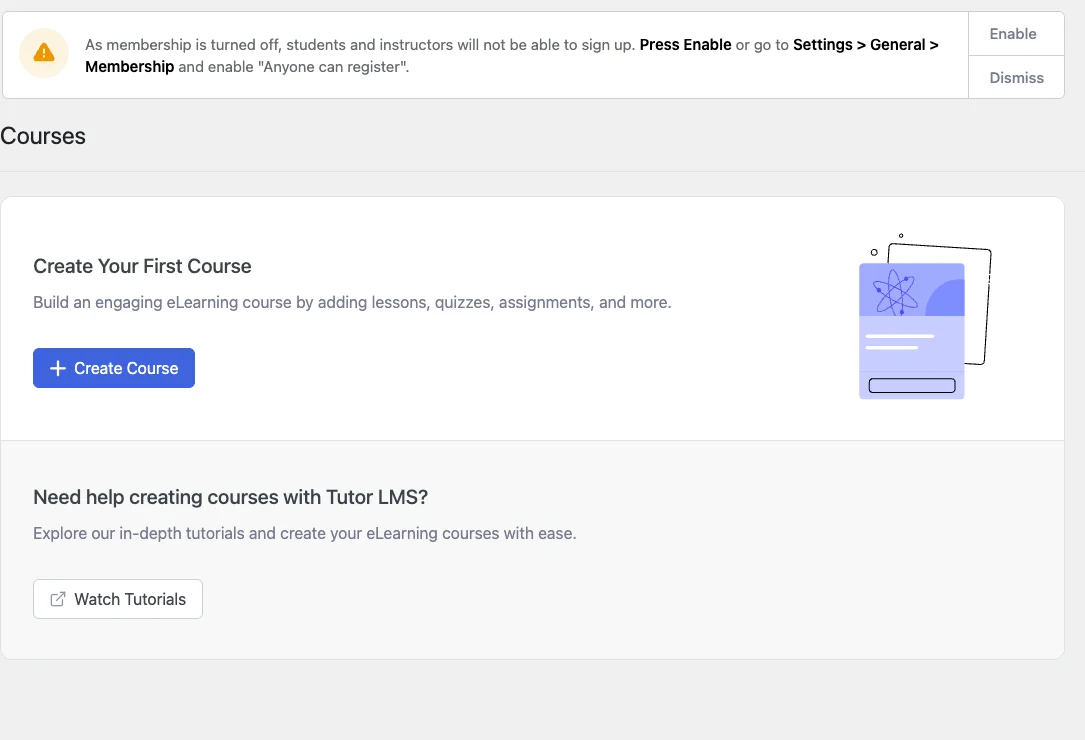
Tutor LMS redirected to a welcome screen after activation and created 5 pages, such as the student dashboard and instructor registration. It added one role, Tutor Instructor.
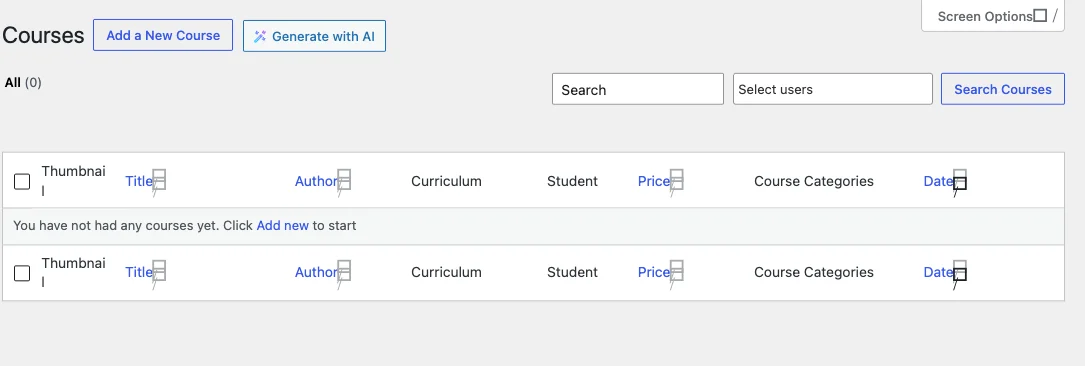
LearnPress did not redirect, but it created 7 pages, added 2 dashboard widgets (order statuses and plugin status), an admin-bar course builder link and a Teacher role.
Course building
Tutor LMS’s builder is the main reason people choose it: topics, lessons, quizzes, prerequisites and pricing on one screen, with a drag-and-drop curriculum. Instructors can build courses from the front-end dashboard, which suits multi-instructor schools. LearnPress has a capable curriculum editor and a course builder of its own, but it feels closer to classic WordPress editing.
Both plugins are free to download: Tutor LMS and LearnPress on WordPress.org.
Selling courses
Both can sell courses in their free versions. Tutor LMS has a native checkout and also works with WooCommerce; LearnPress includes built-in payment methods, with WooCommerce and Stripe as paid add-ons. For subscriptions and memberships, Tutor LMS Pro covers it in one plan; with LearnPress you buy the add-ons you need or the Pro Bundle.
Quizzes and student experience
Tutor LMS includes true/false, single choice, multiple choice, matching and fill-in-the-blank questions in the free version, with time limits, attempt limits and passing grades. Its Pro version adds image-based and puzzle question types. Students get a front-end dashboard with enrolled courses, progress and quiz attempts, and instructors can build courses from the front end without seeing the WordPress admin.
LearnPress covers the core question types too, and its free add-ons include course reviews, wishlists and prerequisites. Certificates, gradebooks and assignments are paid add-ons. Its student profile page shows enrolled courses and progress, and many education themes style it heavily, so the experience depends on your theme.
Performance in practice
The 1.2 MB Tutor LMS loads on every page is the biggest practical difference in the Tutor LMS vs LearnPress test. On a course-only site, visitors need most of those files anyway. On a site with a blog, a shop or marketing pages, every visitor downloads them for nothing. An asset manager such as Perfmatters, Asset CleanUp or Plugin Organizer can disable Tutor LMS scripts outside course pages, which closes most of the gap.
LearnPress is the opposite case: its pages stay light, but it used 12 MB of extra PHP memory on every request in our test. On cheap shared hosting with a low memory limit, that matters more than page weight, because uncached pages, logged-in students and quiz submissions all run through PHP.
Pricing model
Tutor LMS sells one Pro plan with every add-on included, priced by the number of sites. LearnPress keeps its core free and sells add-ons individually or as a Pro Bundle. If you need only certificates, buying one LearnPress add-on can be cheaper; if you need certificates, assignments, content drip and subscriptions, Tutor LMS Pro is simpler. Check both vendors for current prices before you decide.
Which should you choose?
- Your site is mainly a course platform: Tutor LMS. The heavier front end matters less when most pages are course pages.
- Courses are one part of a bigger site: LearnPress, or Tutor LMS with its files unloaded on non-course pages.
- You want to pay only for the features you use: LearnPress add-ons.
See all five options in our best WordPress LMS plugin test.
Tutor LMS vs LearnPress: how to decide
Answer these questions to settle Tutor LMS vs LearnPress for your site.
- Is the site mainly courses? Tutor LMS.
- Is it a blog or shop with a few courses? LearnPress, or Tutor LMS with assets unloaded elsewhere.
- Do you need multiple instructors? Both support instructors; Tutor LMS’s front-end builder is friendlier.
- Which theme do you use? Many education themes target one of the two.
How we tested
Every plugin was installed from WordPress.org on a clean WordPress 7.1.4 site (PHP 8.3, Kadence theme) in WordPress Playground in November 2026. We activated one plugin at a time, measured the site, then deactivated it again, so each result is compared with the same baseline.
We loaded the home page and a normal blog post as a logged-out visitor three times and kept the median PHP peak memory, added up the CSS and JavaScript files the plugin added, and recorded database tables, options, scheduled cron jobs, admin menus, notices, dashboard widgets and any redirect on the first admin visit.
Screenshots were taken on the same test site right after activation. Ratings, installs and versions come from the WordPress.org plugin directory on the same day.
The WPGlory score rates what a plugin costs your site, not how many features it has: front-end weight 30%, server cost 20%, admin clutter 20%, WordPress.org rating 20% (weighted by the number of reviews) and maintenance 10%. Features are covered in the text. Read the full method.
FAQ
Tutor LMS vs LearnPress: which is better?
Tutor LMS has the better builder and quizzes; LearnPress is lighter for visitors. Choose by whether your site is mainly courses.
Is Tutor LMS free?
Yes, the core Tutor LMS plugin is free. Certificates, assignments, content drip and subscriptions are Pro.
Is LearnPress free?
Yes. The core is free; certificates, gradebook, assignments and some payment gateways are paid add-ons.
Which is faster, Tutor LMS or LearnPress?
LearnPress loaded 47 KB on every page vs 1.2 MB for Tutor LMS in our test, but used more PHP memory.
Can I switch from LearnPress to Tutor LMS?
Tutor LMS offers a migration tool for LearnPress courses; test it on staging first.
Which has better quizzes?
Tutor LMS, especially with Pro quiz types.
Final verdict
Tutor LMS vs LearnPress: Tutor LMS for course sites
Tutor LMS is the better course builder. If your courses live next to a busy blog or shop, LearnPress is the lighter choice for visitors.
5.8/10