Smush vs ShortPixel (2026): Which Image Optimizer Should You Use?
Some links on this page are affiliate links. If you buy through them we may earn a commission, at no extra cost to you. It never changes our verdict. How we test and make money
On this page
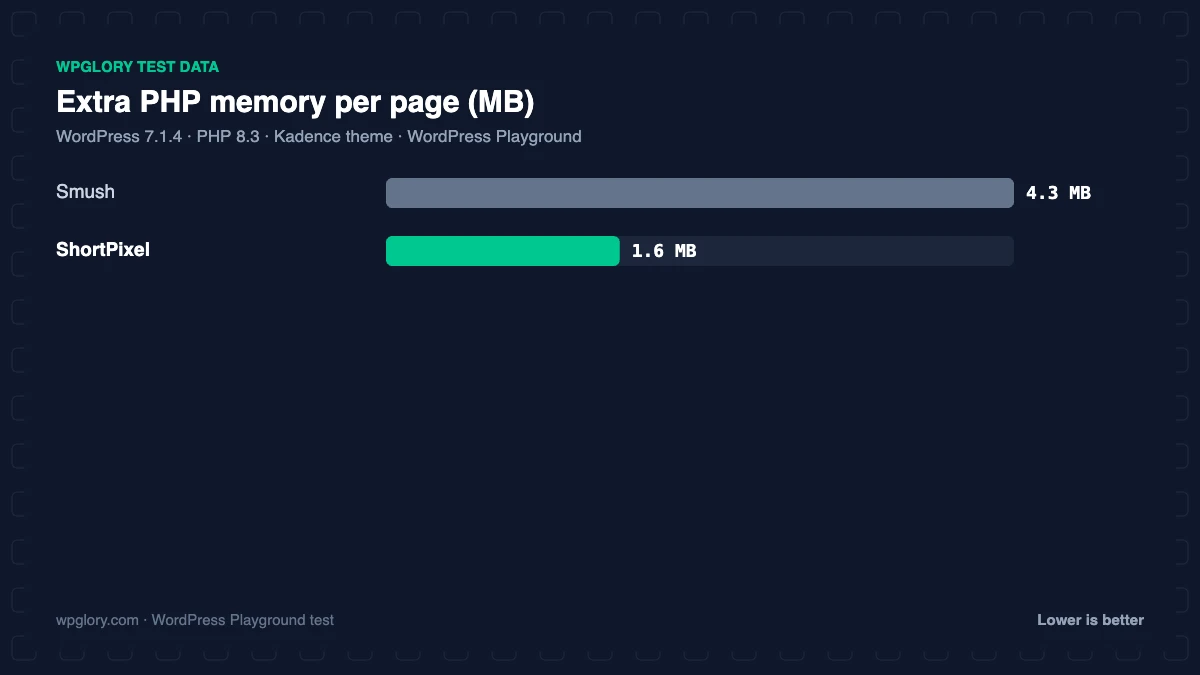
Short answer: Smush vs ShortPixel: Smush is free and unlimited (images up to 5 MB), with lazy load built in; ShortPixel compresses harder and converts to WebP and AVIF, but the free plan is 100 images a month. ShortPixel was also lighter in our test (1.6 MB vs 4.3 MB of memory). Pick Smush for a free blog, ShortPixel when image quality and modern formats matter.
Smush and ShortPixel are two of the most popular image optimization plugins for WordPress, with over 1 million and 300,000 active installs. Both compress images in the cloud, both bulk-optimize your media library and both have paid plans. They differ in free limits, formats and pricing model. We installed both on the same clean WordPress site to compare them.
Smush vs ShortPixel at a glance
| Smush | ShortPixel | |
|---|---|---|
| Free limit | Unlimited, images up to 5 MB | 100 credits a month |
| Account needed | No (Hub connection optional) | Yes, API key |
| Compression modes | Lossless, lossy (Super with Hub) | Lossy, glossy, lossless |
| WebP / AVIF | Pro | Yes (uses credits) |
| Lazy load | Free | No (use WordPress native) |
| CDN | Pro | Separate ShortPixel Adaptive Images |
| Full-size originals | Pro | Yes |
| Installs | 1 million+ | 300,000+ |
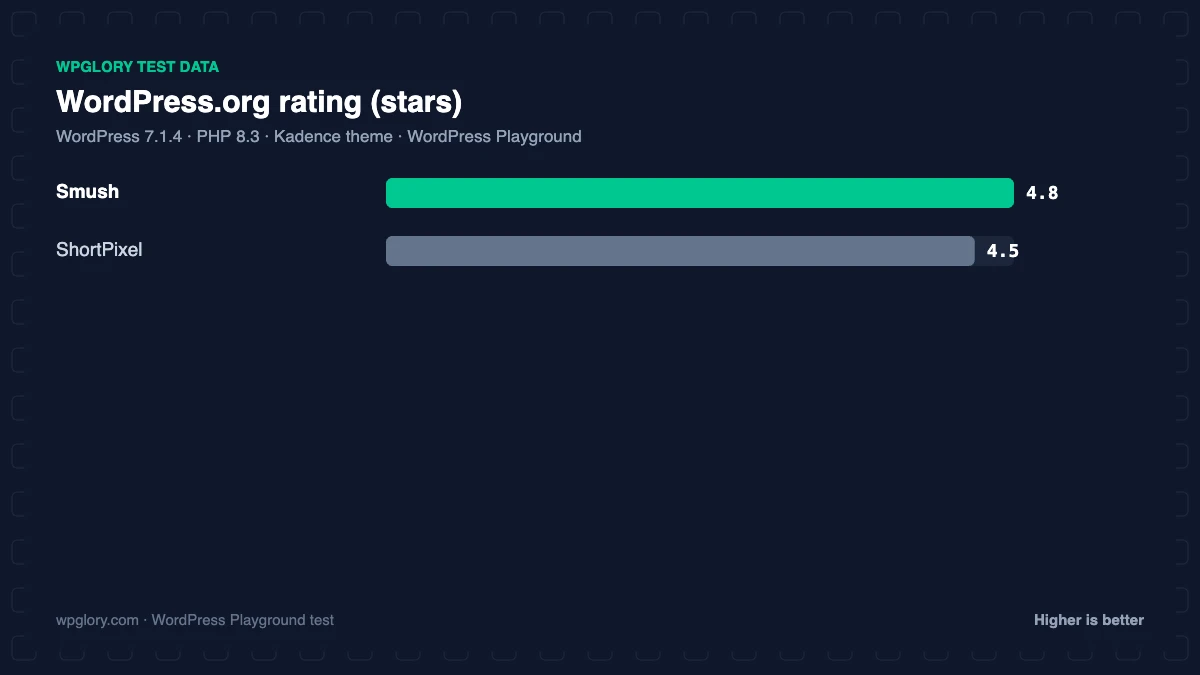
| Rating | 4.8 (6,053) | 4.5 (830) |
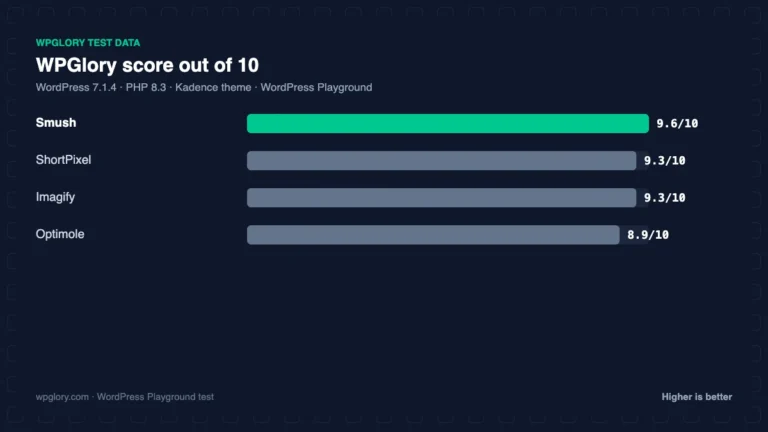
| WPGlory score | 9.6/10 | 9.3/10 |
Performance test
| Measurement | Smush | ShortPixel |
|---|---|---|
| Version tested | 4.3.6 | 6.6.1 |
| Active installs | 1 million+ | 300,000+ |
| WordPress.org rating | 4.8 (6,053) | 4.5 (830) |
| CSS/JS added for visitors | 0 KB | 0 KB |
| Extra PHP memory (front end) | 4.3 MB | 1.6 MB |
| Extra PHP memory (admin) | 4.9 MB | 3.5 MB |
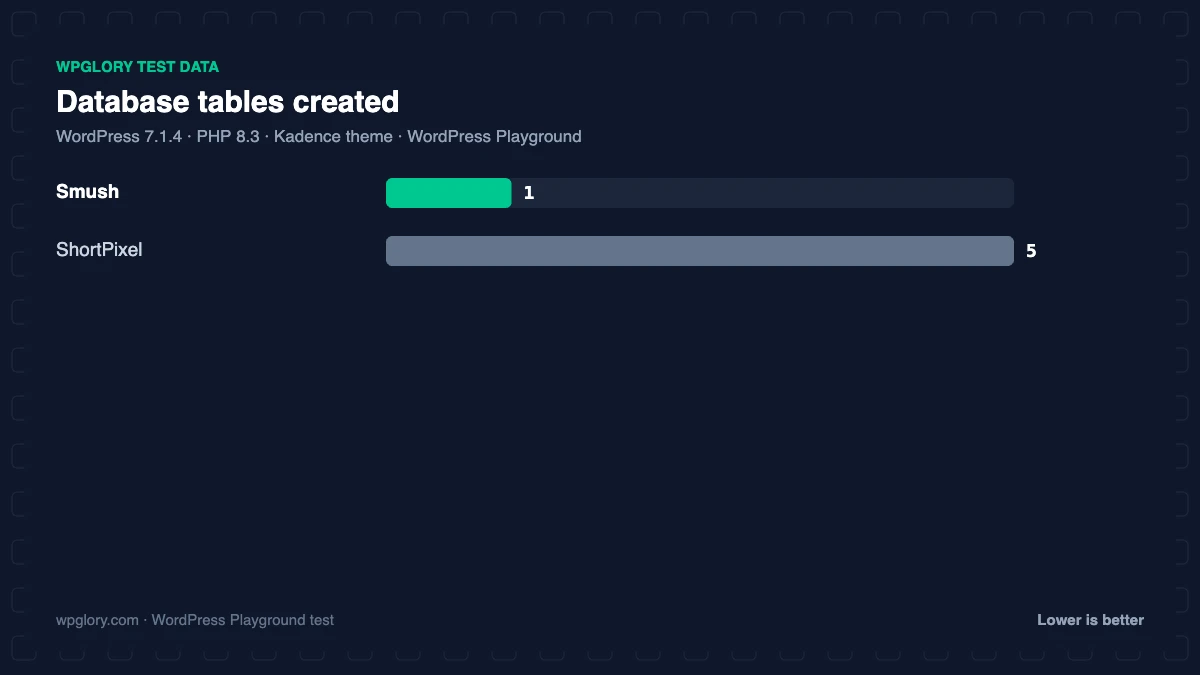
| Database tables | 1 | 5 |
| Options saved | 12 | 8 |
| Scheduled cron jobs | 3 | 1 |
| Notices / redirects | None | setup redirect |
| Plugin size | 19.6 MB | 5.4 MB |
| WPGlory score | 9.6/10 | 9.3/10 |
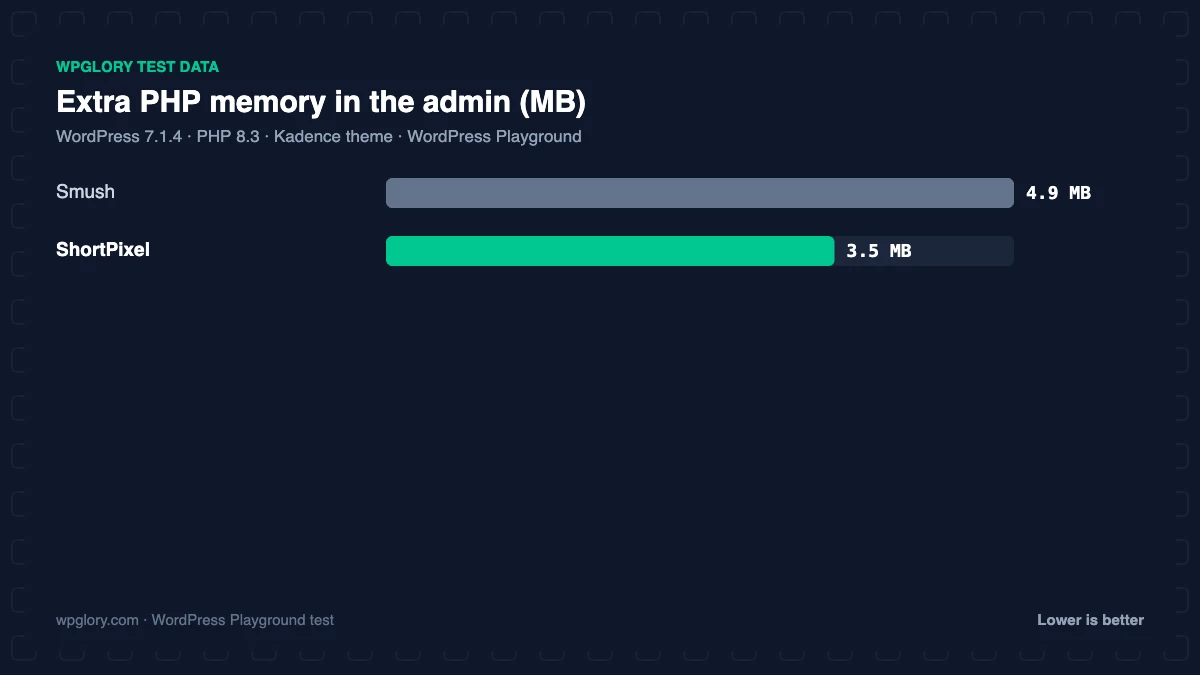
Neither plugin added files for visitors. ShortPixel used less memory on every page (1.6 MB vs 4.3 MB) and in the admin (3.5 MB vs 4.9 MB), but created more tables (5 vs 1). ShortPixel sent us to its settings page after activation to enter an API key; Smush showed no notices.

Compression and formats
ShortPixel’s glossy mode is popular with photographers because it keeps detail while still cutting file size sharply, and it converts to both WebP and AVIF. Smush free offers lossless and lossy compression of the resized images WordPress generates; WebP and AVIF conversion and full-size compression are Smush Pro.
Both plugins are free to download: Smush and ShortPixel on WordPress.org.
Pricing
Smush is genuinely free for unlimited images under 5 MB; Smush Pro is part of a WPMU DEV membership. ShortPixel sells monthly plans and one-time credit packs, and each thumbnail size WordPress generates uses a credit, so a library of 1,000 photos can need several thousand credits.
Smush vs ShortPixel: setup compared
Setting up Smush takes about a minute: activate it, accept the recommended settings and run Bulk Smush on your media library. There is no account to create, and new uploads are compressed automatically from then on. Lazy load is switched on from the same screen, although WordPress already lazy-loads images natively, so check that the two do not overlap.
ShortPixel needs one more step. After activation it opens its settings page and asks for an API key, which you get by entering your email. Then you choose lossy, glossy or lossless compression, decide whether to keep backups of originals, and switch on WebP or AVIF delivery. ShortPixel can serve those formats with a picture tag or with rewrite rules on Apache, and its settings explain which suits your host.
Smush vs ShortPixel for WooCommerce and photography
Product photos and portfolio images are where the Smush vs ShortPixel choice matters most. Every product image in WooCommerce generates several thumbnail sizes, so the number of files grows quickly. Smush free handles all of them at no cost as long as each original is under 5 MB. ShortPixel charges a credit for each size, but its glossy mode and AVIF output usually produce smaller files with fewer visible artefacts, which is why photographers prefer it.
A practical compromise for stores: compress with Smush free and add WebP with a separate converter, or buy a one-time ShortPixel credit pack to optimize your existing library once, then keep new uploads on the monthly free credits.
What our test does not measure
Our lab measures what each plugin adds to a WordPress site: memory, tables, options, cron jobs, notices and front-end files. It does not benchmark compression quality, because ShortPixel compresses on its own servers after you add an API key, and results depend on your photos. Run both on ten of your own images if file size is the deciding factor; both plugins show the savings per image.
Which should you choose?
- Free blog with lots of images: Smush.
- Photography, ecommerce or Core Web Vitals focus: ShortPixel.
- Want WebP for free with Smush: add Converter for Media.
See all the options in our best image optimization plugin for WordPress test.
Smush vs ShortPixel: how to decide
The Smush vs ShortPixel decision comes down to volume, formats and budget.
- How many images do you upload a month? Under 100 with few thumbnail sizes, ShortPixel free can work; more than that, Smush free.
- Do you need AVIF? ShortPixel.
- Do you need lazy load from the same plugin? Smush.
- Do you want no account at all? Smush.
How we tested
Every plugin was installed from WordPress.org on a clean WordPress 7.1.4 site (PHP 8.3, Kadence theme) in WordPress Playground in November 2026. We activated one plugin at a time, measured the site, then deactivated it again, so each result is compared with the same baseline.
We loaded the home page and a normal blog post as a logged-out visitor three times and kept the median PHP peak memory, added up the CSS and JavaScript files the plugin added, and recorded database tables, options, scheduled cron jobs, admin menus, notices, dashboard widgets and any redirect on the first admin visit.
Screenshots were taken on the same test site right after activation. Ratings, installs and versions come from the WordPress.org plugin directory on the same day.
The WPGlory score rates what a plugin costs your site, not how many features it has: front-end weight 30%, server cost 20%, admin clutter 20%, WordPress.org rating 20% (weighted by the number of reviews) and maintenance 10%. Features are covered in the text. Read the full method.
FAQ
Smush vs ShortPixel: which is better?
Smush for free unlimited compression; ShortPixel for stronger compression and WebP/AVIF.
Is ShortPixel free?
Yes, with 100 credits a month. Each image size uses a credit.
Does Smush convert to WebP?
Only in Smush Pro.
Can I use Smush and ShortPixel together?
No. Pick one compressor to avoid double compression.
Which is better for WooCommerce product photos?
ShortPixel, for its glossy mode and AVIF, if you can budget for credits.
Final verdict
Smush vs ShortPixel: Smush for free, ShortPixel for quality
Most blogs are well served by free Smush. Switch to ShortPixel when you want AVIF and the smallest files.
9.6/10