Best WordPress Booking Plugin (2026): 4 Appointment Plugins Tested
Some links on this page are affiliate links. If you buy through them we may earn a commission, at no extra cost to you. It never changes our verdict. How we test and make money
On this page
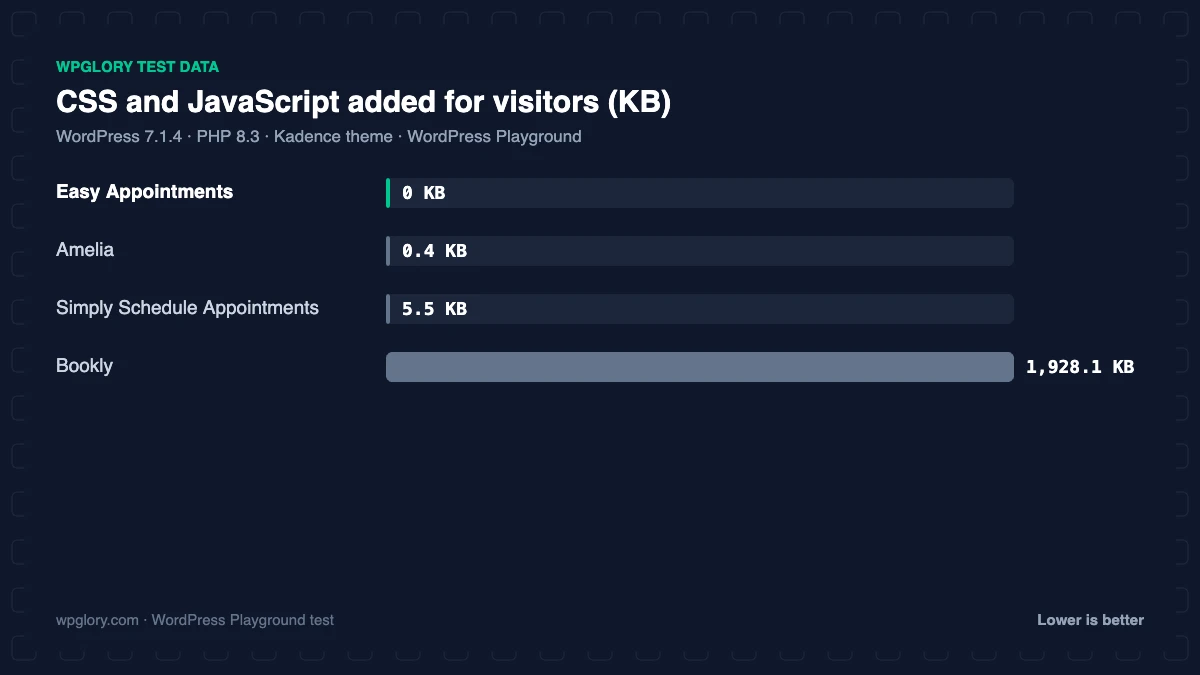
Short answer: The best WordPress booking plugin for most service businesses is Amelia: a polished booking form, a back-end calendar, events and free Square payments, with no files added to your pages until you place a booking form. Simply Schedule Appointments is the best free option for unlimited calendars and appointments, Easy Appointments is fully open source and light, and Bookly has a strong Pro add-on ecosystem but loaded 1.9 MB of CSS and JavaScript on every page in our test.
A booking plugin lets clients pick a service, a staff member and a time, then confirms the appointment and sends reminders. Salons, consultants, tutors, clinics and coaches all rely on one. Because the booking widget often sits on your home page, the best WordPress booking plugin is the one that is easy for clients and does not slow your site.
We installed the four most popular free booking plugins on the same clean WordPress site, one at a time, measured what each adds to every page, and captured their admin screens.
Our picks at a glance
1
AmeliaBest overall: polished booking, free Square payments
8.8/10
2
Simply Schedule AppointmentsBest free plan: unlimited calendars
9.2/10
3
Easy AppointmentsOpen source and light
9.5/10
4
BooklyBig add-on ecosystem
6.3/10
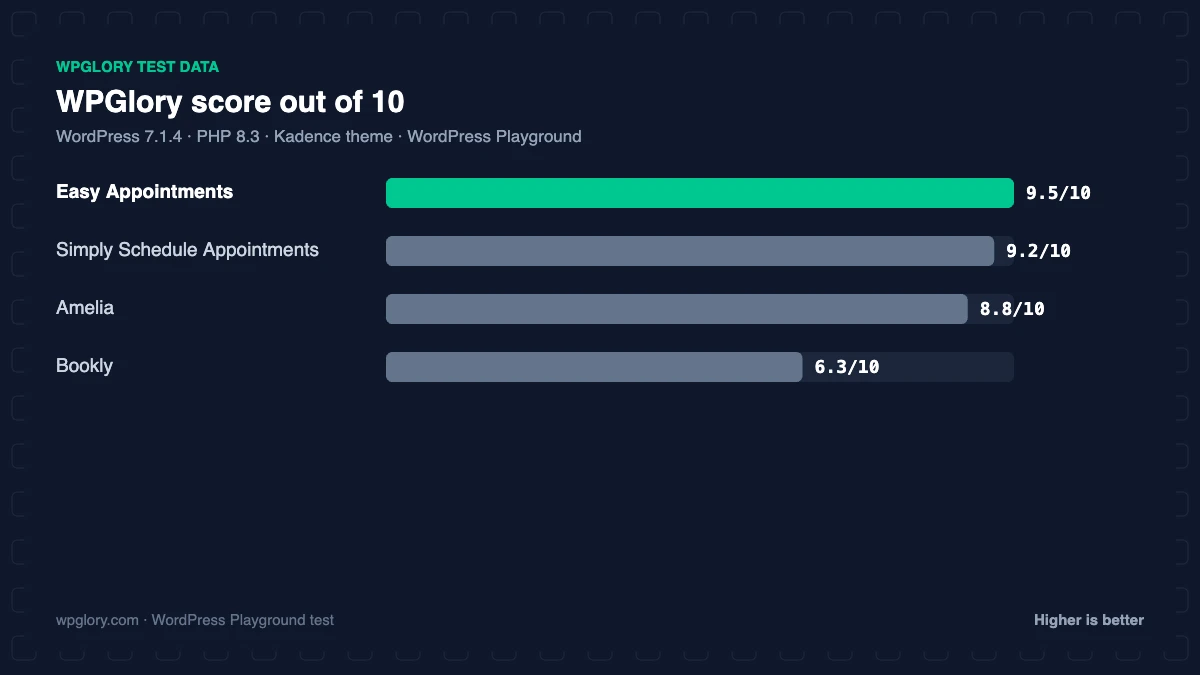
The order is our recommendation for most sites, weighing features and fit. The score measures only what each plugin costs your site.
WordPress booking plugins compared: test results
| Measurement | Amelia | Simply Schedule Appointments | Easy Appointments | Bookly |
|---|---|---|---|---|
| Version tested | 2.4.14 | 1.6.13.0 | 4.0.4 | 28.7 |
| Active installs | 90,000+ | 50,000+ | 10,000+ | 60,000+ |
| WordPress.org rating | 4.6 (793) | 5.0 (155) | 4.3 (131) | 4.4 (586) |
| CSS/JS added for visitors | 0.4 KB | 5.5 KB | 0 KB | 1928.1 KB |
| Extra PHP memory (front end) | 4.6 MB | 5.0 MB | 1.6 MB | 1.0 MB |
| Extra PHP memory (admin) | 7.2 MB | 5.6 MB | 2.1 MB | 2.5 MB |
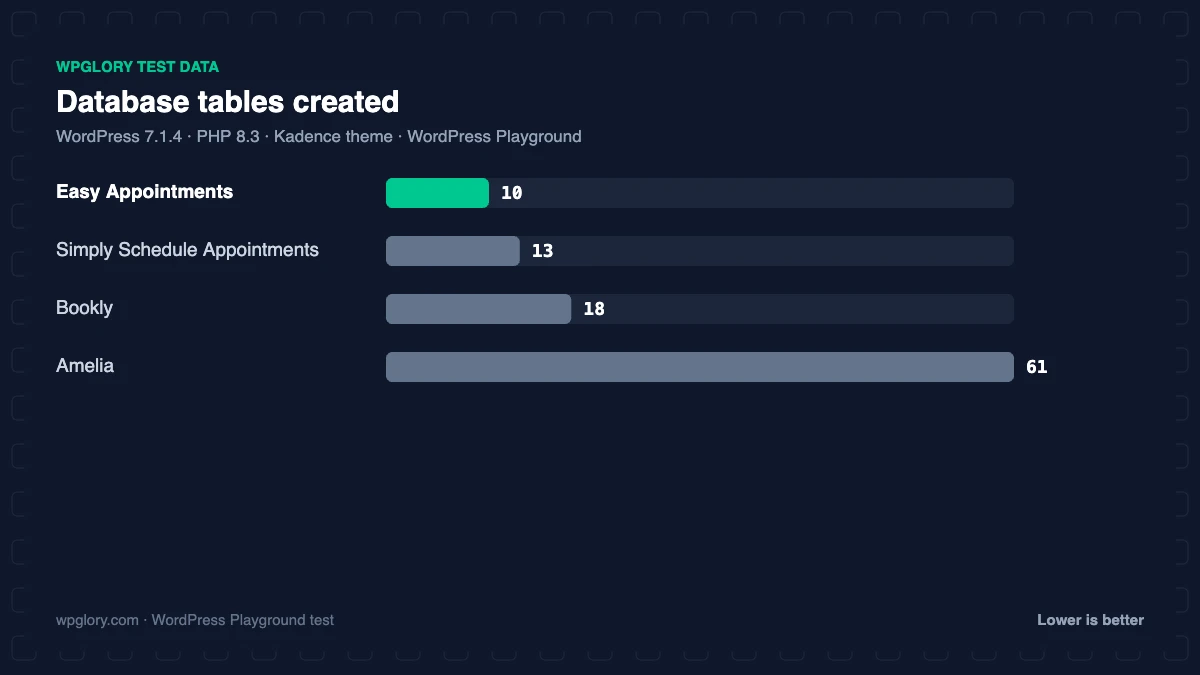
| Database tables | 61 | 13 | 10 | 18 |
| Options saved | 10 | 26 | 2 | 209 |
| User roles added | 3 | 1 | 0 | 0 |
| Notices / redirects | admin-bar item | dashboard widget | None | dashboard widget |
| Plugin size | 97.8 MB | 19.6 MB | 14.9 MB | 16.1 MB |
| WPGlory score | 8.8/10 | 9.2/10 | 9.5/10 | 6.3/10 |
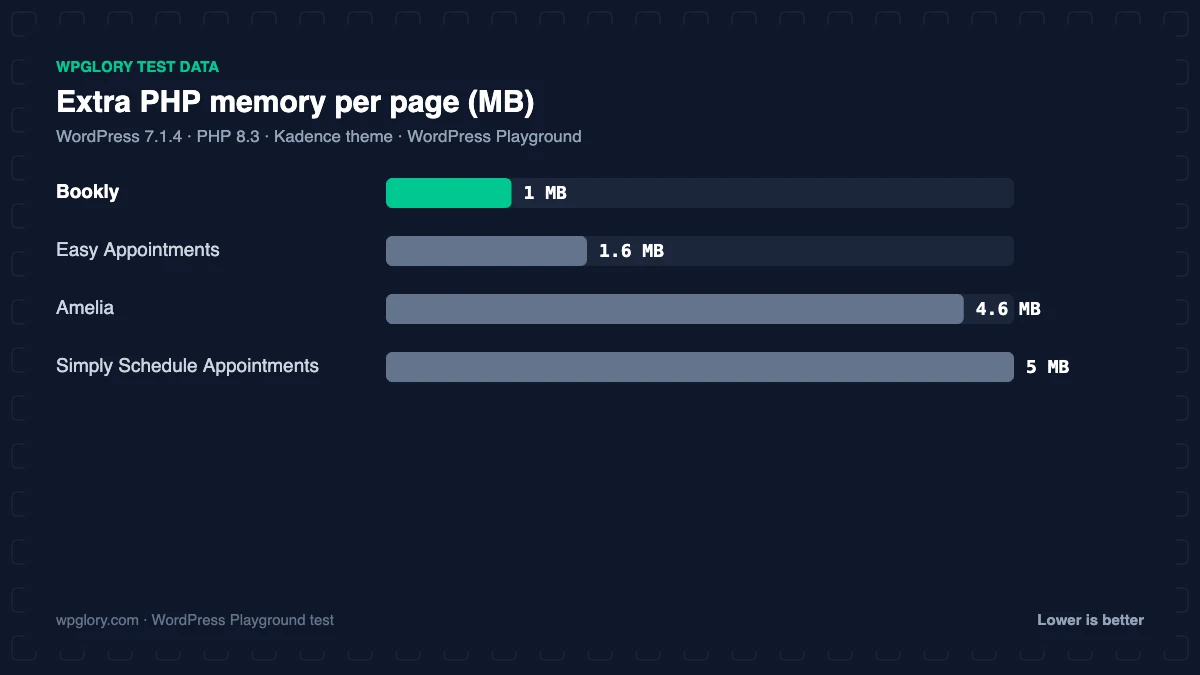
The big finding: Bookly loaded 1928.1 KB of CSS and JavaScript on every page for logged-out visitors, including a normal blog post with no booking form. That is more than most themes. Amelia and Easy Appointments loaded nothing until a booking form was placed, and Simply Schedule Appointments added 5.5 KB.
On the server, Amelia created the most tables (61) and is the largest download (97.8 MB), and Bookly saved 209 options, the most in this test. Easy Appointments was the lightest overall (1.6 MB of memory).
1. Amelia: best WordPress booking plugin overall
8.8/10 Free plan v2.4.14 · 90,000+ installs · 4.6★ on WordPress.org
Amelia has 90,000+ active installs and 4.6 stars. The free Lite version includes a step-by-step booking form, a back-end calendar, a KPI dashboard, email and SMS notifications, events, double-booking prevention, 20+ languages and online payments through Square.
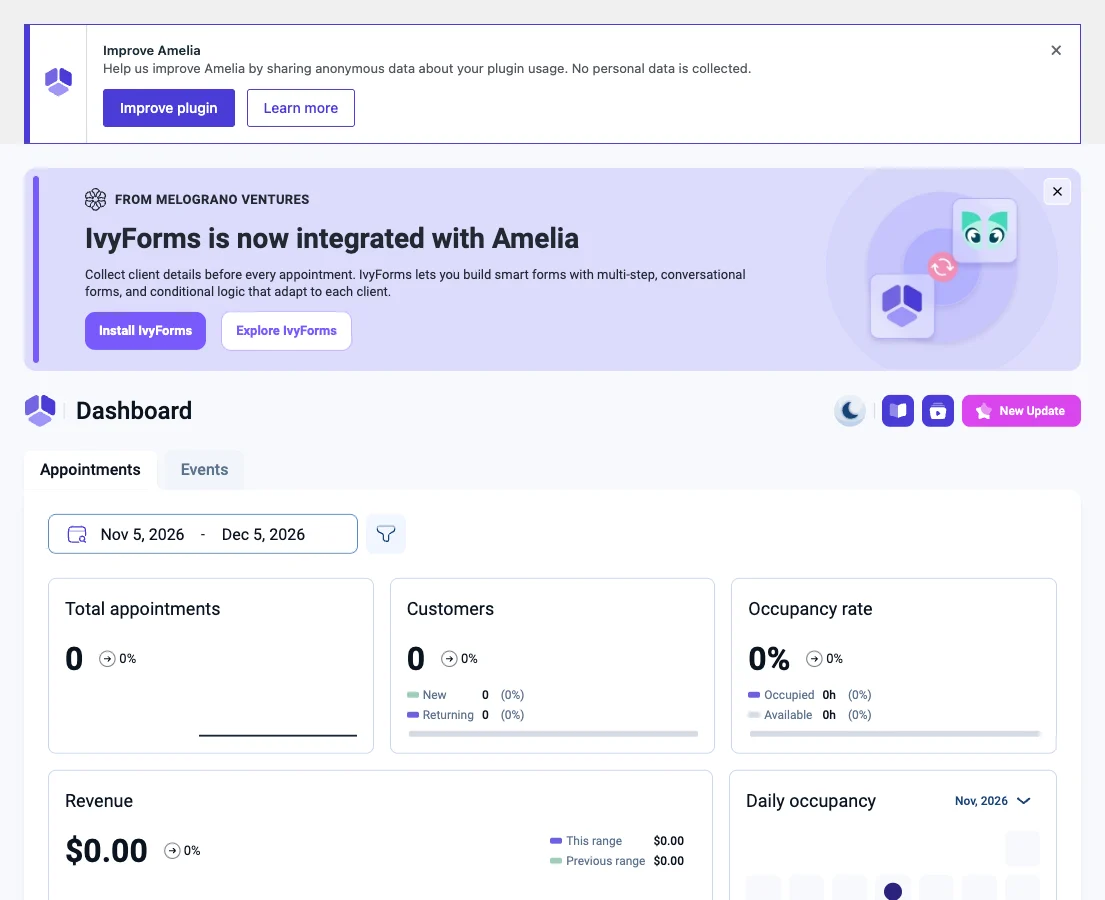
In our test it added no files to your pages until you place a booking shortcode or block, 4.6 MB of memory, 61 tables, an admin-bar menu and three roles (customer, provider and manager). Unlimited employees, Stripe and PayPal, Google Calendar, Zoom, recurring appointments and coupons are in the premium version.
Free download: Amelia on WordPress.org (version 2.4.14, last updated 27 October 2026).
Pros
- Most polished booking flow
- Free Square payments and events
- Nothing loaded until you add a form
Cons
- 61 tables, 98 MB download
- Employees limited in Lite
- Stripe and PayPal are premium
2. Simply Schedule Appointments: best free plan
9.2/10 Free plan v1.6.13.0 · 50,000+ installs · 5.0★ on WordPress.org
Simply Schedule Appointments (SSA) gives you unlimited booking calendars and unlimited appointments for free, with custom notifications, blackout dates and blocks for the block editor, Elementor, Beaver Builder and Divi. It has a perfect 5.0 rating.
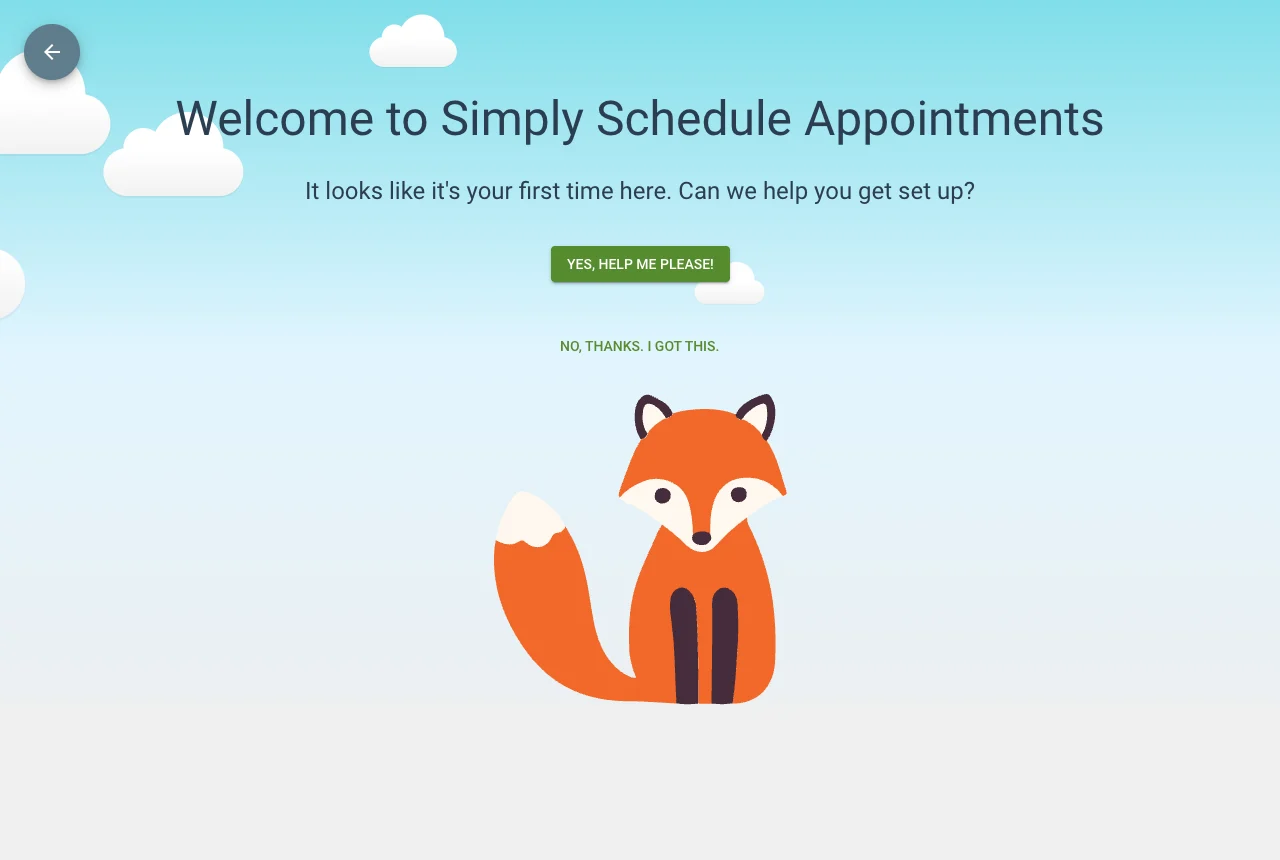
It added 5.5 KB to pages, 5 MB of memory, 13 tables, a dashboard widget and a “team member” role. Google Calendar sync, payments, group booking, SMS and Zoom are in the Plus, Professional and Business editions.
Free download: Simply Schedule Appointments on WordPress.org (version 1.6.13.0, last updated 3 November 2026).
Pros
- Unlimited calendars and appointments free
- Perfect 5.0 rating
- Works with major page builders
Cons
- Google Calendar sync is paid
- Payments are paid
3. Easy Appointments: open source and light
9.5/10 Free plan v4.0.4 · 10,000+ installs · 4.3★ on WordPress.org
Easy Appointments is 100% free and open source: multiple locations, services and workers, email notifications, custom form fields, reCAPTCHA and CSV export. Two-way Google Calendar sync, payments and SMS are in a paid extension.
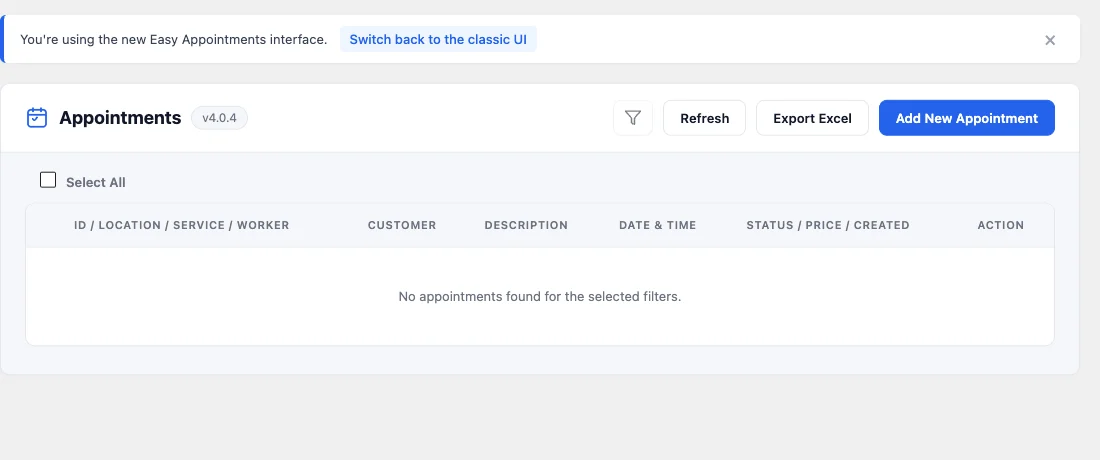
It was the lightest on the server (1.6 MB) with no files on your pages, 10 tables and only 2 options. Its interface is plainer than Amelia’s.
Free download: Easy Appointments on WordPress.org (version 4.0.4, last updated 21 October 2026).
Pros
- Lightest on the server
- Open source, multiple locations and workers free
- No front-end files until used
Cons
- Plain interface
- Payments and Google Calendar are paid
4. Bookly: big add-on ecosystem
6.3/10 Free plan v28.7 · 60,000+ installs · 4.4★ on WordPress.org
Bookly is one of the best-known booking systems for WordPress, with 60,000+ active installs and dozens of paid add-ons. The free version allows up to five services; online payments, unlimited staff, Google Calendar and all add-ons need Bookly Pro.

Our test showed the cost: 1928.1 KB of CSS and JavaScript on every page, 209 options, 18 tables and a dashboard widget. If you choose Bookly, unload its assets on pages without a booking form.
Free download: Bookly on WordPress.org (version 28.7, last updated 26 October 2026).
Pros
- Huge add-on ecosystem
- Mature, widely used
Cons
- 1.9 MB of CSS/JS on every page
- Free: 5 services, no payments, no add-ons
- 209 options saved
How to choose the best WordPress booking plugin
- Salon, spa or clinic with staff: Amelia.
- Solo consultant or coach on a budget: Simply Schedule Appointments.
- Developer or privacy-focused business: Easy Appointments.
- You need a specific Bookly add-on: Bookly Pro, with assets unloaded elsewhere.
What to look for in the best WordPress booking plugin
Before you choose the best WordPress booking plugin for your business, check these points.
- Calendar sync: two-way Google or Outlook sync prevents double bookings, and it is a paid feature in most plugins.
- Payments and deposits: which gateways are free and whether you can take a deposit.
- Reminders: email and SMS reminders cut no-shows.
- Staff and locations: free plans often limit staff, services or locations.
- Page weight: some booking plugins load their scripts on every page.
Selling classes or events with tickets instead? See our events calendar plugin test.
How we tested
Every plugin was installed from WordPress.org on a clean WordPress 7.1.4 site (PHP 8.3, Kadence theme) in WordPress Playground in November 2026. We activated one plugin at a time, measured the site, then deactivated it again, so each result is compared with the same baseline.
We loaded the home page and a normal blog post as a logged-out visitor three times and kept the median PHP peak memory, added up the CSS and JavaScript files the plugin added, and recorded database tables, options, scheduled cron jobs, admin menus, notices, dashboard widgets and any redirect on the first admin visit.
Screenshots were taken on the same test site right after activation. Ratings, installs and versions come from the WordPress.org plugin directory on the same day. No booking forms were placed, so the numbers show what each plugin adds before you use it on a page.
The WPGlory score rates what a plugin costs your site, not how many features it has: front-end weight 30%, server cost 20%, admin clutter 20%, WordPress.org rating 20% (weighted by the number of reviews) and maintenance 10%. Features are covered in the text. Read the full method.
FAQ
What is the best WordPress booking plugin?
Amelia for most service businesses; Simply Schedule Appointments for the best free plan.
Is there a free booking plugin for WordPress?
Yes. Amelia Lite, Simply Schedule Appointments, Easy Appointments and Bookly all have free versions.
Can I take payments with a free booking plugin?
Amelia Lite takes payments through Square for free. The others need a paid version for online payments.
Do booking plugins slow down WordPress?
Some do. Bookly loaded 1.9 MB on every page in our test; Amelia loaded nothing until a booking form was added.
Do booking plugins sync with Google Calendar?
Yes, but in all four plugins two-way Google Calendar sync is a paid feature.
Final verdict
Amelia is the best WordPress booking plugin for most businesses
It looks professional, takes Square payments for free and keeps your pages clean. Choose Simply Schedule Appointments if you need unlimited calendars at no cost.
8.8/10