Best Google Analytics Plugin for WordPress (2026): 5 Tested
Some links on this page are affiliate links. If you buy through them we may earn a commission, at no extra cost to you. It never changes our verdict. How we test and make money
On this page
Short answer: The best Google Analytics plugin for WordPress is Site Kit by Google: free, official, and it adds Analytics, Search Console and PageSpeed data to your dashboard with no upsells. MonsterInsights has the friendliest reports for beginners but pushes its paid plans. If you would rather not use Google at all, Koko Analytics was the lightest plugin we tested (0.1 MB of memory) and Independent Analytics has the nicest self-hosted dashboard.
Google Analytics 4 is free, but adding it to WordPress and reading the reports is where most site owners get stuck. A Google Analytics plugin connects your site, adds the tracking tag and shows key numbers inside WordPress. A growing alternative is self-hosted analytics, which counts visits in your own database without cookies or Google.
We installed the five most popular analytics plugins on the same clean WordPress site, one at a time, and measured what each adds before and after you connect an account. Here is the best Google Analytics plugin for WordPress, and two privacy-first alternatives.
Our picks at a glance
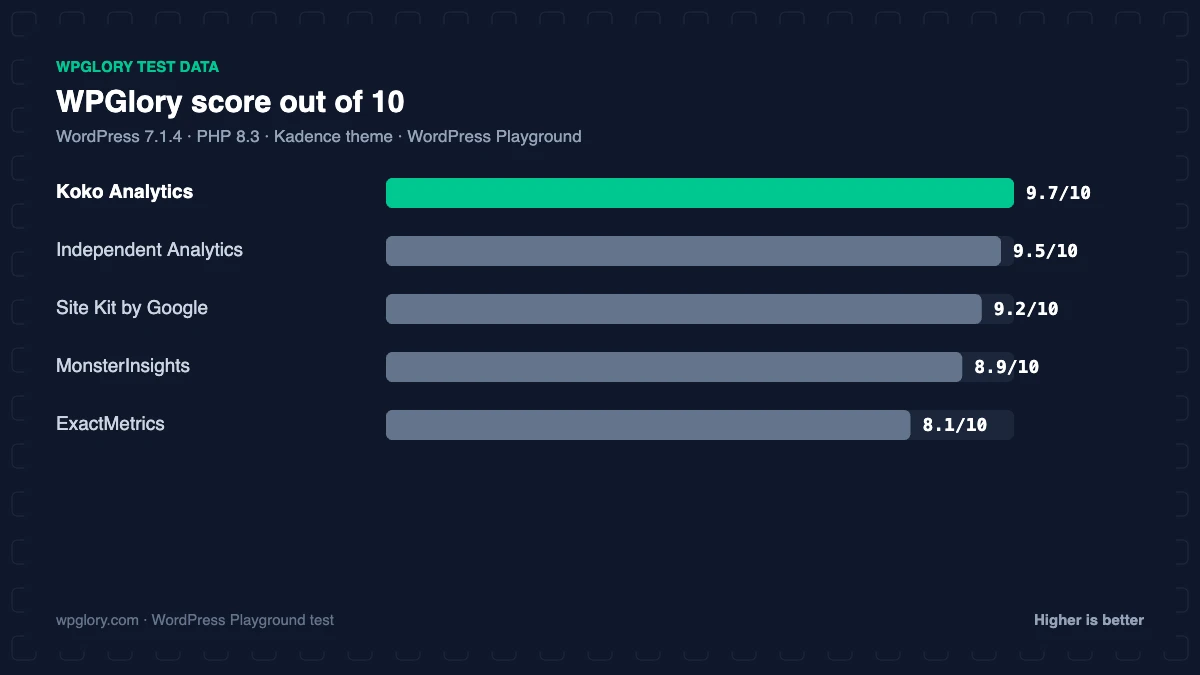
1
Site Kit by GoogleBest overall: official, free, no upsells
9.2/10
2
MonsterInsightsFriendliest reports for beginners
8.9/10
3
Koko AnalyticsLightest, privacy-first, no Google
9.7/10
4
Independent AnalyticsBest self-hosted dashboard
9.5/10
5
ExactMetricsMonsterInsights alternative
8.1/10
The order is our recommendation for most sites, weighing features and fit. The score measures only what each plugin costs your site.
WordPress analytics plugins compared: test results
| Measurement | Site Kit by Google | MonsterInsights | Independent Analytics | Koko Analytics | ExactMetrics |
|---|---|---|---|---|---|
| Version tested | 1.191.0 | 11.3.0 | 2.16.2 | 2.5.3 | 10.3.0 |
| Active installs | 5 million+ | 2 million+ | 100,000+ | 70,000+ | 200,000+ |
| WordPress.org rating | 4.2 (1,014) | 4.5 (3,158) | 4.8 (167) | 5.0 (245) | 2.5 (1,546) |
| CSS/JS added for visitors | 0 KB | 0 KB | 0 KB | 1.8 KB | 0 KB |
| Extra PHP memory (front end) | 6.8 MB | 2.6 MB | 2.4 MB | 0.1 MB | 2.6 MB |
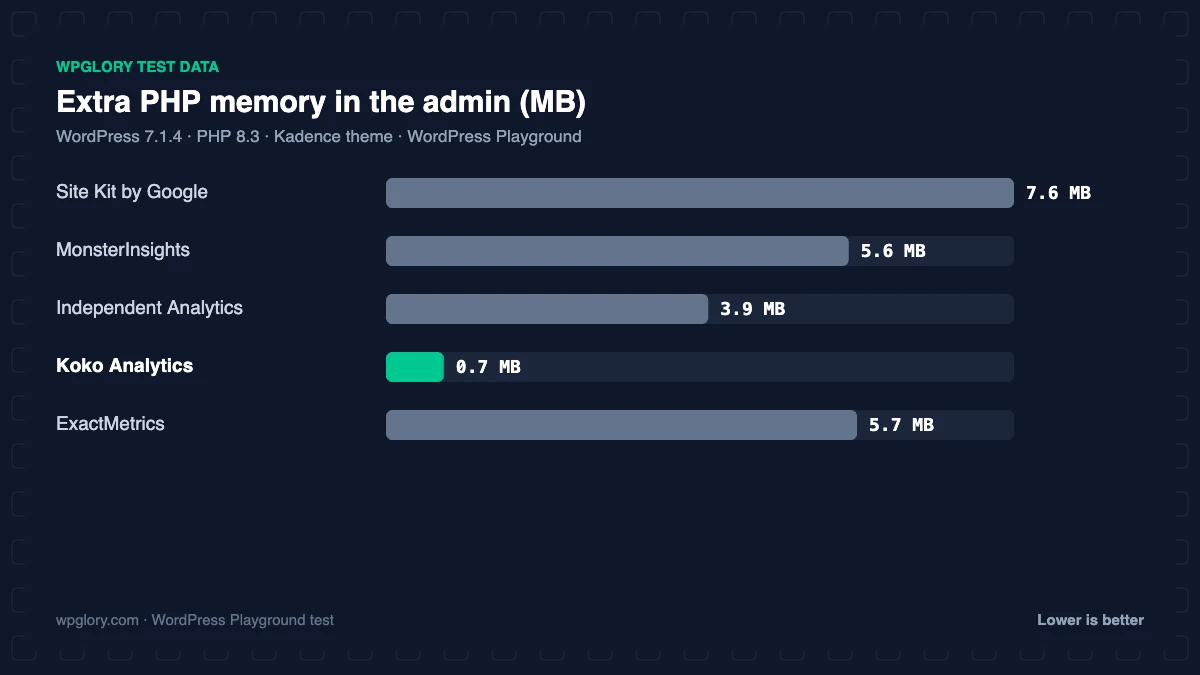
| Extra PHP memory (admin) | 7.6 MB | 5.6 MB | 3.9 MB | 0.7 MB | 5.7 MB |
| Database tables | 0 | 1 | 0 | 5 | 1 |
| Options saved | 6 | 23 | 5 | 2 | 17 |
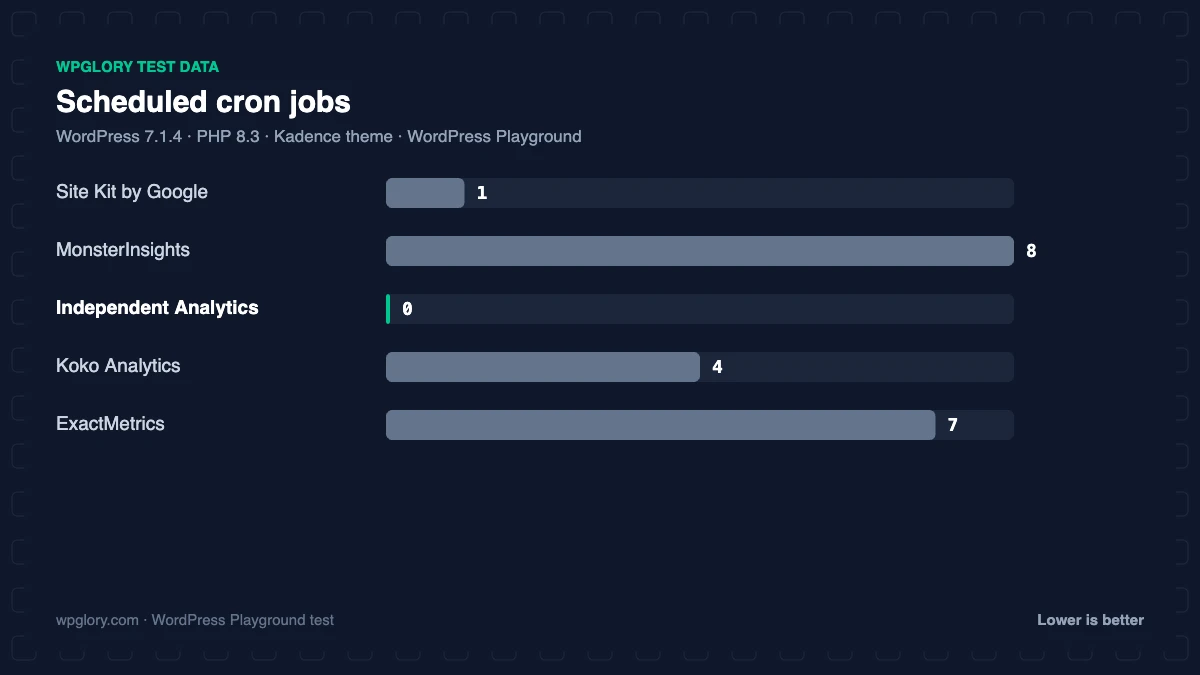
| Scheduled cron jobs | 1 | 8 | 0 | 4 | 7 |
| Notices / redirects | None | setup notice, setup redirect, dashboard widget, admin-bar item | setup notice | dashboard widget | setup notice, setup redirect, dashboard widget, admin-bar item |
| Plugin size | 23.2 MB | 39.3 MB | 23.2 MB | 0.7 MB | 40.7 MB |
| WPGlory score | 9.2/10 | 8.9/10 | 9.5/10 | 9.7/10 | 8.1/10 |
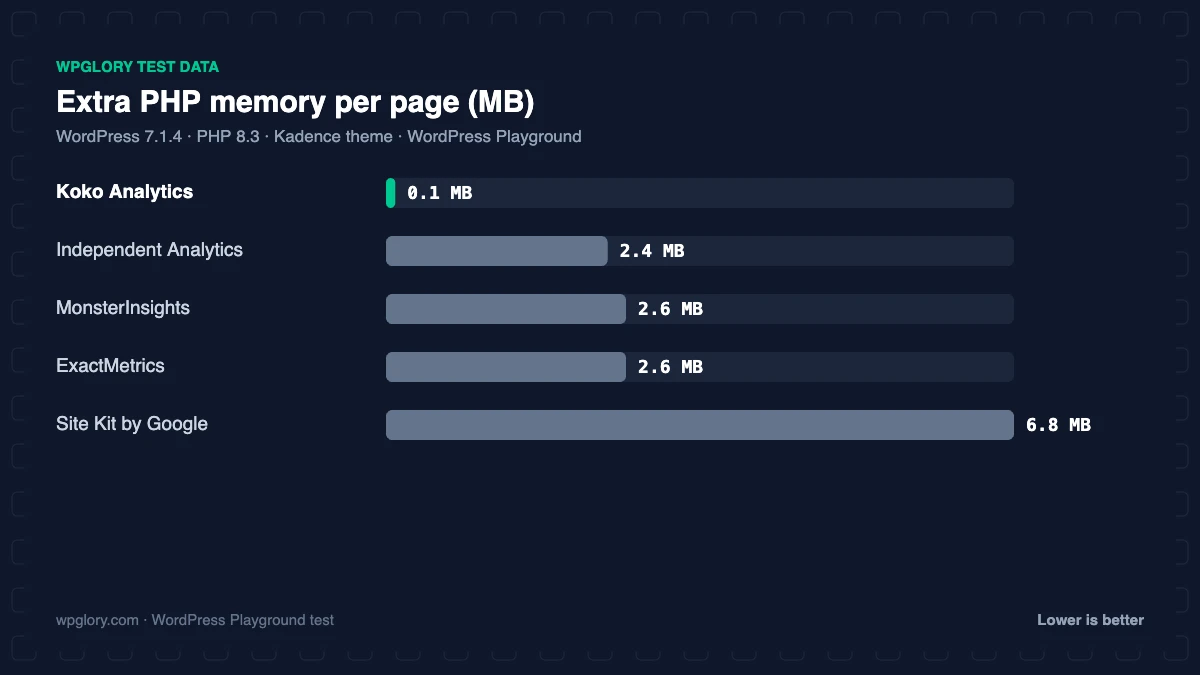
Before connecting an account, none of the Google plugins added files for visitors; the Google tag script is added once you connect an account. Koko Analytics started counting immediately with a tiny 1.8 KB inline script. MonsterInsights and ExactMetrics behaved almost identically (they are made by the same company): about 2.6 MB of memory, 8 and 7 cron jobs, a dashboard widget, a front-end admin-bar button, a “Please set up” notice and a redirect to their online setup wizard. Site Kit used the most memory (6.8 MB) but showed no notices.
1. Site Kit by Google: best Google Analytics plugin for WordPress
9.2/10 Free plan v1.191.0 · 5 million+ installs · 4.2★ on WordPress.org
Site Kit is Google’s own plugin, with 5 million+ active installs. It connects Google Analytics 4, Search Console, PageSpeed Insights, Tag Manager and AdSense through a Google sign-in, places the tags for you, and shows traffic, top pages and search queries on a WordPress dashboard.
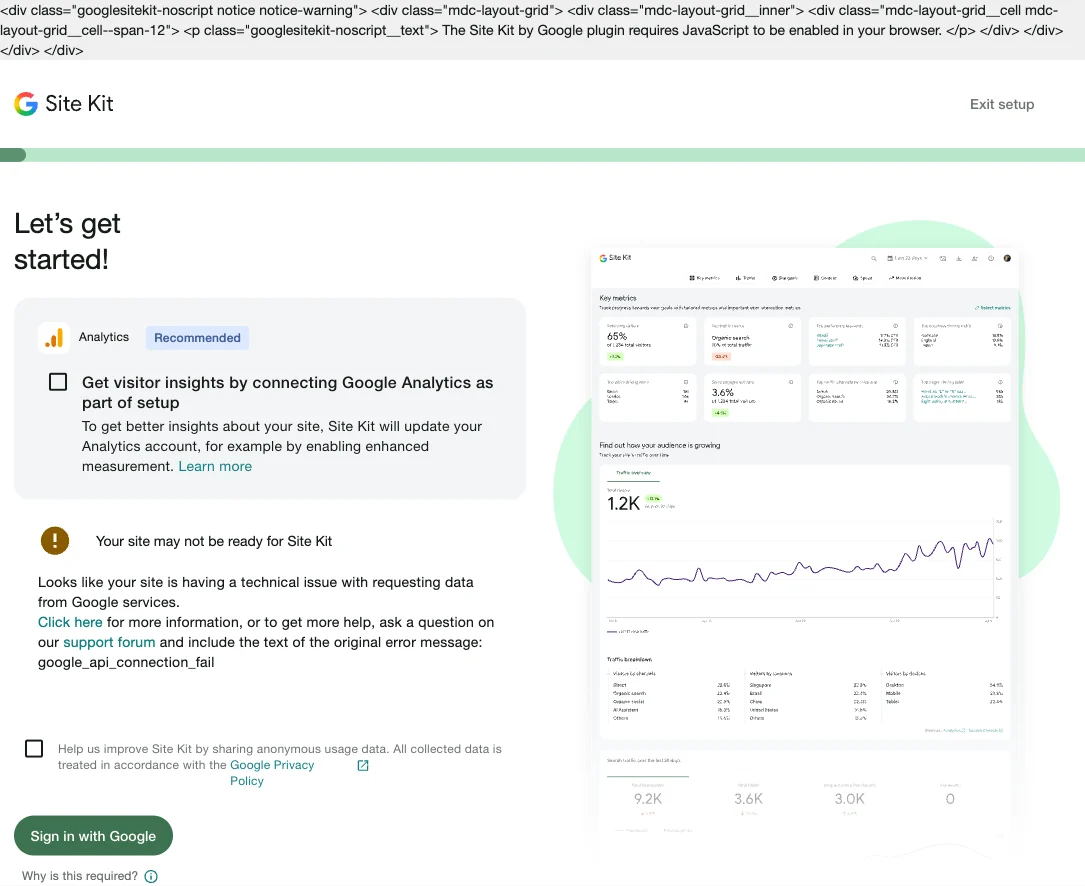
Everything is free and there are no upsells. In our test it added 6.8 MB of memory, no tables, 6 options and one cron job, with no notices or redirect. Its reports are simpler than Google Analytics itself, but for most site owners that is a feature.
Free download: Site Kit by Google on WordPress.org (version 1.191.0, last updated 2 November 2026).
Pros
- Official Google plugin, completely free
- Analytics, Search Console and PageSpeed in one place
- No notices or upsells
Cons
- Highest memory here (6.8 MB)
- Basic reports; deep analysis still needs GA4
- Rated 4.2 stars
2. MonsterInsights: friendliest reports for beginners
8.9/10 Free plan v11.3.0 · 2 million+ installs · 4.5★ on WordPress.org
MonsterInsights is the most installed analytics plugin after Site Kit (2 million+). Its setup wizard connects GA4 in a few clicks and its reports explain the numbers in plain English. The Lite version covers the basics; ecommerce, forms, scroll and author tracking are in paid plans.
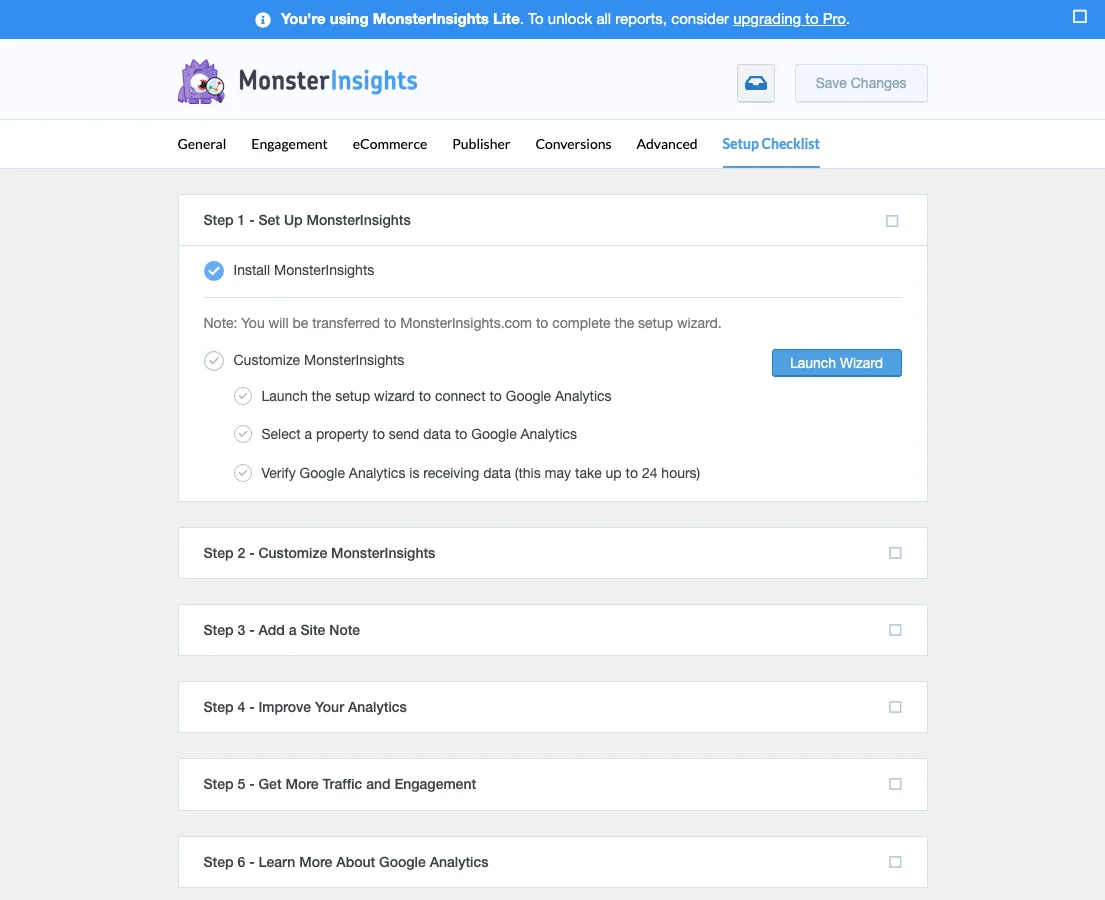
It is noisy, though. Activation redirected to its online onboarding at connect.monsterinsights.com; it added a “Please Set Up Website Analytics” notice, a dashboard widget, an admin-bar button on the front end, an “Insights” menu with 10 items and 8 cron jobs.
Free download: MonsterInsights on WordPress.org (version 11.3.0, last updated 16 September 2026).
Pros
- Beginner-friendly reports
- Quick GA4 setup wizard
- 2 million+ installs
Cons
- Upsells, notice and dashboard widget
- 8 cron jobs
- Advanced tracking is paid
3. Koko Analytics: lightest, privacy-first analytics
9.7/10 Free plan v2.5.3 · 70,000+ installs · 5.0★ on WordPress.org
Koko Analytics counts visitors, page views and referrers in your own database, with no cookies, no personal data and no third-party service. Its tracking script is tiny and works even with caching.
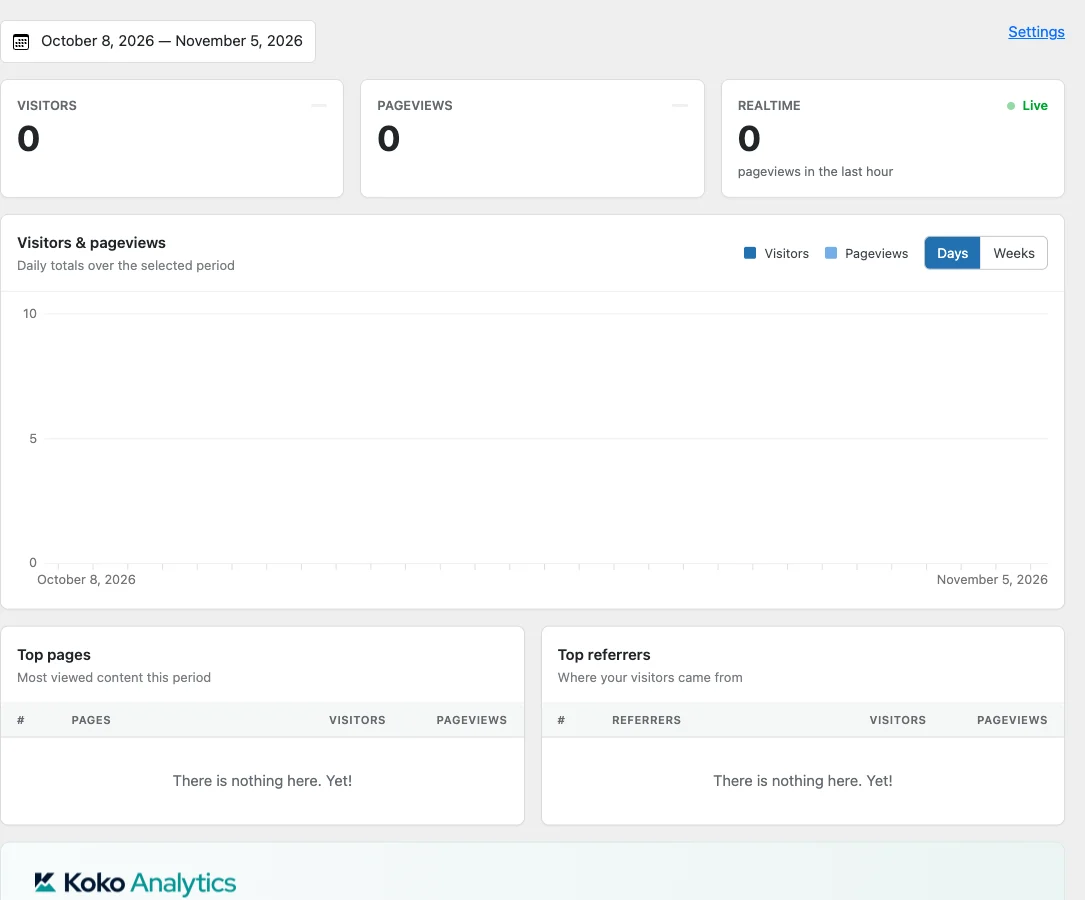
It was the lightest plugin in our test: 0.1 MB of memory, a 1.8 KB inline tracker, 5 small tables and 4 cron jobs that aggregate stats. It has a perfect 5.0-star rating from 245 reviews.
Free download: Koko Analytics on WordPress.org (version 2.5.3, last updated 24 September 2026).
Pros
- Lightest: 0.1 MB memory
- No cookies, no Google, data stays on your site
- Perfect 5.0 rating
Cons
- Basic reports only
- No goal or ecommerce tracking in the free version
4. Independent Analytics: best self-hosted dashboard
9.5/10 Free plan v2.16.2 · 100,000+ installs · 4.8★ on WordPress.org
Independent Analytics is a self-hosted Google Analytics alternative with a polished dashboard: visitors, views, referrers, campaigns, real-time stats and filters, all stored in your database without cookies.
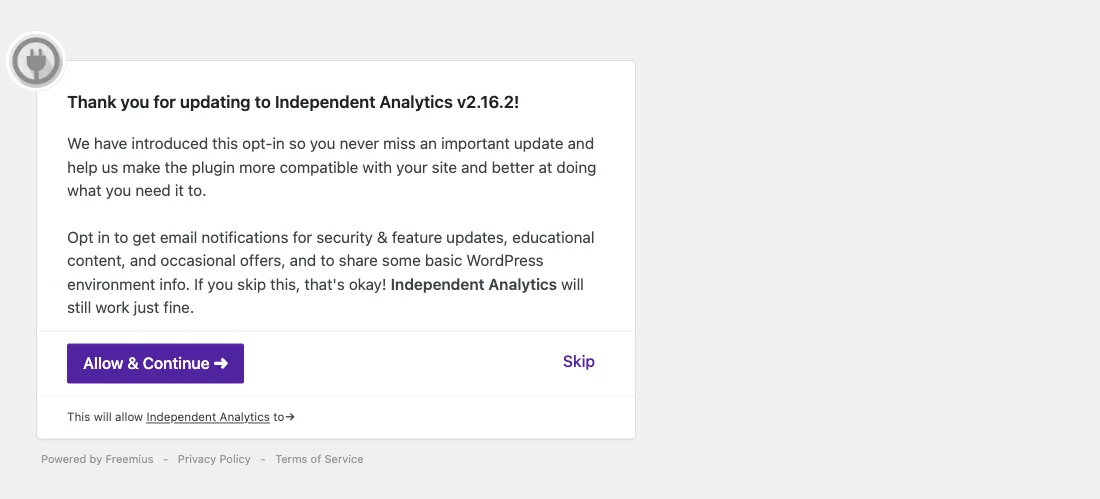
In our test it added 2.4 MB of memory and an opt-in notice asking to share usage data. Pro adds WooCommerce, form and click tracking. It requires PHP 8.0 or newer.
Free download: Independent Analytics on WordPress.org (version 2.16.2, last updated 22 October 2026).
Pros
- Best-looking self-hosted reports
- No cookies, GDPR-friendly
- Real-time view
Cons
- Data lives in your database, which grows over time
- Opt-in notice after activation
5. ExactMetrics: MonsterInsights alternative
8.1/10 Free plan v10.3.0 · 200,000+ installs · 2.5★ on WordPress.org
ExactMetrics is made by the same company as MonsterInsights, and in our test it behaved almost identically: an online setup redirect, a “Please Set Up” notice, a dashboard widget, an admin-bar button and 7 cron jobs.
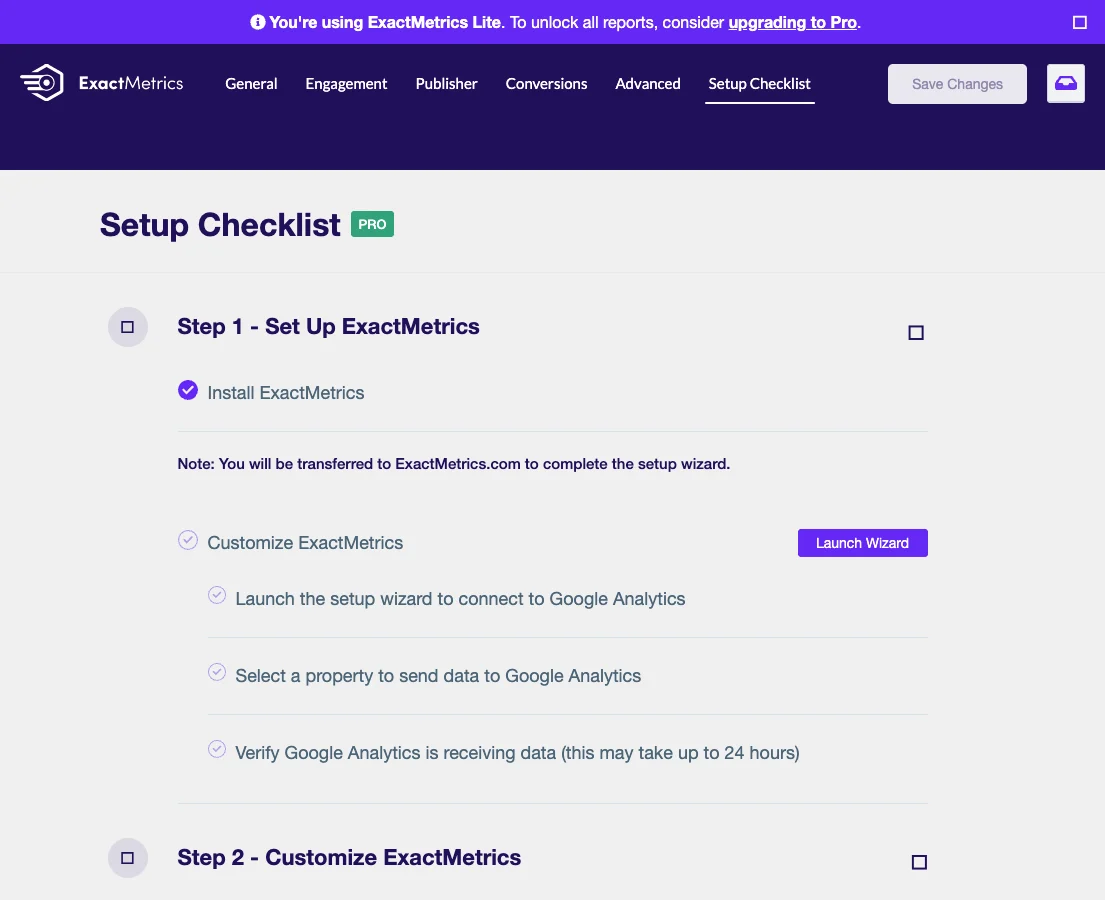
Its WordPress.org rating is very low: 2.5 stars from 1,546 reviews, many from users who moved over from the older “Google Analytics Dashboard for WP” plugin it replaced. We would pick MonsterInsights or Site Kit instead.
Free download: ExactMetrics on WordPress.org (version 10.3.0, last updated 16 September 2026).
Pros
- Simple GA4 setup
- Beginner reports
Cons
- Rated 2.5 stars
- Same upsells and notices as MonsterInsights
How to choose the best Google Analytics plugin for WordPress
- You want Google Analytics with zero cost and no nags: Site Kit.
- You want reports explained in plain English and may pay later: MonsterInsights.
- You want privacy and speed, no cookie banner needed for analytics: Koko Analytics or Independent Analytics.
If you use Google Analytics in the EU or UK, you need consent first; see our cookie consent plugin test.
How we tested
Every plugin was installed from WordPress.org on a clean WordPress 7.1.4 site (PHP 8.3, Kadence theme) in WordPress Playground in November 2026. We activated one plugin at a time, measured the site, then deactivated it again, so each result is compared with the same baseline.
We loaded the home page and a normal blog post as a logged-out visitor three times and kept the median PHP peak memory, added up the CSS and JavaScript files the plugin added, and recorded database tables, options, scheduled cron jobs, admin menus, notices, dashboard widgets and any redirect on the first admin visit.
Screenshots were taken on the same test site right after activation. Ratings, installs and versions come from the WordPress.org plugin directory on the same day. No Google account was connected, so the numbers show what each plugin adds before setup.
The WPGlory score rates what a plugin costs your site, not how many features it has: front-end weight 30%, server cost 20%, admin clutter 20%, WordPress.org rating 20% (weighted by the number of reviews) and maintenance 10%. Features are covered in the text. Read the full method.
FAQ
What is the best Google Analytics plugin for WordPress?
Site Kit by Google: official, free and without upsells. MonsterInsights is the friendliest for beginners.
Do I need a plugin for Google Analytics?
No, you can paste the GA4 tag into your theme, but a plugin keeps it after theme changes and shows reports in WordPress.
Do analytics plugins slow down WordPress?
The plugins themselves added 0.1 to 6.8 MB of memory in our test. Once connected, the Google tag script loads on every page; Koko Analytics adds under 2 KB.
Is there a Google Analytics alternative for WordPress?
Yes: Koko Analytics and Independent Analytics count visits on your own site without cookies.
Final verdict
Site Kit is the best Google Analytics plugin for WordPress
It is official, free and quiet. If you would rather keep visitors’ data on your own site, Koko Analytics is the lightest alternative we have tested.
9.2/10