Best WordPress LMS Plugin (2026): 5 Free LMS Plugins Tested
Some links on this page are affiliate links. If you buy through them we may earn a commission, at no extra cost to you. It never changes our verdict. How we test and make money
On this page
Short answer: The best WordPress LMS plugin for most course creators is Tutor LMS: the best course builder and quizzes in a free plugin, with 100,000+ installs. But it was also the heaviest in our test, loading 1.2 MB of CSS and JavaScript on every page, even blog posts. LearnPress is the lightest full LMS (47 KB), LifterLMS is best for memberships and certificates, Sensei is the simplest, and MasterStudy has the most features but also the most upsells.
A WordPress LMS (learning management system) plugin turns your site into an online school: courses, lessons, quizzes, student progress, certificates and a way to charge for access. Choosing the best WordPress LMS plugin matters more than most plugin choices, because moving hundreds of lessons and student records to another LMS later is painful.
We installed the five most popular free LMS plugins on the same clean WordPress site, one at a time, and measured what each adds to every page, the server and the dashboard. We also captured the first screen each one shows you. The results surprised us: some LMS plugins load heavy files on pages that have nothing to do with courses.
Our picks at a glance
1
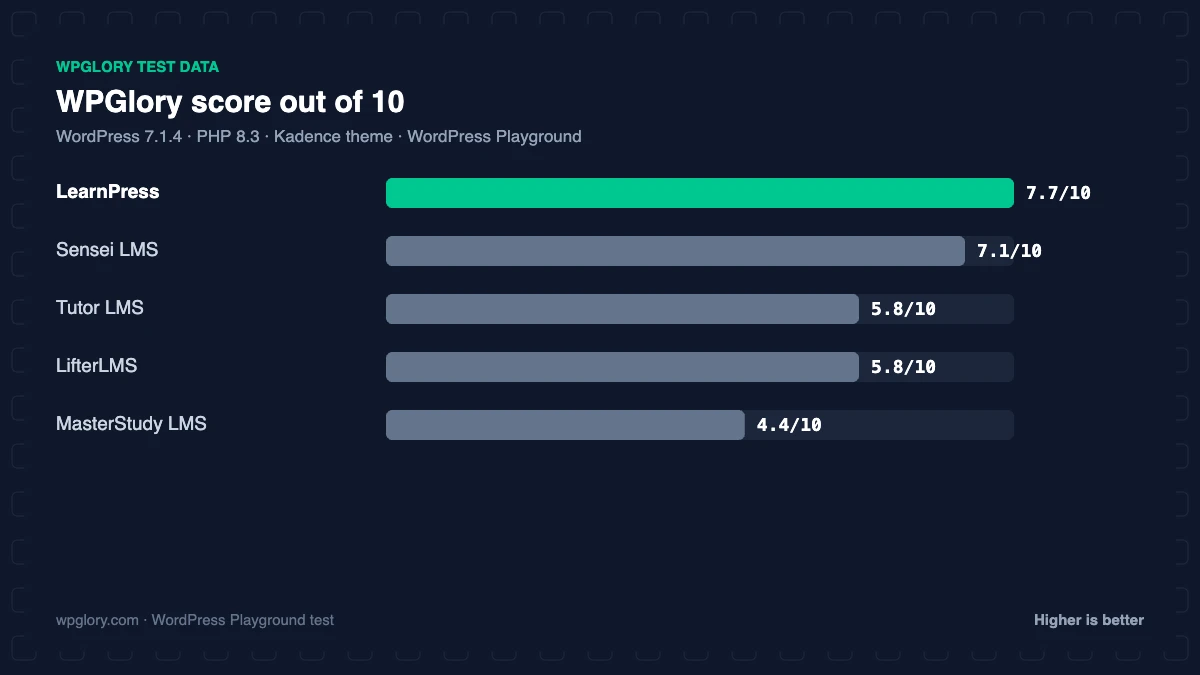
Tutor LMSBest course builder and quizzes
5.8/10
2
LearnPressLightest full LMS, free core
7.7/10
3
LifterLMSBest for memberships and certificates
5.8/10
4
Sensei LMSSimplest, block-editor first
7.1/10
5
MasterStudy LMSMost features, most upsells
4.4/10
The order is our recommendation for most sites, weighing features and fit. The score measures only what each plugin costs your site.
WordPress LMS plugins compared: test results
Measured straight after activation, before any course was created. “CSS/JS added” was the same on the home page and on a normal blog post.
| Measurement | Tutor LMS | LearnPress | MasterStudy LMS | Sensei LMS | LifterLMS |
|---|---|---|---|---|---|
| Version tested | 4.2.0 | 4.4.13 | 3.7.58 | 4.26.4 | 11.0.1 |
| Active installs | 100,000+ | 70,000+ | 10,000+ | 9,000+ | 10,000+ |
| WordPress.org rating | 4.4 (590) | 4.3 (597) | 4.5 (487) | 3.5 (40) | 4.8 (393) |
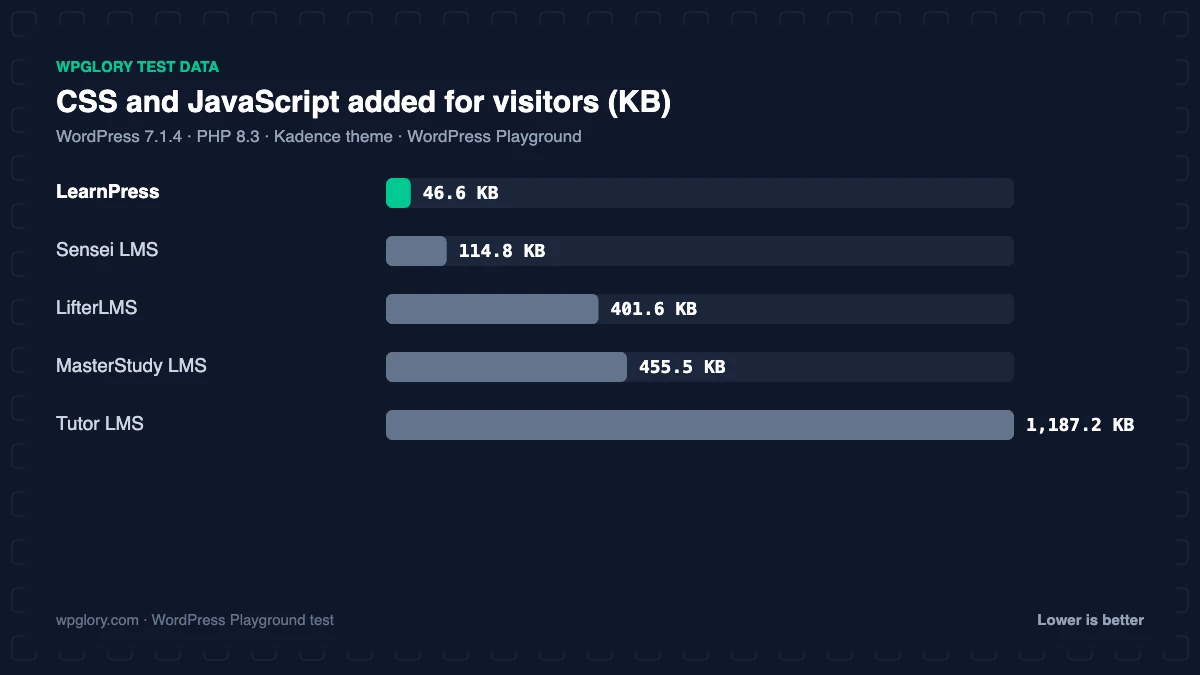
| CSS/JS added for visitors | 1187.2 KB | 46.6 KB | 455.5 KB | 114.8 KB | 401.6 KB |
| Extra PHP memory (front end) | 5.9 MB | 12.0 MB | 10.9 MB | 10.0 MB | 9.4 MB |
| Extra PHP memory (admin) | 7.6 MB | 14.7 MB | 15.2 MB | 8.7 MB | 15.1 MB |
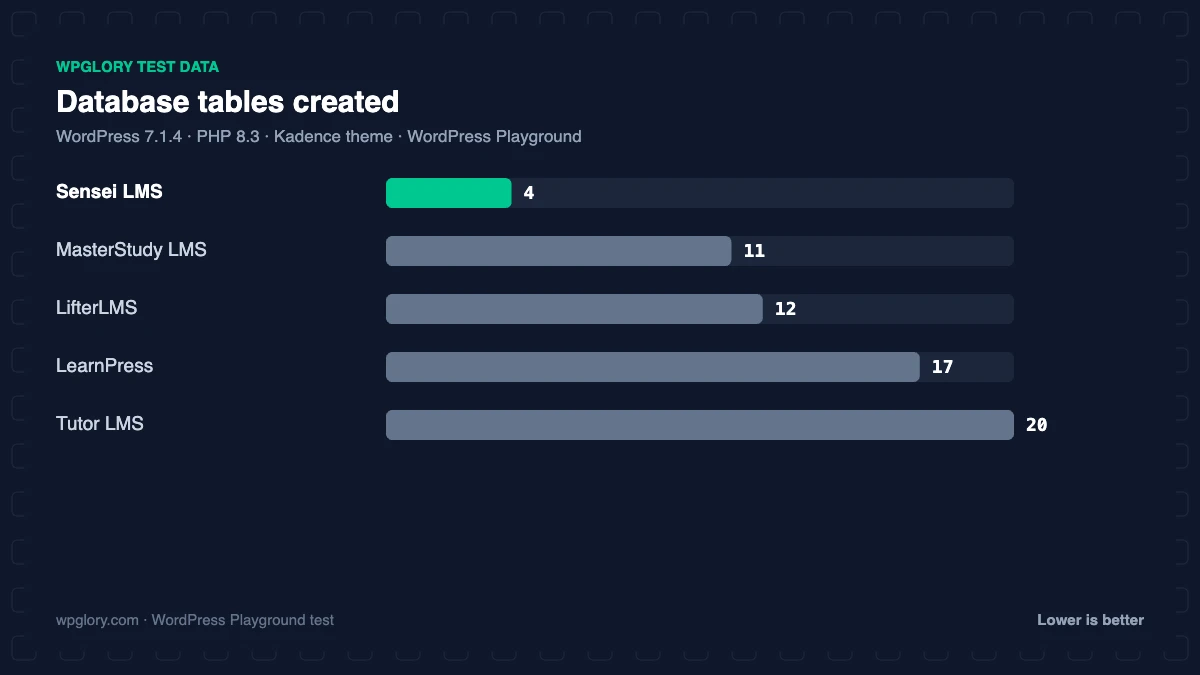
| Database tables | 20 | 17 | 11 | 4 | 12 |
| Files added to every page | 5 CSS, 18 JS | 2 CSS, 2 JS | 8 CSS, 7 JS | 4 CSS, 0 JS | 3 CSS, 13 JS |
| Pages created | 5 | 7 | 5 | 3 | 0 |
| User roles added | 1 | 1 | 1 | 1 | 4 |
| Notices / redirects | setup redirect | dashboard widget, admin-bar item | upsell notice, setup notice, setup redirect, dashboard widget, admin-bar item | setup redirect | setup notice, dashboard widget |
| Plugin size | 20.4 MB | 37.3 MB | 65.9 MB | 21.6 MB | 21.0 MB |
| WPGlory score | 5.8/10 | 7.7/10 | 4.4/10 | 7.1/10 | 5.8/10 |
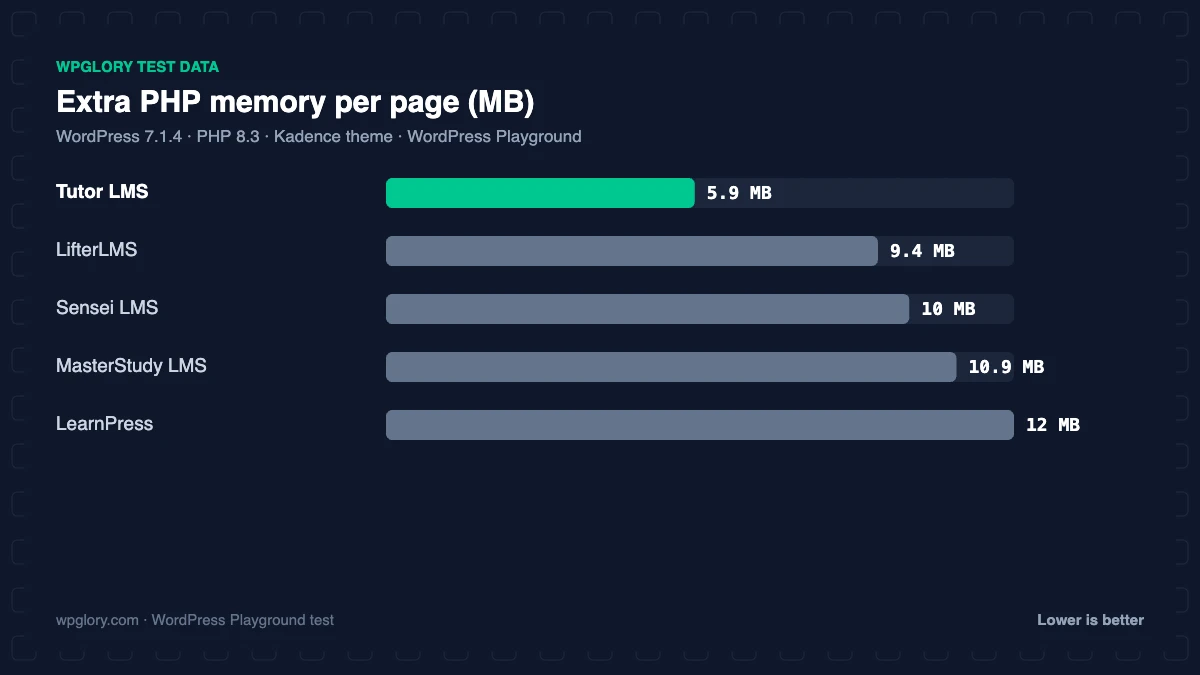
The big finding: four of the five LMS plugins load their course CSS and JavaScript on every page of your site. Tutor LMS added 1187.2 KB across 23 files, MasterStudy 455.5 KB and LifterLMS 401.6 KB, even on a blog post with no course content. If your LMS lives on the same site as your blog or marketing pages, that weight slows every page. A plugin manager or asset unloading (for example in Perfmatters or Asset CleanUp) can switch these files off where they are not needed.
1. Tutor LMS: best WordPress LMS plugin for course building
5.8/10 Free plan v4.2.0 · 100,000+ installs · 4.4★ on WordPress.org
Tutor LMS from Themeum has the best free course builder we have seen: a single screen for topics, lessons, quizzes and settings, plus true/false, multiple choice, matching and fill-in-the-blank quizzes with time limits and attempts. It sells courses through its own native checkout or WooCommerce, and integrates with Zoom, Google Classroom and H5P. It has 100,000+ active installs.
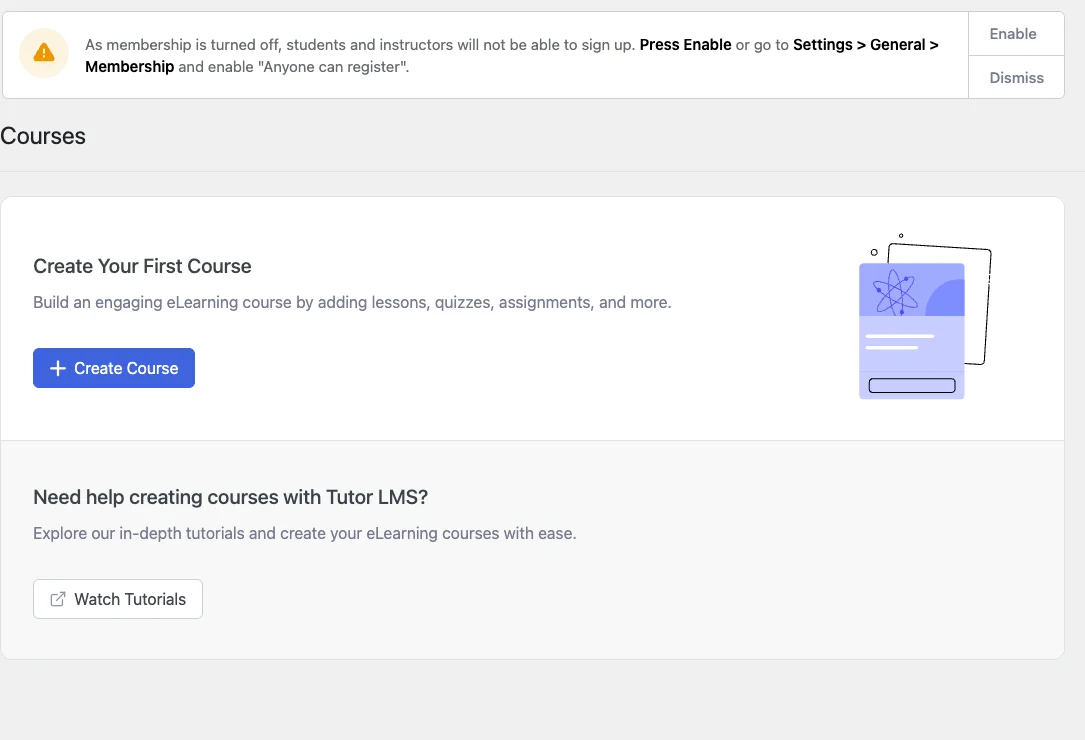
It is also the heaviest LMS for visitors in our test: 1187.2 KB of CSS and JavaScript (5 stylesheets and 18 scripts) on every page, 5.9 MB of memory, 20 tables and 5 pages (such as the student dashboard and instructor registration). Activation redirected to a welcome screen. Certificates, assignments, content drip, subscriptions and the advanced quiz types are Tutor LMS Pro. Compare it head to head in Tutor LMS vs LearnPress.
Free download: Tutor LMS on WordPress.org (version 4.2.0, last updated 27 October 2026).
Pros
- Best free course builder and quizzes
- Native checkout or WooCommerce
- Zoom, Google Classroom and H5P
Cons
- 1.2 MB of CSS/JS on every page
- Certificates and assignments are Pro
2. LearnPress: lightest full LMS
7.7/10 Free plan v4.4.13 · 70,000+ installs · 4.3★ on WordPress.org
LearnPress from ThimPress is free “and always will be”, with 70,000+ active installs. The core plugin creates courses, lessons and quizzes, tracks students and sells courses with built-in payment methods. Extra features (Certificates, Gradebook, Assignments, WooCommerce and Stripe payments) are paid add-ons or the LearnPress Pro Bundle.
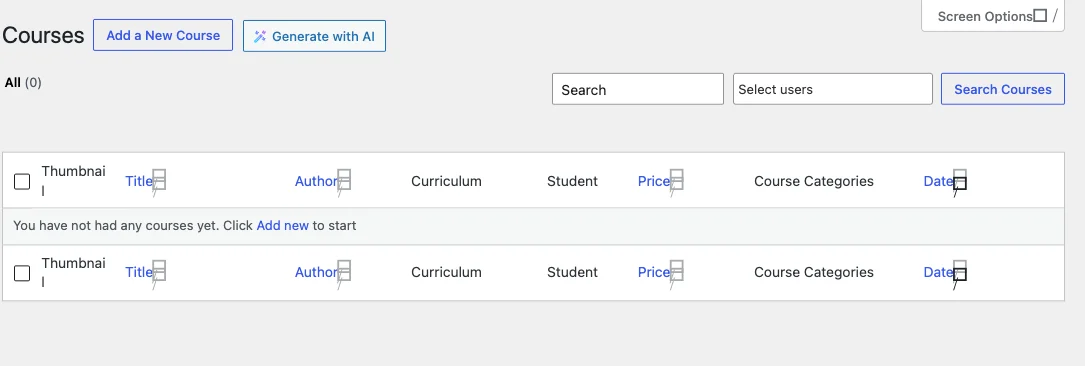
It was the lightest full LMS on the front end: 46.6 KB across 4 files. On the server it was heavier: 12 MB of memory on every page, 14.7 MB in the admin, 17 tables, 7 pages, 2 dashboard widgets and an admin-bar “course builder” link.
Free download: LearnPress on WordPress.org (version 4.4.13, last updated 30 October 2026).
Pros
- Lightest LMS for visitors: 47 KB
- Free core with free add-ons
- Many LMS themes support it
Cons
- 12 MB of extra memory per page
- Key features are paid add-ons
- Busy dashboard: 2 widgets, 7 pages
3. LifterLMS: best for memberships and certificates
5.8/10 Free plan v11.0.1 · 10,000+ installs · 4.8★ on WordPress.org
LifterLMS includes courses, memberships, certificates, achievements and engagement emails in the free plugin, which is unusual. It is built for people selling course bundles and memberships together.
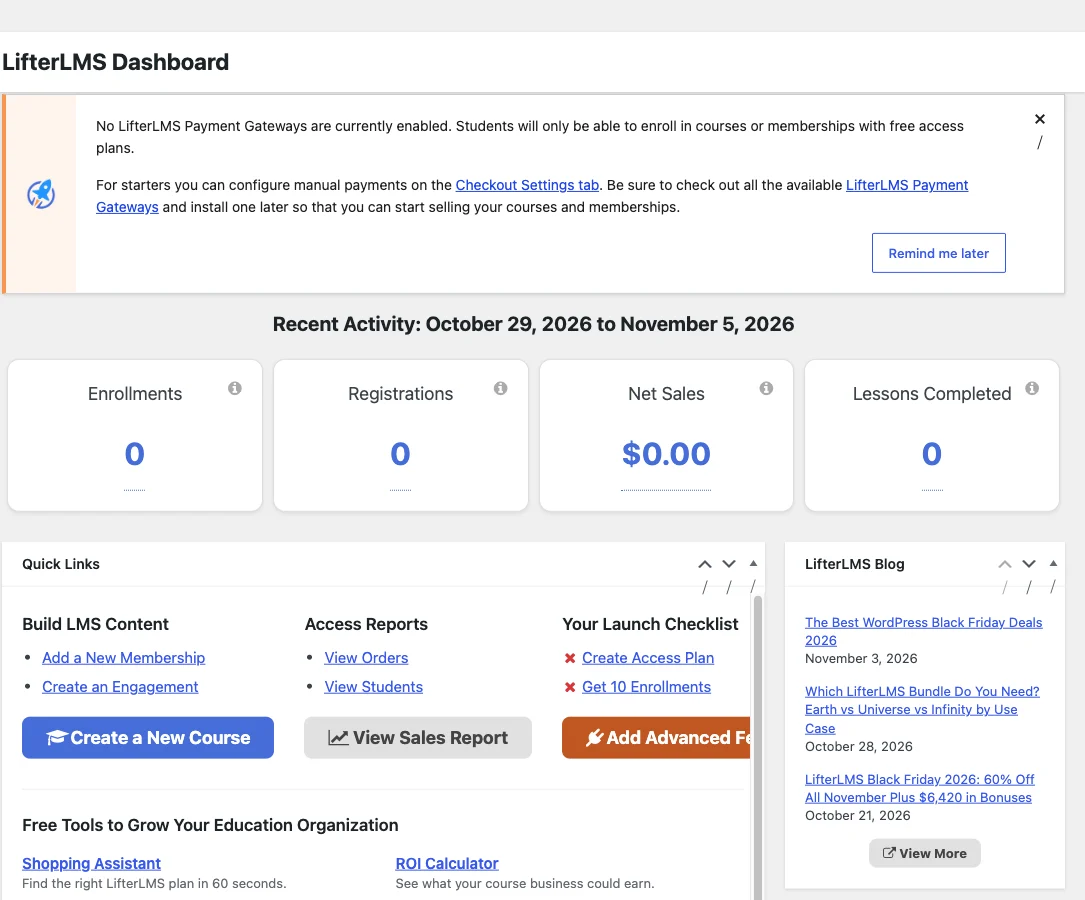
It is heavy, though: 401.6 KB on every page, 9.4 MB of memory, 95 options (the most here), 6 cron jobs and four user roles. It added five top-level admin menus and a notice warning that no payment gateway is enabled; the payment gateways are paid add-ons.
Free download: LifterLMS on WordPress.org (version 11.0.1, last updated 4 November 2026).
Pros
- Memberships, certificates and achievements free
- Strong engagement emails
- 4.8-star rating
Cons
- 402 KB on every page
- Payment gateways are paid add-ons
- Five top-level menus
4. Sensei LMS: simplest WordPress LMS
7.1/10 Free plan v4.26.4 · 9,000+ installs · 3.5★ on WordPress.org
Sensei LMS is made by Automattic and built around the block editor: lessons are normal block pages with course blocks for quizzes and progress. It is the most “WordPress-native” option and pairs naturally with WooCommerce for paid courses (through Sensei Pro).

Activation redirected to a setup wizard. It added 114.8 KB of CSS on every page, 10 MB of memory, only 4 tables and 3 pages. Its rating is the lowest of the group (3.5 stars from 40 reviews).
Free download: Sensei LMS on WordPress.org (version 4.26.4, last updated 29 September 2026).
Pros
- Block-editor native, by Automattic
- Only 4 tables
- Clean setup wizard
Cons
- Selling courses needs Sensei Pro
- Lowest rating here (3.5 stars)
- 115 KB of CSS on every page
5. MasterStudy LMS: most features, most upsells
4.4/10 Free plan v3.7.58 · 10,000+ installs · 4.5★ on WordPress.org
MasterStudy LMS has a polished front end, a course builder, quizzes, a student dashboard and its own analytics. It is a full school in a box, and many paid themes are built for it.
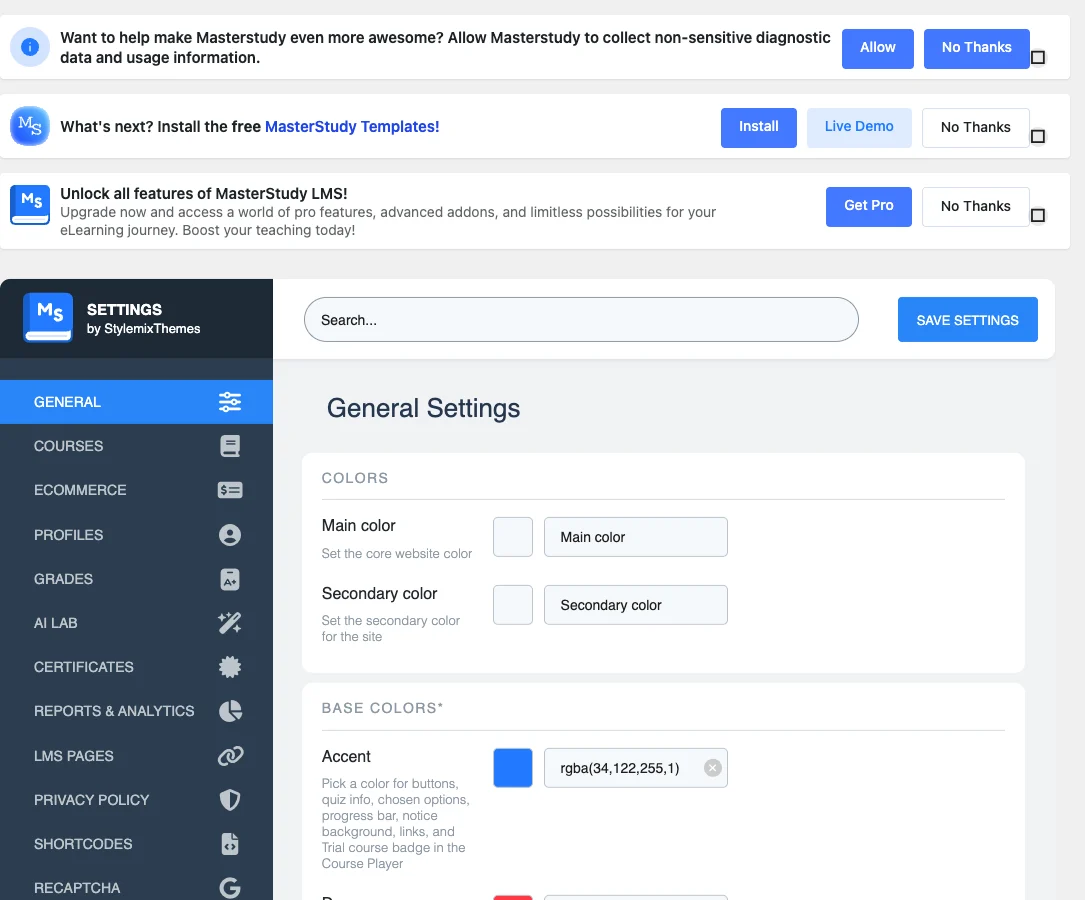
It was also the noisiest in our test. Activation redirected to its setup wizard, then it added two notices (one promoting templates, one promoting Pro), 2 dashboard widgets, an admin-bar menu, a 45-item admin menu and items under Appearance and Tools. It loaded 455.5 KB of CSS and JavaScript on every page and used 10.9 MB of memory, and at 65.9 MB it is the largest download here.
Free download: MasterStudy LMS on WordPress.org (version 3.7.58, last updated 2 November 2026).
Pros
- Most complete feature set
- Polished student front end
- Setup wizard
Cons
- Upsell notices and 2 dashboard widgets
- 456 KB on every page
- 66 MB download
How to choose the best WordPress LMS plugin
- You want the best course builder and will optimize assets: Tutor LMS.
- Your LMS shares a site with a blog or shop and speed matters: LearnPress.
- You sell memberships and want certificates free: LifterLMS.
- You like the block editor and WooCommerce: Sensei LMS.
Selling access to content without courses? A membership plugin may be enough; see our membership plugin test. And for the email side, a CRM helps: best WordPress CRM plugins.
What to look for in the best WordPress LMS plugin
Switching LMS later is hard, so check these points before you build your first course.
- Course builder: try building one lesson and one quiz in the free version before you commit.
- Selling courses: check whether payments are free or a paid add-on, and whether WooCommerce is supported.
- Certificates and drip content: often Pro features; price them in from the start.
- Front-end weight: some LMS plugins load hundreds of kilobytes on every page; plan to unload them on non-course pages.
- Theme support: many education themes are built for one LMS, so match your theme and LMS.
How we tested
Every plugin was installed from WordPress.org on a clean WordPress 7.1.4 site (PHP 8.3, Kadence theme) in WordPress Playground in November 2026. We activated one plugin at a time, measured the site, then deactivated it again, so each result is compared with the same baseline.
We loaded the home page and a normal blog post as a logged-out visitor three times and kept the median PHP peak memory, added up the CSS and JavaScript files the plugin added, and recorded database tables, options, scheduled cron jobs, admin menus, notices, dashboard widgets and any redirect on the first admin visit.
Screenshots were taken on the same test site right after activation. Ratings, installs and versions come from the WordPress.org plugin directory on the same day. No courses were created, so the numbers show what each plugin adds before you start.
The WPGlory score rates what a plugin costs your site, not how many features it has: front-end weight 30%, server cost 20%, admin clutter 20%, WordPress.org rating 20% (weighted by the number of reviews) and maintenance 10%. Features are covered in the text. Read the full method.
FAQ
What is the best WordPress LMS plugin?
Tutor LMS has the best free course builder; LearnPress is the lightest for visitors. For memberships and certificates, LifterLMS.
Is there a free LMS plugin for WordPress?
Yes. Tutor LMS, LearnPress, LifterLMS, Sensei LMS and MasterStudy all have free versions on WordPress.org.
Do LMS plugins slow down WordPress?
Many do. In our test Tutor LMS loaded 1.2 MB of CSS and JavaScript on every page, including blog posts. LearnPress loaded 47 KB.
Can I sell courses with a free LMS plugin?
Tutor LMS and LearnPress can sell courses in their free versions. LifterLMS and Sensei need paid add-ons for payments.
Can I move courses between LMS plugins?
Only partly. Some LMS plugins import from others, but quizzes, progress and certificates rarely transfer cleanly.
Do I need WooCommerce to sell courses?
Not with Tutor LMS or LearnPress, which have built-in checkouts. LifterLMS and Sensei need add-ons or WooCommerce.
Final verdict
Tutor LMS is the best WordPress LMS plugin for building courses
It has the best free builder and quizzes. Plan to unload its files on non-course pages, or choose LearnPress if speed on a shared blog matters most.
5.8/10