Best WordPress CRM Plugin (2026): 5 Plugins Tested on a Real Site
Some links on this page are affiliate links. If you buy through them we may earn a commission, at no extra cost to you. It never changes our verdict. How we test and make money
On this page
Short answer: The best WordPress CRM plugin for most site owners is FluentCRM: unlimited contacts, email campaigns and automations in the free version, nothing added to your pages, and it runs on your own site. FunnelKit Automations is the pick for WooCommerce stores, Groundhogg has the most complete free funnel builder, Jetpack CRM suits freelancers who need invoices and quotes, and the HubSpot plugin is the lightest because the CRM lives in HubSpot’s cloud.
A WordPress CRM (customer relationship management) plugin keeps a record of everyone who signs up, buys or gets in touch, and lets you email them based on what they did. Picking the best WordPress CRM plugin matters because the CRM stores your contact list on your own site: no monthly fee per contact, no export headaches, and your data stays yours. The trade-off is that the plugin runs on your server, so it adds tables, memory and scheduled jobs to WordPress.
We installed the five most popular CRM plugins for WordPress on the same clean test site, one at a time, measured what each one adds, and took screenshots of the first screen you see after activation. Here is what we found, and which of these WordPress CRM plugins we would install.
Our picks at a glance
1
FluentCRMBest overall: free email CRM on your own site
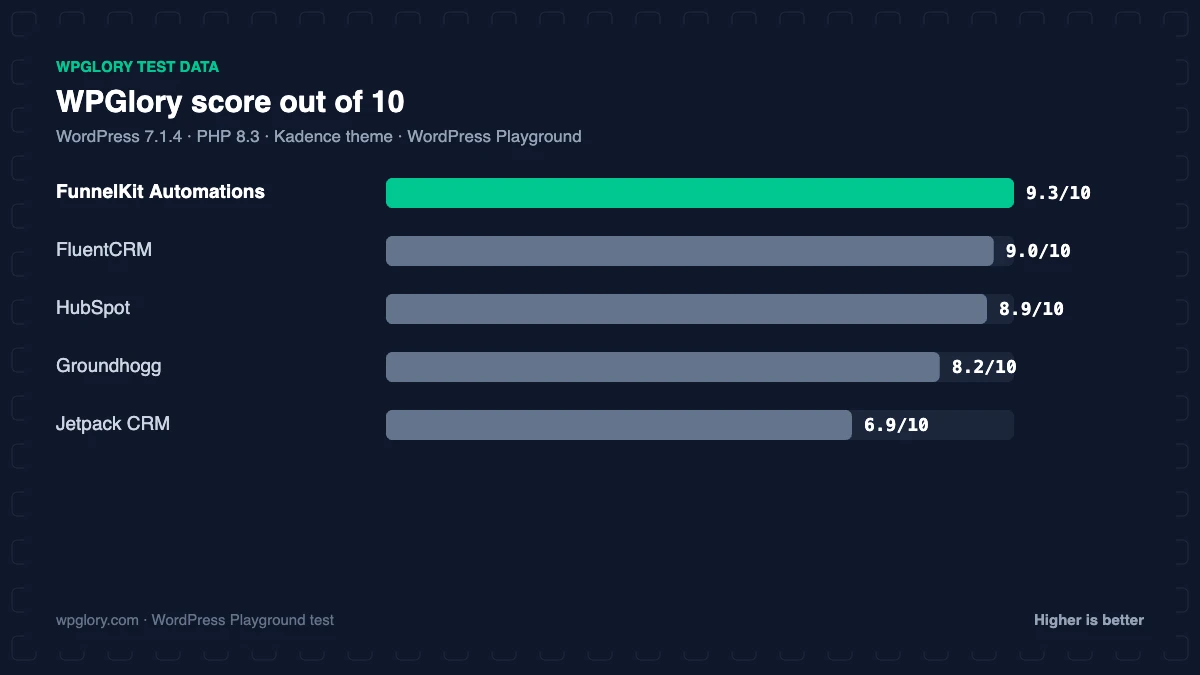
9.0/10
2
FunnelKit AutomationsBest for WooCommerce stores
9.3/10
3
GroundhoggMost complete free funnel builder
8.2/10
4
Jetpack CRMBest for invoices, quotes and clients
6.9/10
5
HubSpotLightest: the CRM lives in HubSpot's cloud
8.9/10
The order is our recommendation for most sites, weighing features and fit. The score measures only what each plugin costs your site.
WordPress CRM plugins compared: test results
This table shows what each plugin added to a clean WordPress site straight after activation, before we changed any setting. Lower is better for memory, tables and front-end weight.
| Measurement | FluentCRM | FunnelKit Automations | Groundhogg | Jetpack CRM | HubSpot |
|---|---|---|---|---|---|
| Version tested | 3.3.1 | 3.9.0 | 4.10 | 6.8.5 | 11.3.75 |
| Active installs | 80,000+ | 20,000+ | 2,000+ | 30,000+ | 200,000+ |
| WordPress.org rating | 4.8 (250) | 5.0 (346) | 4.8 (150) | 4.3 (152) | 4.3 (207) |
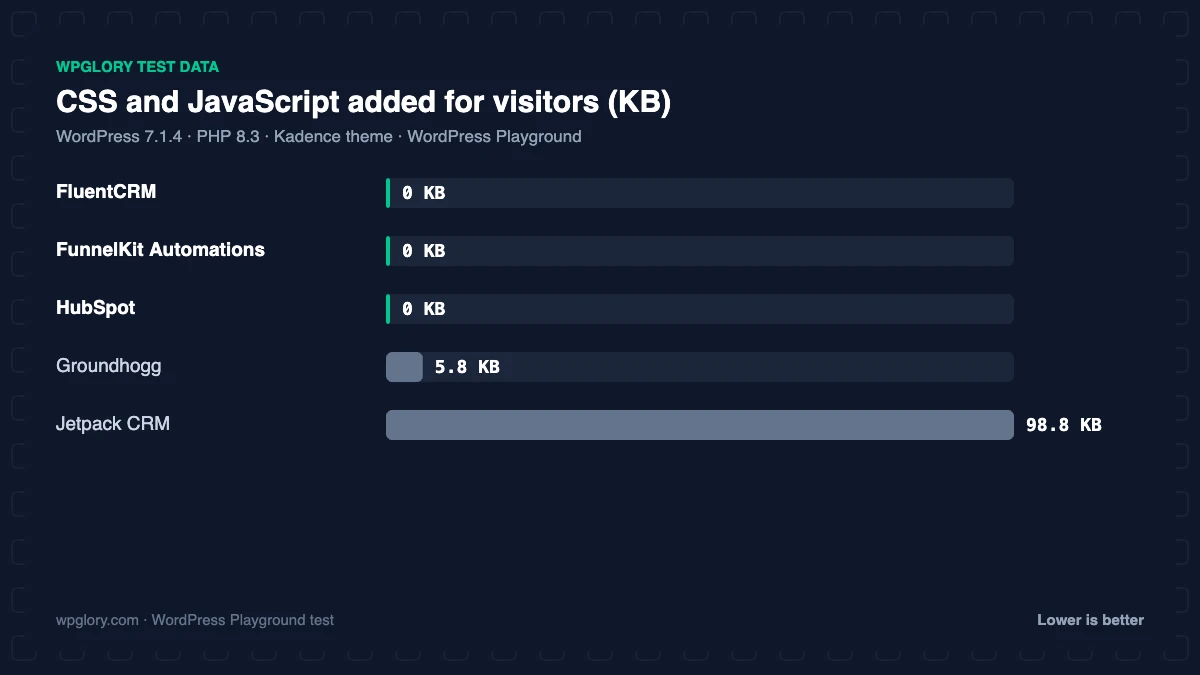
| CSS/JS added for visitors | 0 KB | 0 KB | 5.8 KB | 98.8 KB | 0 KB |
| Extra PHP memory (front end) | 7.5 MB | 3.9 MB | 10.4 MB | 14.1 MB | 1.9 MB |
| Extra PHP memory (admin) | 9.0 MB | 6.2 MB | 11.1 MB | 13.3 MB | 0.8 MB |
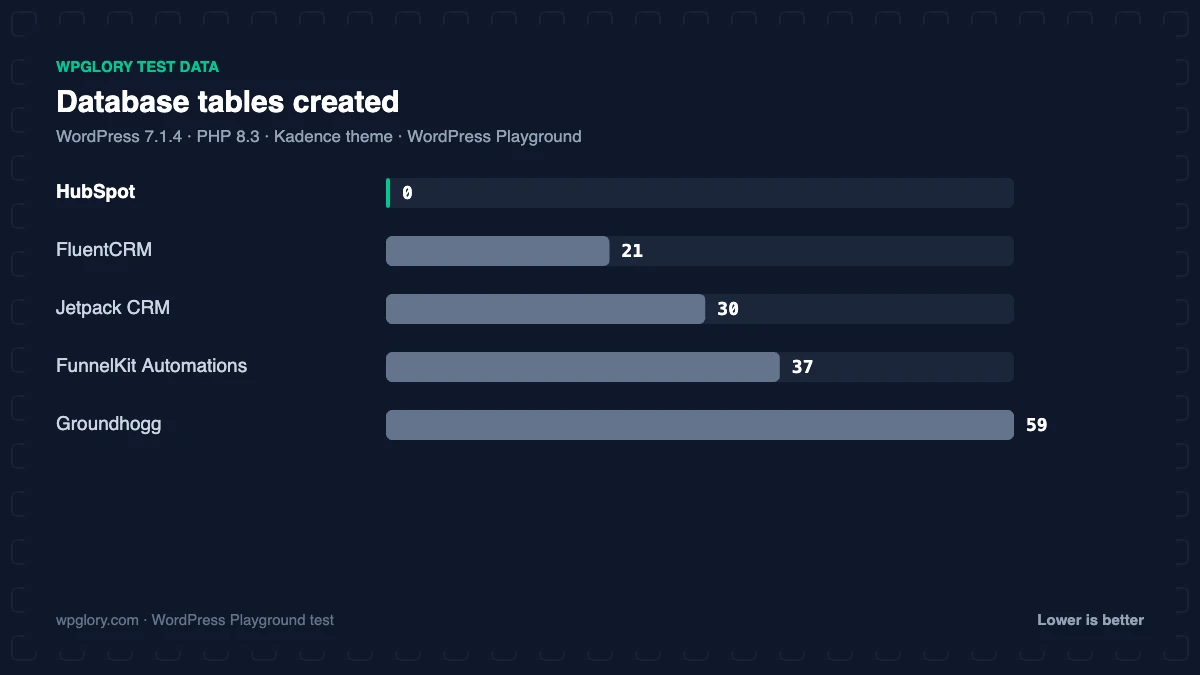
| Database tables | 21 | 37 | 59 | 30 | 0 |
| Options saved | 12 | 28 | 68 | 27 | 1 |
| Scheduled cron jobs | 4 | 5 | 9 | 0 | 0 |
| User roles added | 0 | 0 | 3 | 7 | 0 |
| Pages created | 0 | 2 | 3 | 1 | 0 |
| Notices / redirects | admin-bar item | None | setup notice, admin-bar item | setup redirect | setup notice |
| Plugin size | 20.3 MB | 20.4 MB | 18.6 MB | 28.7 MB | 3.9 MB |
| WPGlory score | 9.0/10 | 9.3/10 | 8.2/10 | 6.9/10 | 8.9/10 |
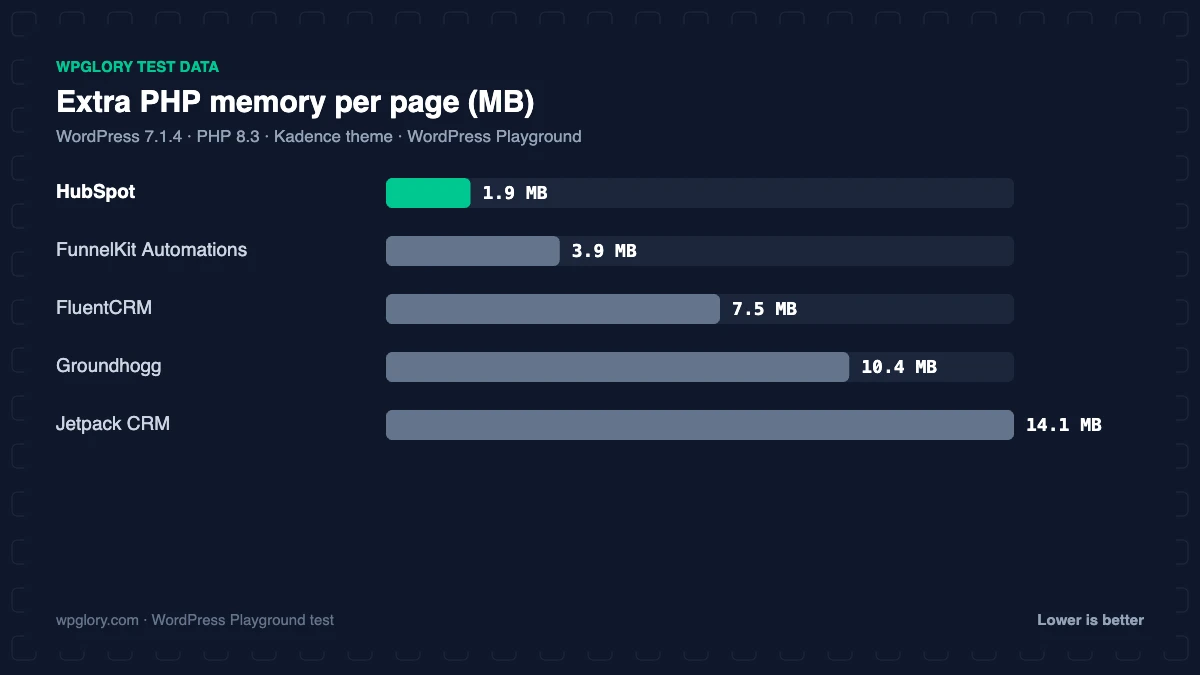
The spread between WordPress CRM plugins is large. HubSpot added no tables at all, because your contacts are stored in HubSpot’s cloud. Groundhogg created 59 tables, 68 options, 3 pages and 3 new user roles, and Jetpack CRM added 99 KB of CSS and JavaScript to every page for logged-out visitors, which none of the others did. Among the WordPress CRM options, FluentCRM and FunnelKit Automations sat in the middle: 21 and 37 tables, no front-end files, and a few scheduled jobs for sending email in the background.
Why the table count matters less than you think: a CRM needs tables for contacts, lists, tags, campaigns and email logs. Twenty or forty well-indexed tables are normal. What slows a site down is code that runs on every page view, which is why the front-end memory and weight rows matter more.
1. FluentCRM: best WordPress CRM plugin overall
9.0/10 Free plan v3.3.1 · 80,000+ installs · 4.8★ on WordPress.org
FluentCRM, from the team behind Fluent Forms, is the best WordPress CRM plugin for most people. The free version gives you unlimited contacts, lists and tags, email campaigns and basic automations, and it sends through your own email service, so there is no per-contact bill. It has 80,000+ active installs and 4.8 stars from 250 reviews.
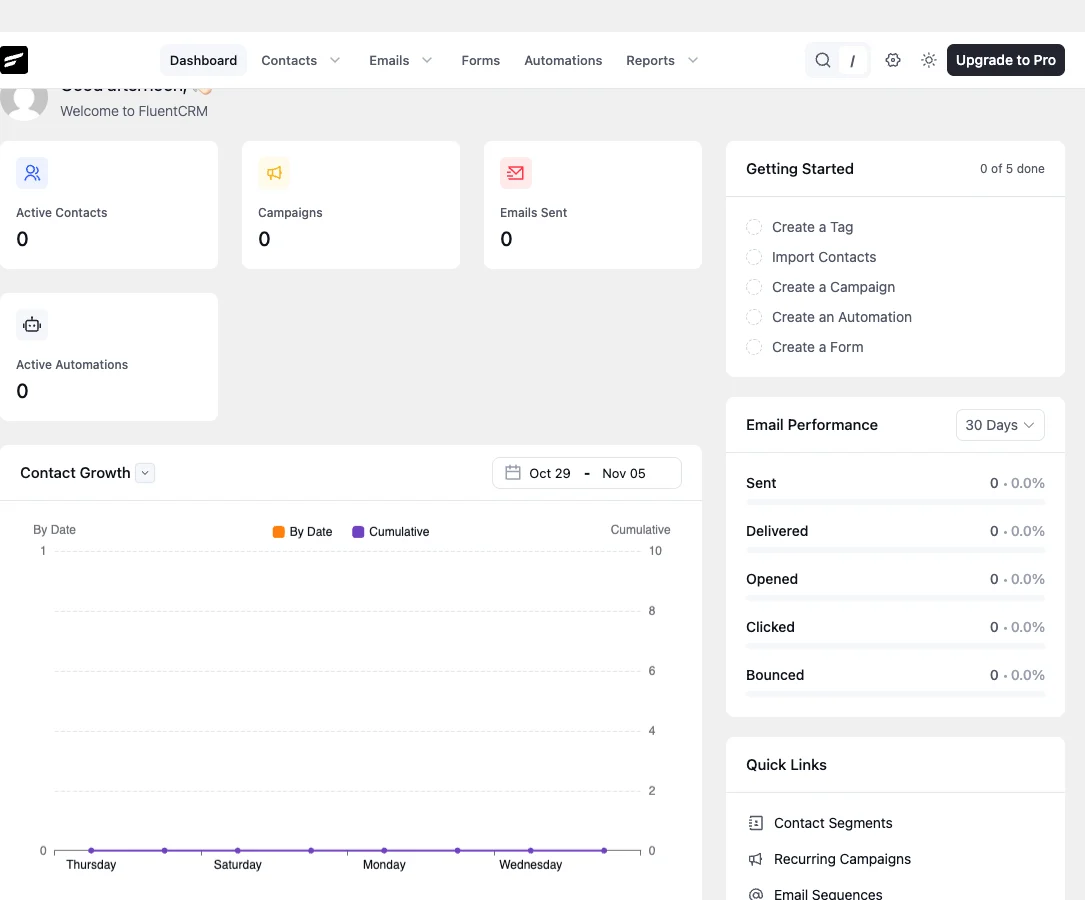
For a WordPress CRM, it is remarkably quiet: in our test it added no CSS or JavaScript to your pages. It used 7.5 MB of extra PHP memory on the front end and 9 MB in the admin, created 21 tables (prefixed fc_, plus the shared Action Scheduler tables), and added 4 scheduled jobs for sending and clean-up. It showed no notices and no setup redirect: you land on a clean dashboard and start importing contacts.
FluentCRM Pro adds the drag-and-drop email builder, email sequences, WooCommerce purchase history, abandoned cart recovery and 45+ integrations. On fluentcrm.com in November 2026 it cost $129 a year for one site (pricing is per site, not per contact). For email delivery, pair it with an SMTP plugin; see our SMTP plugin test.
Free download: FluentCRM on WordPress.org (version 3.3.1, last updated 29 October 2026).
Pros
- Unlimited contacts and campaigns in the free version
- Nothing added to the front end
- No notices or setup redirect
- Priced per site, not per contact
Cons
- 7.5 MB extra memory on every page view
- WooCommerce history, sequences and the visual email builder are Pro features
2. FunnelKit Automations: best CRM for WooCommerce stores
9.3/10 Free plan v3.9.0 · 20,000+ installs · 5.0★ on WordPress.org
FunnelKit Automations (formerly Autonami) is built around WooCommerce: abandoned cart recovery, post-purchase emails, win-back flows and customer profiles that show orders. The free version includes a visual workflow builder, unlimited contacts and basic cart recovery. In our test the dashboard showed broadcasts and audiences locked behind Pro, which matches FunnelKit’s own Lite vs Pro list.
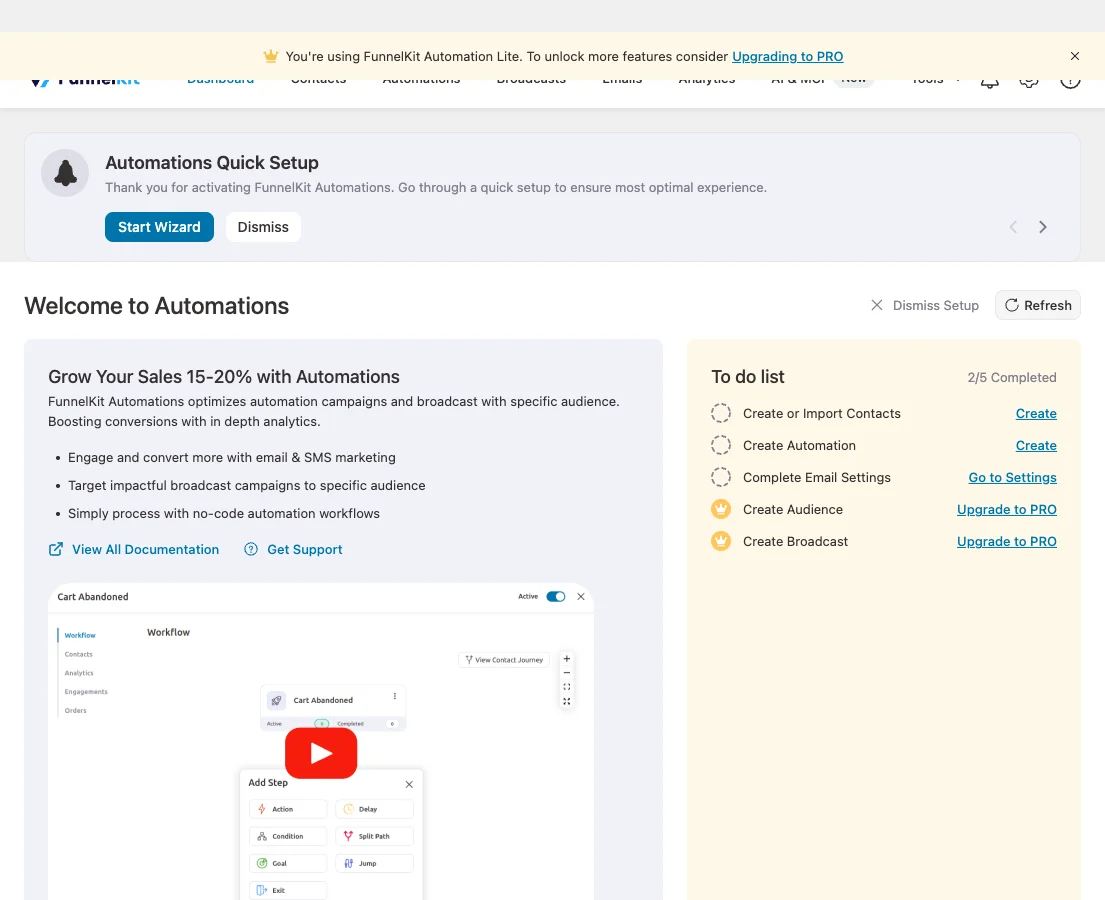
It was the lightest of the self-hosted CRMs on the front end: 3.9 MB of extra memory and no CSS or JavaScript. In the admin it added 6.2 MB, 37 tables, 28 options and 5 cron jobs, and it created 2 pages (used for email preferences and unsubscribe). Activation ended the PHP request early with a redirect to its own dashboard, so expect to land on FunnelKit’s welcome screen.
Pro starts at $99.50 a year for one site (first-year price on funnelkit.com in November 2026). If you want the best WordPress CRM plugin for WooCommerce and already use FunnelKit’s funnel builder, it is the natural choice; read our FunnelKit Automations vs FluentCRM comparison.
Free download: FunnelKit Automations on WordPress.org (version 3.9.0, last updated 3 November 2026).
Pros
- Built for WooCommerce: cart recovery, order-based automations
- Lowest front-end memory of the self-hosted CRMs (3.9 MB)
- Visual workflow builder in the free version
Cons
- Broadcasts and audiences need Pro
- 37 tables and 5 cron jobs
- Free automations can only send email
3. Groundhogg: most complete free funnel builder
8.2/10 Free plan v4.10 · 2,000+ installs · 4.8★ on WordPress.org
Groundhogg is a full marketing automation platform inside WordPress: CRM, broadcasts, funnels with a visual builder, forms and reporting. It is popular with agencies that want a HubSpot-style WordPress CRM they control.
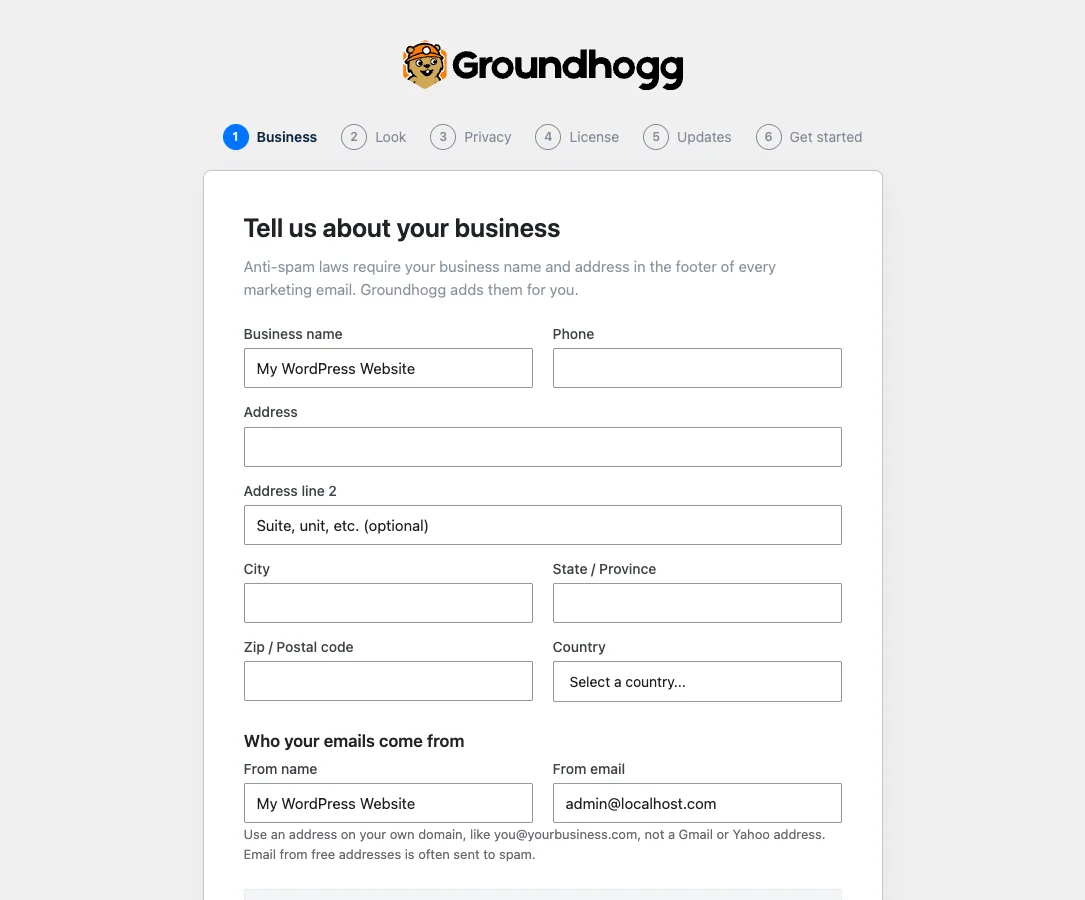
It is also the heaviest of the self-hosted options. It added 10.4 MB of extra memory on the front end and 11.1 MB in the admin, 59 tables, 68 options, 9 cron jobs, 3 pages and 3 user roles (marketer, sales manager and sales rep). It loaded about 6 KB of scripts on the front end and showed a “Ready to get started?” notice. Clicking its menu opened a six-step guided setup (business details, look, privacy, license, updates).
Paid plans on groundhogg.io start at $20 a month billed yearly for one site in November 2026. Groundhogg has only 2,000+ active installs on WordPress.org, but a 4.8-star rating from 150 reviews.
Free download: Groundhogg on WordPress.org (version 4.10, last updated 29 October 2026).
Pros
- Funnels, broadcasts and CRM in one plugin
- Sales roles for teams
- Guided setup asks for anti-spam business details up front
Cons
- Heaviest self-hosted CRM in our test (10.4 MB, 59 tables)
- Paid plans billed monthly-equivalent are pricier than FluentCRM
4. Jetpack CRM: best for invoices, quotes and clients
6.9/10 Free plan v6.8.5 · 30,000+ installs · 4.3★ on WordPress.org
Jetpack CRM (formerly Zero BS CRM, now from Automattic) is less about email marketing and more about running a small service business: contacts, companies, quotes, invoices, transactions and a client portal.
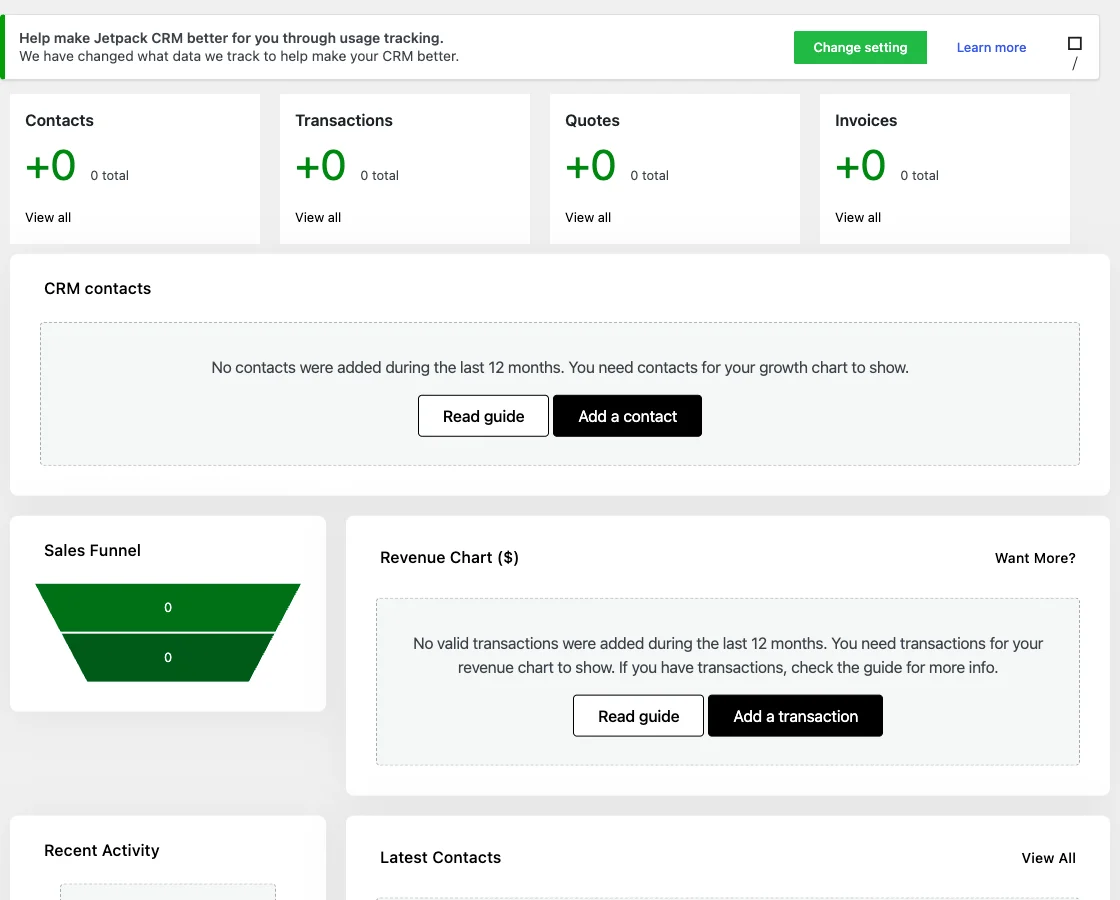
After activation it redirected straight to a setup wizard that asks for your CRM name, currency, business type and menu style (it can replace the WordPress admin menu). It was the heaviest plugin for visitors in our test: 98.8 KB of CSS and JavaScript on every page, 14.1 MB of extra memory, 30 tables, 7 new user roles and a client-portal page.
If you need invoices and quotes, it saves you a separate tool. If you only want email marketing, FluentCRM is the lighter WordPress CRM.
Free download: Jetpack CRM on WordPress.org (version 6.8.5, last updated 5 October 2026).
Pros
- Quotes, invoices, transactions and client portal
- By Automattic
- Guided setup wizard
Cons
- Heaviest front end: 98.8 KB of CSS/JS on every page
- 14.1 MB extra memory, 7 user roles
- Lowest rating here (4.3 stars)
5. HubSpot: lightest: the CRM lives in HubSpot's cloud
8.9/10 Free plan v11.3.75 · 200,000+ installs · 4.3★ on WordPress.org
The HubSpot plugin connects WordPress to HubSpot’s free CRM. Contacts, emails, live chat and forms are stored and run by HubSpot, so the plugin itself is tiny.

In our test it added 1.9 MB of memory at most, no tables, no front-end files until you connect an account, and a single notice asking you to connect HubSpot. It has 200,000+ active installs.
It is the best WordPress CRM plugin if you want the plugin itself to stay out of the way. The catch is that your data lives in HubSpot, and the free HubSpot plan has limits on emails and branding. Growing past them means HubSpot’s paid tiers, which are priced per seat and per contact tier.
Free download: HubSpot on WordPress.org (version 11.3.75, last updated 16 September 2026).
Pros
- Lightest plugin here: no tables, almost no memory
- Free HubSpot CRM, forms, chat and email
- Polished cloud dashboard
Cons
- Your contact data lives on HubSpot, not WordPress
- Paid HubSpot plans get expensive as you grow
- Tested up to WordPress 6.9 on WordPress.org
How to choose the best WordPress CRM plugin for your site
- You run a blog, course or service site and want email marketing: FluentCRM.
- You sell with WooCommerce: FunnelKit Automations, or FluentCRM Pro if you already use the Fluent tools.
- You want funnels and a sales team view: Groundhogg.
- You send quotes and invoices to clients: Jetpack CRM.
- You prefer a hosted CRM and minimal plugin load: HubSpot.
Whatever you choose, a self-hosted WordPress CRM needs reliable email delivery. Connect it to an SMTP service such as Amazon SES, Brevo or Mailgun, and keep backups: your contact list is now one of the most valuable things on your site. Our backup plugin test covers the options.
Self-hosted CRM vs a cloud CRM
A self-hosted WordPress CRM plugin (FluentCRM, FunnelKit Automations, Groundhogg, Jetpack CRM) stores contacts in your database and sends email through your SMTP provider. With WordPress CRM plugins you pay a flat yearly license, not a fee per contact, which is why sites with 20,000+ subscribers often save hundreds of dollars a month compared with Mailchimp or ActiveCampaign. A cloud CRM (HubSpot) handles sending, deliverability and uptime for you, but the price climbs with your list. Compare the two approaches in our MailPoet vs FluentCRM test.
What to look for in the best WordPress CRM plugin
Before you commit your contact list to a WordPress CRM, check these five things.
- Pricing model: flat per-site pricing (FluentCRM, FunnelKit) gets cheaper per contact as you grow; per-contact pricing (HubSpot) gets more expensive.
- Email delivery: a self-hosted WordPress CRM sends through your SMTP or API service, so budget for Amazon SES, Brevo or Mailgun.
- Integrations: check that your forms, shop, LMS and membership plugins can tag contacts automatically.
- Automations in the free version: some CRMs limit free automations to a single “send email” action.
- Data ownership and backups: your contacts live in your database, so back it up daily.
How we tested
Every plugin was installed from WordPress.org on a clean WordPress 7.1.4 site (PHP 8.3, Kadence theme) in WordPress Playground in November 2026. We activated one plugin at a time, measured the site, then deactivated it again, so each result is compared with the same baseline.
We loaded the home page and a normal blog post as a logged-out visitor three times and kept the median PHP peak memory, added up the CSS and JavaScript files the plugin added, and recorded database tables, options, scheduled cron jobs, admin menus, notices, dashboard widgets and any redirect on the first admin visit.
Screenshots were taken on the same test site right after activation. Ratings, installs and versions come from the WordPress.org plugin directory on the same day.
The WPGlory score rates what a plugin costs your site, not how many features it has: front-end weight 30%, server cost 20%, admin clutter 20%, WordPress.org rating 20% (weighted by the number of reviews) and maintenance 10%. Features are covered in the text. Read the full method.
FAQ
What is the best WordPress CRM plugin?
For most sites, FluentCRM. It is free for unlimited contacts, adds nothing to your pages, and its Pro version is priced per site, not per contact.
Is there a free CRM plugin for WordPress?
Yes. FluentCRM, FunnelKit Automations, Groundhogg and Jetpack CRM all have free versions on WordPress.org, and the HubSpot plugin connects to HubSpot’s free CRM.
Do CRM plugins slow down WordPress?
Most add no files to your pages, but they do load PHP code on every request. In our test the extra memory ranged from 1.9 MB (HubSpot) to 14.1 MB (Jetpack CRM).
Which WordPress CRM plugin is best for WooCommerce?
FunnelKit Automations, because cart recovery and order-based automations are built in. FluentCRM Pro is a strong alternative.
Can a WordPress CRM replace Mailchimp?
Yes, for most sites. FluentCRM and FunnelKit Automations send campaigns and automations from WordPress through your own email service.
How many contacts can a WordPress CRM handle?
Tens of thousands on decent hosting. Large lists need a proper sending service and a server with enough memory for background sending.
Final verdict
FluentCRM is the best WordPress CRM plugin for most sites
It is free for unlimited contacts, adds nothing to your pages, and grows into a full marketing automation tool without per-contact pricing. Pick FunnelKit Automations if WooCommerce is the centre of your business.
9.0/10