Best Free WordPress Newsletter Plugins in 2026: 5 Tested
Some links on this page are affiliate links. If you buy through them we may earn a commission, at no extra cost to you. It never changes our verdict. How we test and make money
On this page
Short answer: If you want to send newsletters from inside WordPress, FluentCRM is our pick: nothing loaded for visitors, no nags and a full CRM in the free version. MailPoet does the same job but cost the most memory in our entire test (27.9 MB) and created 40 database tables. If you would rather use a hosted email service, MailerLite’s plugin is the lightest connector we tested.
WordPress newsletter plugins come in two kinds: plugins that store your list and send from WordPress, and small connectors for hosted email services. We tested both kinds of WordPress newsletter plugins on the same site.
There are two kinds of newsletter plugin: ones that store your list and send email from WordPress (FluentCRM, MailPoet, Newsletter), and small connectors that put a hosted service’s signup form on your site (MailerLite, ActiveCampaign). We tested both kinds on the same site.
| Measurement | FluentCRM | MailPoet | Newsletter (Stefano Lissa) | MailerLite | ActiveCampaign |
|---|---|---|---|---|---|
| Version tested | 3.2.6 | 5.43.0 | 9.4.8 | 1.7.26 | 8.1.21 |
| Active installs | 80,000+ | 500,000+ | 200,000+ | 100,000+ | 40,000+ |
| WordPress.org rating | 4.8 (250 reviews) | 4.4 (1,433 reviews) | 4.6 (1,204 reviews) | 3.0 (40 reviews) | 4.5 (29 reviews) |
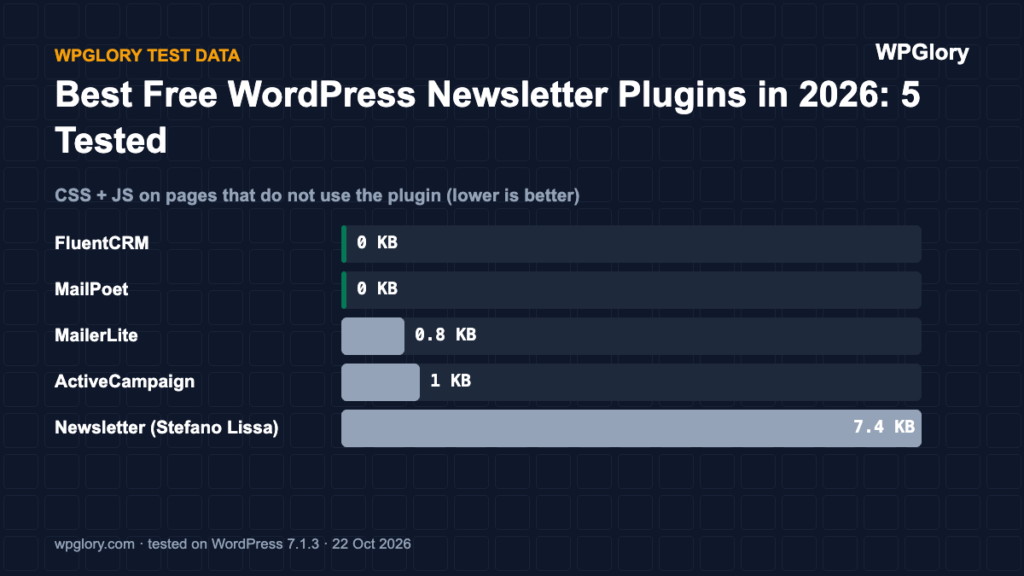
| Extra CSS/JS on pages that don’t use it | 0 files, 0 KB | 0 files, 0 KB | 2 files, 7.4 KB | 1 file, 0.8 KB | 1 file, 1 KB |
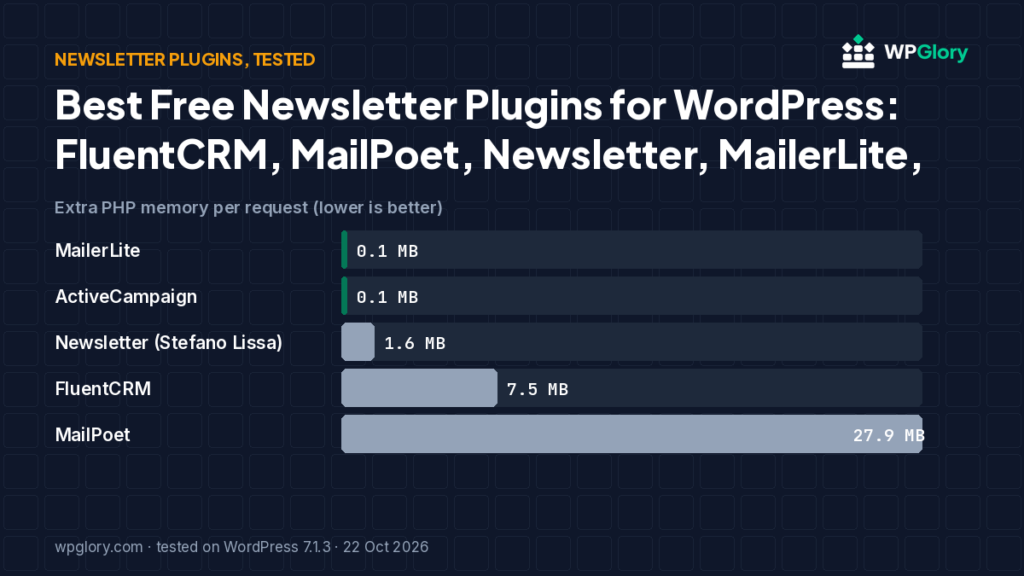
| Extra PHP memory | 7.5 MB | 27.9 MB | 1.6 MB | 0.1 MB | 0.1 MB |
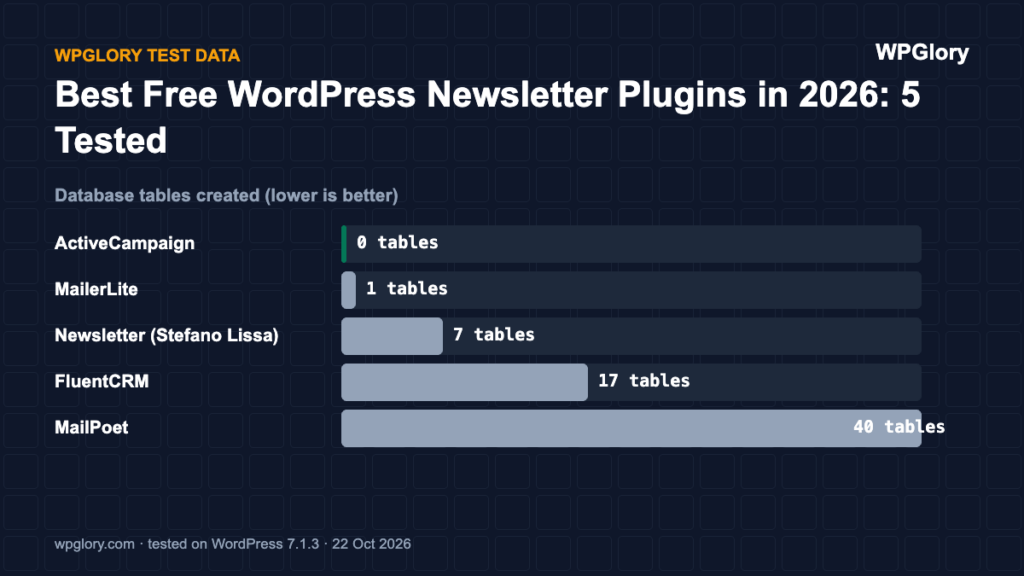
| Database tables created | 17 | 40 | 7 | 1 | 0 |
| Notices / redirects after activation | None | None | None | None | None |
| Plugin size | 20.1 MB | 28.0 MB | 12.8 MB | 2.3 MB | 18.6 MB |
| WPGlory test score | 8.9/10 | 7.8/10 | 9.5/10 | 8.9/10 | 8.9/10 |
Extra PHP memory per request (MB, lower is better)
Self-hosted newsletter plugins do more work, so expect higher numbers than the connectors.
Best WordPress newsletter plugins: our picks at a glance
1
FluentCRMBest self-hosted newsletter + CRM
8.9/10
2
Newsletter (Stefano Lissa)Lightest self-hosted option
9.5/10
3
MailerLiteBest connector for a hosted service
8.9/10
1. FluentCRM — best self-hosted newsletter and CRM
8.9/10 Free plan v3.2.6 · 80,000+ installs · 4.8★ on WordPress.org
FluentCRM loaded nothing for visitors and showed no notices. It cost 7.5 MB of memory and created 17 tables for contacts, campaigns and automations. The free version includes campaigns, lists, tags and basic automations; you send through any SMTP service (FluentSMTP pairs well).
Pros
- Nothing loaded for visitors
- No upsell notices
- CRM and automations in the free version
Cons
- 17 database tables
- You need your own sending service
2. Newsletter (Stefano Lissa) — lightest self-hosted option
9.5/10 Free plan v9.4.8 · 200,000+ installs · 4.6★ on WordPress.org
The Newsletter plugin by Stefano Lissa cost only 1.6 MB and loaded two small files (7.4 KB) on every page for its subscription form. It created 7 tables and showed no notices.
Pros
- Light on the server
- No nags
- Mature plugin (since 2009)
Cons
- 7 KB on every page
- Older-looking admin
3. MailPoet — all-in-one, if your hosting is strong
7.8/10 Free plan v5.43.0 · 500,000+ installs · 4.4★ on WordPress.org
MailPoet loaded nothing for visitors, but it was the heaviest plugin in our whole test on the server: 27.9 MB of extra memory on every request and 40 database tables. On cheap shared hosting that matters.
Pros
- Nothing loaded for visitors
- Polished email editor
- Free sending service for small lists
Cons
- 27.9 MB extra memory on every request
- 40 database tables
4. MailerLite — best connector for a hosted service
8.9/10 Free plan v1.7.26 · 100,000+ installs · 3.0★ on WordPress.org
MailerLite’s official plugin was the lightest plugin in the test: 0.1 MB and one 0.8 KB stylesheet. Note that its WordPress.org listing was last updated in June 2026 and tested up to WordPress 6.8.11, and its rating (3.0★ from 40 reviews) is low — most complaints are about the plugin, not the email service. You can also skip the plugin and paste MailerLite’s embed code.
Pros
- Almost no cost to your site
- MailerLite has a free plan
Cons
- Plugin not tested with WordPress 7.x by its author
- Low plugin rating
5. ActiveCampaign — only if you already use ActiveCampaign
8.9/10 Free plan v8.1.21 · 40,000+ installs · 4.5★ on WordPress.org
ActiveCampaign’s plugin was just as light, but it was last updated in November 2025 and is only marked as tested up to WordPress 6.8.11. If you use ActiveCampaign, its site-tracking and form embed codes work without the plugin.
Pros
- Almost no cost to your site
Cons
- Not updated in almost a year
- Not tested with WordPress 7.x
Self-hosted vs hosted: which WordPress newsletter plugins fit you
Self-hosted WordPress newsletter plugins (FluentCRM, MailPoet, Newsletter) keep your subscribers in your own database. That is cheaper as your list grows, but you need a sending service and decent hosting. Hosted services (MailerLite, ActiveCampaign) handle sending, deliverability and reporting for you; their WordPress plugins only add sign-up forms.
- Under 1,000 subscribers and no budget: MailerLite’s free plan or MailPoet’s free sending.
- Growing list, want to own the data: FluentCRM with Amazon SES or another low-cost sender.
- Advanced automation and sales: ActiveCampaign.
How to start a newsletter on WordPress
- Pick a self-hosted plugin or a hosted service from the list above.
- Set up your sending domain (SPF, DKIM, DMARC) so issues land in the inbox.
- Create one list and one sign-up form; keep the form to an email field.
- Add the form to your sidebar or footer and to the end of each post.
- Write a welcome email that sends automatically when someone subscribes.
- Send on a regular schedule, even if it is once a month.
Score breakdown: where each plugin gained and lost points
Our test score adds up five criteria. The table shows each plugin’s points per criterion (out of 10), followed by what we measured. A higher number is always better here.
| Criterion | MailerLite | ActiveCampaign | Newsletter (Stefano Lissa) | FluentCRM | MailPoet |
|---|---|---|---|---|---|
| Front-end weight (30%) | 10.0 | 10.0 | 9.7 | 10.0 | 10.0 |
| Server cost (20%) | 9.9 | 10.0 | 8.7 | 5.7 | 0.0 |
| Admin clutter (20%) | 10.0 | 10.0 | 10.0 | 9.5 | 10.0 |
| WordPress.org trust (20%) | 7.1 | 8.4 | 9.2 | 9.3 | 8.8 |
| Maintenance (10%) | 5.0 | 2.0 | 10.0 | 10.0 | 10.0 |
| Total score | 8.9/10 | 8.9/10 | 9.5/10 | 8.9/10 | 7.8/10 |
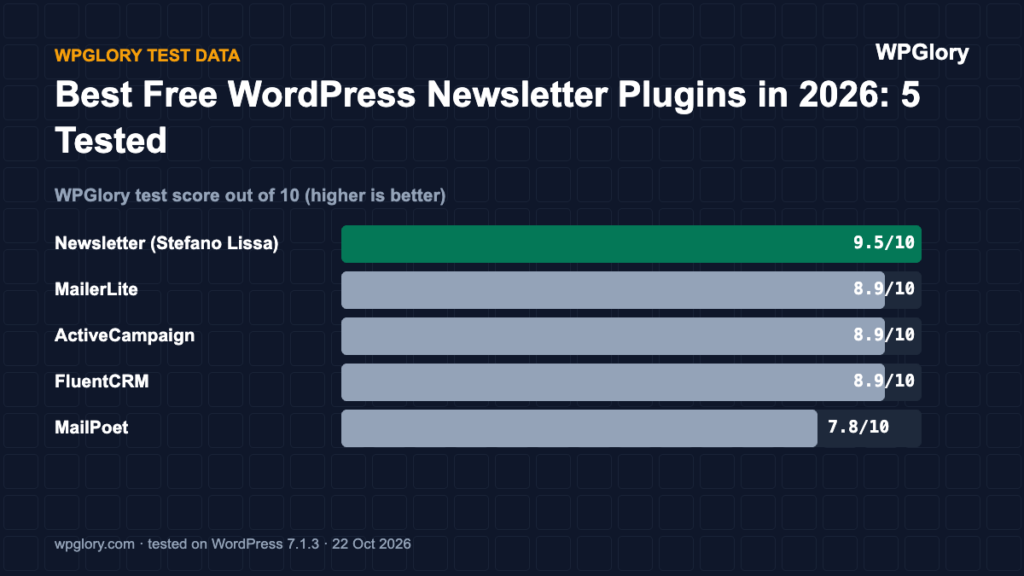
Front-end weight (30%)
We loaded a normal page that does not use the plugin and counted the extra CSS and JavaScript files. Every 25 KB costs one point. FluentCRM and MailPoet added nothing to that page. MailerLite added 1 file (0.8 KB). ActiveCampaign added 1 file (1 KB). Newsletter (Stefano Lissa) added 2 files (7.4 KB).
Server cost (20%)
Extra PHP memory per request ranged from 0.1 MB (MailerLite) to 27.9 MB (MailPoet). Memory matters on shared hosting, where every visitor request runs the plugin code. Database tables created: MailerLite 1, ActiveCampaign 0, Newsletter (Stefano Lissa) 7, FluentCRM 17 and MailPoet 40. We deduct 0.35 points per MB of memory and 0.1 points per table.
Admin clutter (20%)
We counted what appeared in the dashboard right after activation. MailerLite added nothing beyond its own menu. ActiveCampaign added nothing beyond its own menu. Newsletter (Stefano Lissa) added nothing beyond its own menu. FluentCRM added an admin-bar menu. MailPoet added nothing beyond its own menu.
WordPress.org trust (20%)
This is the WordPress.org rating, pulled toward 8/10 when a plugin has few reviews so that a handful of five-star ratings cannot win on its own. MailerLite: 3.0 stars from 40 reviews, 100,000+ active installs. ActiveCampaign: 4.5 stars from 29 reviews, 40,000+ active installs. Newsletter (Stefano Lissa): 4.6 stars from 1,204 reviews, 200,000+ active installs. FluentCRM: 4.8 stars from 250 reviews, 80,000+ active installs. MailPoet: 4.4 stars from 1,433 reviews, 500,000+ active installs.
Maintenance (10%)
MailerLite 1.7.26 was last updated 118 days before our test and is marked as tested up to WordPress 6.8.11. ActiveCampaign 8.1.21 was last updated 342 days before our test and is marked as tested up to WordPress 6.8.11. Newsletter (Stefano Lissa) 9.4.8 was last updated 3 days before our test and is marked as tested up to WordPress 7.1.3. FluentCRM 3.2.6 was last updated 10 days before our test and is marked as tested up to WordPress 7.1.3. MailPoet 5.43.0 was last updated 2 days before our test and is marked as tested up to WordPress 7.1.3. Plugins tested with the current WordPress version get full points; an update older than six months costs three points.
Which newsletter plugin we would install today
If you only need a sign-up form that sends subscribers to an email service, use that service’s own form plugin. The MailerLite and ActiveCampaign plugins were almost free in our test (0.1 MB of memory), but check the last update date before you rely on one.
If you want to send newsletters from WordPress itself, FluentCRM is our pick. It is heavier than a form plugin (7.5 MB, 17 tables) but far lighter than MailPoet, which added 27.9 MB of memory and 40 database tables on every request.
The Newsletter plugin is the middle ground: light, well rated and updated days before our test, with a free sending engine built in. It suits small lists that do not need automations.
How we tested
Every plugin was installed from WordPress.org on a clean WordPress 7.1.3 site (PHP 8.3, Kadence theme, default content) in WordPress Playground on 22 October 2026. We took a snapshot before and after activating each plugin, one plugin at a time, and compared them: CSS and JavaScript added to a logged-out page that doesn’t use the plugin, extra PHP memory to load WordPress, database tables, and every admin notice, dashboard widget and setup redirect. Directory facts (version, installs, rating) come from the WordPress.org API on the same day.
The WPGlory test score rates what a plugin costs your site, not how many features it has: front-end weight 30%, server cost 20%, admin clutter and upsells 20%, WordPress.org rating 20%, maintenance 10%. Features are covered in the text. Full method.
FAQ
Should I send newsletters from WordPress or use a service?
A service (MailerLite, ActiveCampaign) handles deliverability for you. A plugin (FluentCRM, MailPoet) keeps your list in your own database and is cheaper at scale, but you need a sending service and decent hosting.
Which newsletter plugin is the lightest?
Of the self-hosted ones, Newsletter (1.6 MB). Of the connectors, MailerLite (0.1 MB).
Which WordPress newsletter plugins are free?
All five in this test have a free version. FluentCRM, MailPoet and Newsletter are free to install; MailerLite and ActiveCampaign plugins are free but the services have their own plans.
Do WordPress newsletter plugins slow down my site?
The self-hosted ones loaded nothing for visitors in our test, but MailPoet added 27.9 MB of server memory to every request.
Final verdict
FluentCRM for self-hosted, MailerLite for hosted.
FluentCRM gave the most for free with no nags. If you would rather not run email from WordPress, MailerLite is easy and its plugin costs almost nothing.
8.9/10