Best Free WordPress SMTP Plugin: FluentSMTP vs WP Mail SMTP vs Post SMTP vs Easy WP SMTP
Some links on this page are affiliate links. If you buy through them we may earn a commission, at no extra cost to you. It never changes our verdict. How we test and make money
On this page
Short answer: FluentSMTP is our pick: completely free, the lightest on the server (0.8 MB) and no upsells. WP Mail SMTP ties it on score (9.5/10) and is the most popular, but some mailers and email logs are paid features.
A WordPress SMTP plugin is the fix for contact forms and order emails that never arrive. We tested the four most popular free options to see which WordPress SMTP plugin is the lightest and the least pushy.
WordPress sends email with PHP mail by default, and a lot of it lands in spam. An SMTP plugin sends it through a real mail service instead. All four plugins below are free; we installed each one on the same clean site and measured what it costs and how it greets you.
| Measurement | FluentSMTP | WP Mail SMTP | Easy WP SMTP | Post SMTP |
|---|---|---|---|---|
| Version tested | 2.4.1 | 4.10.3 | 2.15.1 | 4.0.2 |
| Active installs | 700,000+ | 4 million+ | 500,000+ | 300,000+ |
| WordPress.org rating | 4.8 (407 reviews) | 4.8 (5,206 reviews) | 4.6 (709 reviews) | 4.7 (528 reviews) |
| Extra CSS/JS on pages that don’t use it | 0 files, 0 KB | 0 files, 0 KB | 0 files, 0 KB | 0 files, 0 KB |
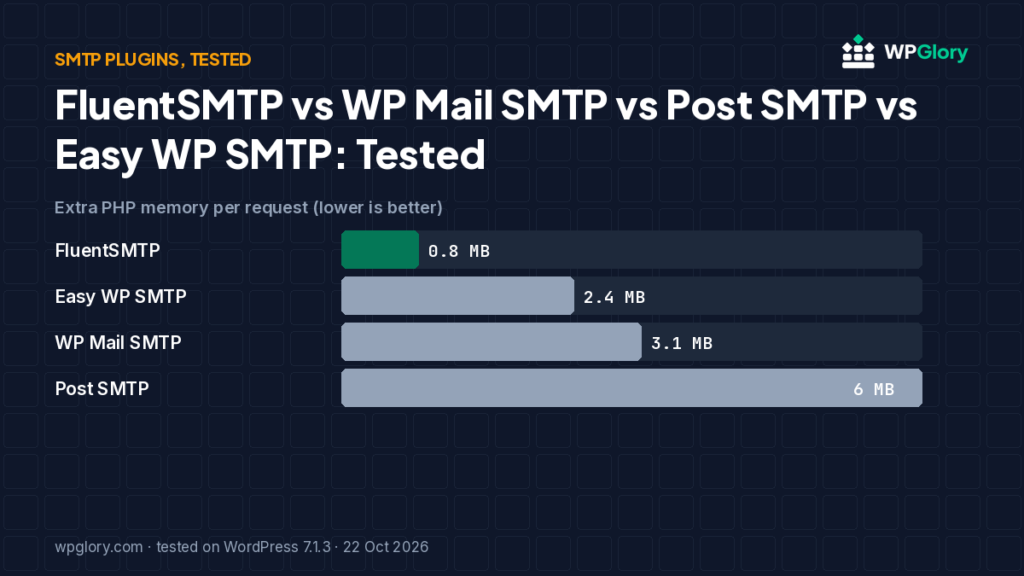
| Extra PHP memory | 0.8 MB | 3.1 MB | 2.4 MB | 6.0 MB |
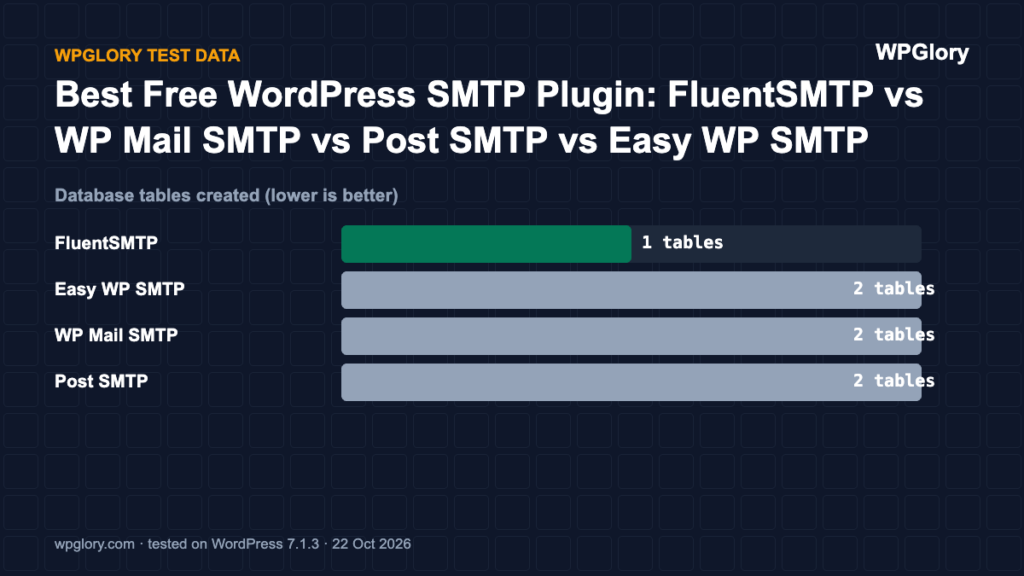
| Database tables created | 1 | 2 | 2 | 2 |
| Notices / redirects after activation | 1 setup reminder | None | setup screen | 1 setup reminder |
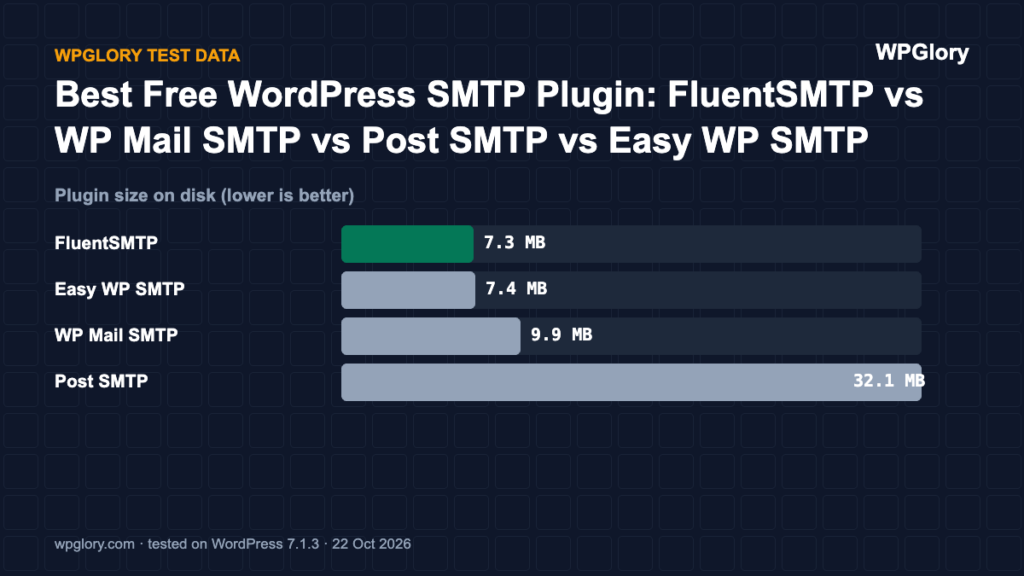
| Plugin size | 7.3 MB | 9.9 MB | 7.4 MB | 32.1 MB |
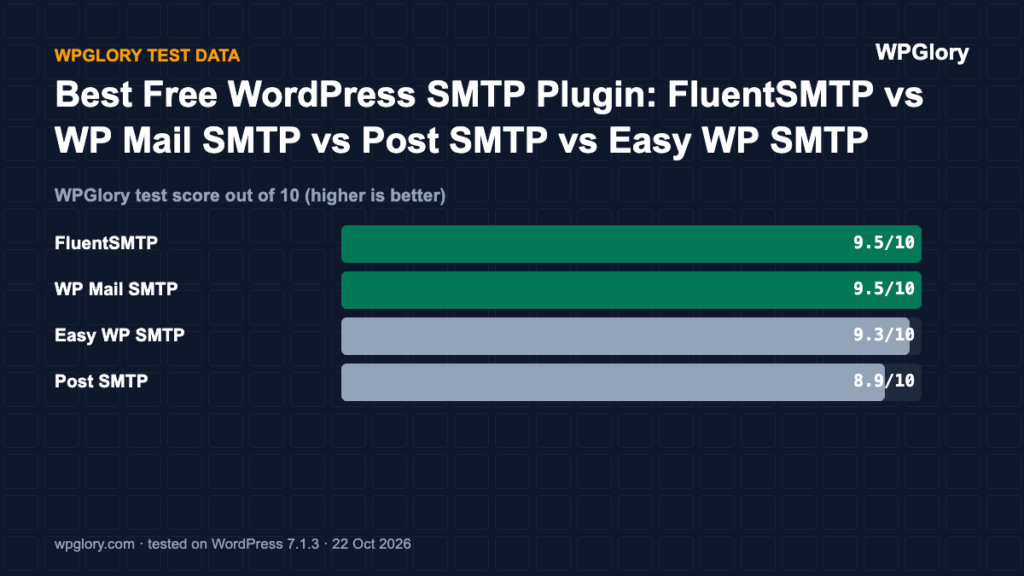
| WPGlory test score | 9.5/10 | 9.5/10 | 9.3/10 | 8.9/10 |
Extra PHP memory per request (MB, lower is better)
Every page load pays this cost, because SMTP plugins load on every request.
Best free WordPress SMTP plugin: our picks at a glance
1
FluentSMTPBest free SMTP plugin
9.5/10
2
WP Mail SMTPMost popular, easiest wizard
9.5/10
3
Easy WP SMTPSimple and light
9.3/10
1. FluentSMTP — best free SMTP plugin
9.5/10 Free plan v2.4.1 · 700,000+ installs · 4.8★ on WordPress.org
FluentSMTP had the lowest memory cost (0.8 MB), one table for its email log and no top-level menu (it sits under Settings). The only notice was a useful one: it reminds you that no email connection is set up yet.
It is 100% free — there is no paid version — and it supports Amazon SES, SendGrid, Mailgun, Postmark, Gmail and any SMTP server, with email logging and a fallback connection.
Pros
- Lowest memory cost
- No paid version, so no upsells
- Email log and fallback connection included
Cons
- Setup reminder until you connect a mailer
- Dashboard widget added
2. WP Mail SMTP — most popular, easiest wizard
9.5/10 Free plan v4.10.3 · 4 million+ installs · 4.8★ on WordPress.org
WP Mail SMTP added 3.1 MB, two tables and one dashboard widget, with no notices in our test. It has the most installs (4 million+) and a guided setup wizard.
Some mailers and the email log are part of the paid Pro version.
Pros
- Most installs and reviews
- Friendly setup wizard
- No nags in our test
Cons
- Email log is a Pro feature
- Dashboard widget added
3. Easy WP SMTP — simple and light
9.3/10 Free plan v2.15.1 · 500,000+ installs · 4.6★ on WordPress.org
Easy WP SMTP was light (2.4 MB, two tables) and sent us straight to its setup wizard after activation, which is reasonable for an SMTP plugin.
Pros
- Light on the server
- Guided setup
Cons
- Setup redirect after activation
- Fewer reviews than WP Mail SMTP
4. Post SMTP — detailed logs and alerts
8.9/10 Free plan v4.0.2 · 300,000+ installs · 4.7★ on WordPress.org
Post SMTP was the heaviest of the four (6.0 MB) and added two dashboard widgets plus a “not configured” notice on both the dashboard and the Plugins screen until you finish setup. Its strength is detailed logging and failure alerts.
Pros
- Detailed logs and alerts
- Free
Cons
- Highest memory cost of the four
- Two dashboard widgets and notices until configured
Why WordPress emails go to spam
By default WordPress sends mail with the PHP mail function on your web server. Your host’s server is not an authorised sender for your domain, so Gmail, Outlook and others treat the message as suspicious. A WordPress SMTP plugin routes the same email through a real mail service that is authorised for your domain.
How to set up a WordPress SMTP plugin (step by step)
The steps are the same for every WordPress SMTP plugin in this test:
- Choose a sending service: Amazon SES, Brevo, Mailgun, Postmark, SendGrid, or your Google Workspace / Microsoft 365 account.
- Verify your domain with that service and add the SPF and DKIM records it gives you to your DNS.
- Install the SMTP plugin and pick the same service as the mailer.
- Paste the API key (better than an SMTP password) and set the “From” email to an address on your domain.
- Send the plugin’s test email, then send a real form submission and check it arrives in the inbox, not spam.
- Add a DMARC record to your DNS once SPF and DKIM pass.
Which WordPress SMTP plugin should you use?
- FluentSMTP if you want everything free: email logs, a fallback connection and no upsells.
- WP Mail SMTP if you want the most guided setup and the biggest user base.
- Easy WP SMTP if you want a light plugin with a wizard.
- Post SMTP if detailed logs and failure alerts matter more than server weight.
Score breakdown: where each plugin gained and lost points
Our test score adds up five criteria. The table shows each plugin’s points per criterion (out of 10), followed by what we measured. A higher number is always better here.
| Criterion | FluentSMTP | Easy WP SMTP | WP Mail SMTP | Post SMTP |
|---|---|---|---|---|
| Front-end weight (30%) | 10.0 | 10.0 | 10.0 | 10.0 |
| Server cost (20%) | 9.6 | 9.0 | 8.7 | 7.7 |
| Admin clutter (20%) | 8.2 | 8.5 | 9.2 | 7.5 |
| WordPress.org trust (20%) | 9.4 | 9.1 | 9.6 | 9.3 |
| Maintenance (10%) | 10.0 | 10.0 | 10.0 | 10.0 |
| Total score | 9.5/10 | 9.3/10 | 9.5/10 | 8.9/10 |
Front-end weight (30%)
We loaded a normal page that does not use the plugin and counted the extra CSS and JavaScript files. Every 25 KB costs one point. FluentSMTP, Easy WP SMTP, WP Mail SMTP and Post SMTP added nothing to that page.
Server cost (20%)
Extra PHP memory per request ranged from 0.8 MB (FluentSMTP) to 6 MB (Post SMTP). Memory matters on shared hosting, where every visitor request runs the plugin code. Database tables created: FluentSMTP 1, Easy WP SMTP 2, WP Mail SMTP 2 and Post SMTP 2. We deduct 0.35 points per MB of memory and 0.1 points per table.
Admin clutter (20%)
We counted what appeared in the dashboard right after activation. FluentSMTP added 1 dashboard widget and a setup reminder. Easy WP SMTP added a setup screen on activation. WP Mail SMTP added 1 dashboard widget. Post SMTP added 2 dashboard widgets and a setup reminder.
WordPress.org trust (20%)
This is the WordPress.org rating, pulled toward 8/10 when a plugin has few reviews so that a handful of five-star ratings cannot win on its own. FluentSMTP: 4.8 stars from 407 reviews, 700,000+ active installs. Easy WP SMTP: 4.6 stars from 709 reviews, 500,000+ active installs. WP Mail SMTP: 4.8 stars from 5,206 reviews, 4 million+ active installs. Post SMTP: 4.7 stars from 528 reviews, 300,000+ active installs.
Maintenance (10%)
FluentSMTP 2.4.1 was last updated 25 days before our test and is marked as tested up to WordPress 7.1.3. Easy WP SMTP 2.15.1 was last updated 71 days before our test and is marked as tested up to WordPress 7.1.3. WP Mail SMTP 4.10.3 was last updated 2 days before our test and is marked as tested up to WordPress 7.1.3. Post SMTP 4.0.2 was last updated 28 days before our test and is marked as tested up to WordPress 7.1.3. Plugins tested with the current WordPress version get full points; an update older than six months costs three points.
Which SMTP plugin we would install today
Install FluentSMTP if you want the lightest WordPress SMTP plugin with no upsells. It added under 1 MB of memory, one table and no notices beyond a single reminder to finish setup, and every feature is free, including email logs and a backup connection.
WP Mail SMTP is the safe choice if you want the biggest user base and documentation. It scored the same 9.5 as FluentSMTP in our test because its higher memory cost is balanced by a very strong rating from more than 5,000 reviews.
Whichever WordPress SMTP plugin you choose, send a test email after setup and check that SPF and DKIM pass. The plugin only hands the email to your provider; the DNS records decide whether it lands in the inbox.
How we tested
Every plugin was installed from WordPress.org on a clean WordPress 7.1.3 site (PHP 8.3, Kadence theme, default content) in WordPress Playground on 22 October 2026. We took a snapshot before and after activating each plugin, one plugin at a time, and compared them: CSS and JavaScript added to a logged-out page that doesn’t use the plugin, extra PHP memory to load WordPress, database tables, and every admin notice, dashboard widget and setup redirect. Directory facts (version, installs, rating) come from the WordPress.org API on the same day.
The WPGlory test score rates what a plugin costs your site, not how many features it has: front-end weight 30%, server cost 20%, admin clutter and upsells 20%, WordPress.org rating 20%, maintenance 10%. Features are covered in the text. Full method.
FAQ
Do I need an SMTP plugin?
If your site sends contact form messages, order emails or password resets, yes. Without one, many emails end up in spam or never arrive.
Is FluentSMTP really free?
Yes. There is no Pro version. It is made by WPManageNinja, the team behind Fluent Forms and FluentCRM.
Do SMTP plugins slow down my site?
None of the four loaded anything for visitors. They do load on every request on the server; FluentSMTP had the smallest cost in our test.
Do I need SPF and DKIM if I use an SMTP plugin?
Yes. The WordPress SMTP plugin sends mail through your provider, but SPF, DKIM and DMARC records are what prove to inboxes that the provider may send for your domain.
Can I use Gmail with a WordPress SMTP plugin?
Yes. FluentSMTP and WP Mail SMTP both support Gmail and Google Workspace through an app connection.
Final verdict
Use FluentSMTP.
It is free, light and has no upsells. Pick WP Mail SMTP if you prefer the most popular option and its wizard.
9.5/10