PrettyLinks vs ThirstyAffiliates: Which Affiliate Link Plugin Is Lighter?
Some links on this page are affiliate links. If you buy through them we may earn a commission, at no extra cost to you. It never changes our verdict. How we test and make money
On this page
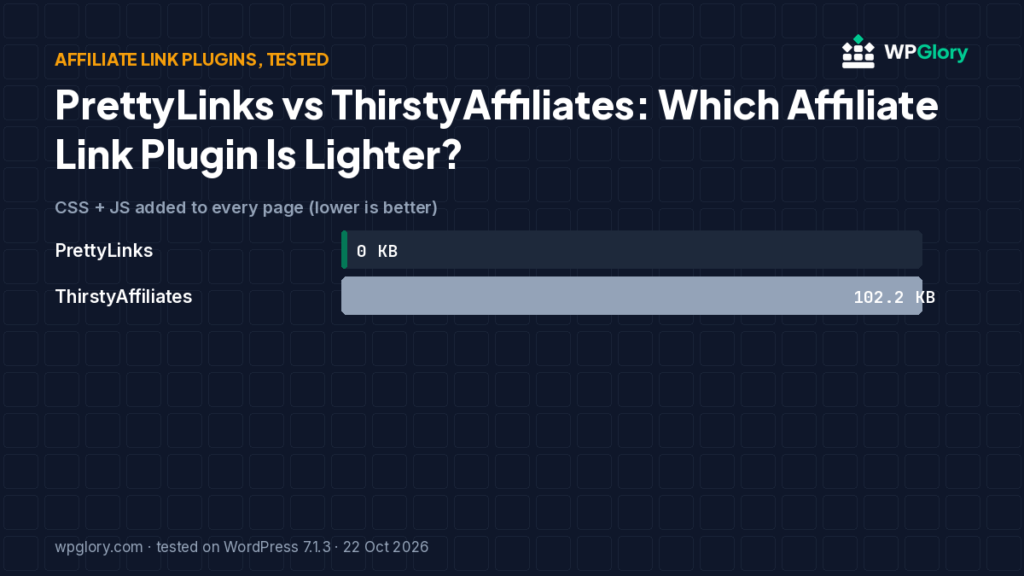
Short answer: Both work well. PrettyLinks loaded nothing on the front end in our test; ThirstyAffiliates loaded jQuery and its own script on every page (102 KB) unless you turn its link-click tracking scripts off. ThirstyAffiliates is better if you want everything under one /go/ prefix with categories — that is what we use on WPGlory.
PrettyLinks vs ThirstyAffiliates is the classic choice for affiliate bloggers. We installed both on the same site and then moved this site’s own links from one to the other, so this comparison covers the migration too.
Affiliate link plugins turn long tracking URLs into short links on your own domain, like wpglory.com/go/rank-math/, and count clicks. We installed both free plugins on the same site. Both are owned by the same company today.
| Measurement | PrettyLinks | ThirstyAffiliates |
|---|---|---|
| Version tested | 4.0.18 | 3.12.1 |
| Active installs | 200,000+ | 30,000+ |
| WordPress.org rating | 4.8 (1,321 reviews) | 4.6 (251 reviews) |
| Extra CSS/JS on pages that don’t use it | 0 files, 0 KB | 3 files, 102.2 KB |
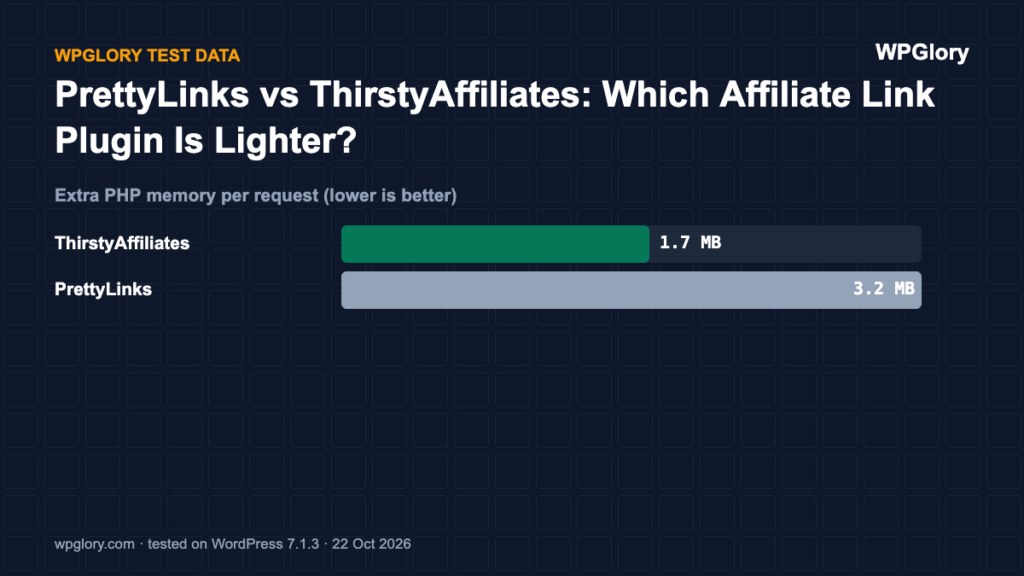
| Extra PHP memory | 3.2 MB | 1.7 MB |
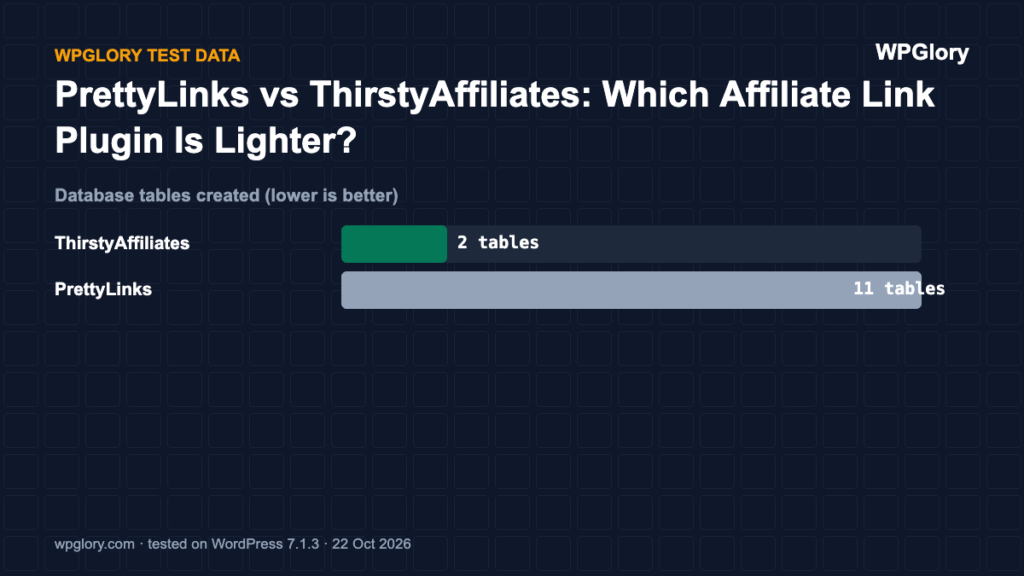
| Database tables created | 11 | 2 |
| Notices / redirects after activation | None | None |
| Plugin size | 7.8 MB | 7.8 MB |
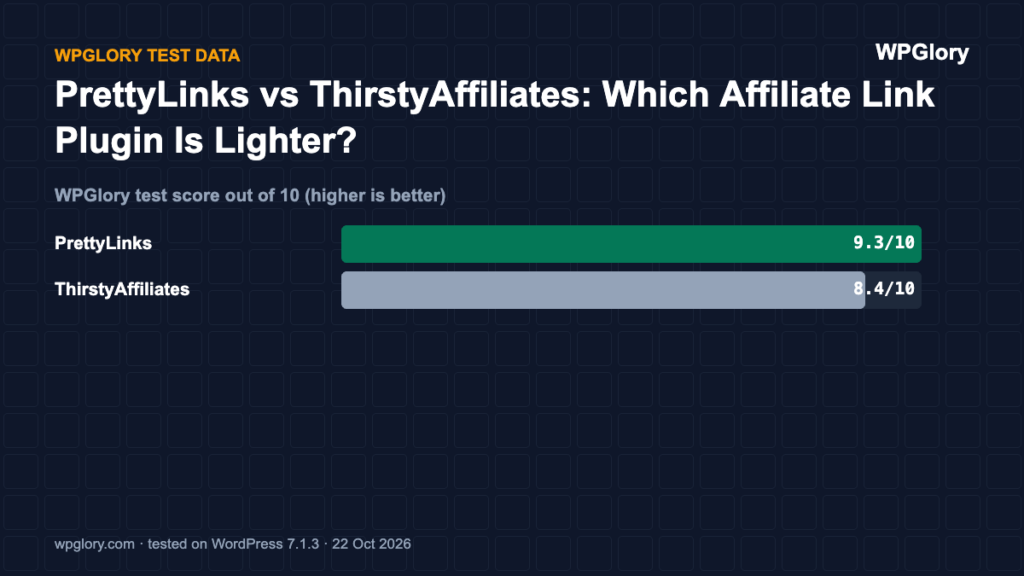
| WPGlory test score | 9.3/10 | 8.4/10 |
1. PrettyLinks — lightest front end
9.3/10 Free plan v4.0.18 · 200,000+ installs · 4.8★ on WordPress.org
PrettyLinks added nothing to the front end, 3.2 MB of memory and 11 tables (links, clicks and groups). Links live at the root of your domain (yoursite.com/link-name) by default.
Pros
- Nothing loaded for visitors
- Click reports in the free version
Cons
- 11 database tables
- Root-level links can clash with page slugs
2. ThirstyAffiliates — best for a /go/ link structure
8.4/10 Free plan v3.12.1 · 30,000+ installs · 4.6★ on WordPress.org
ThirstyAffiliates keeps every link under one prefix you choose (we use /go/), lets you sort links into categories and adds rel=”sponsored nofollow” for you. In our test it loaded jQuery, jQuery Migrate and its click-tracking script on every page: 3 files, 102 KB. ThirstyAffiliates has settings for its JavaScript features (link fixer, enhanced JavaScript redirect); we tested the defaults and did not test whether switching them off removes the files.
Pros
- Clean /go/ prefix and link categories
- Automatic nofollow and sponsored
- Light on the server
Cons
- 102 KB of scripts on every page by default
PrettyLinks vs ThirstyAffiliates: how we moved our own links
Every affiliate link on this site is a /go/ link (for example /go/rank-math/). Links open in a new tab and carry rel=”sponsored nofollow”. If you are moving from PrettyLinks, export your links first and add a 301 redirect from each old URL to its new /go/ URL so nothing you’ve shared breaks.
PrettyLinks vs ThirstyAffiliates: feature differences
- Link structure: PrettyLinks puts links at the root of your domain by default (yoursite.com/link). ThirstyAffiliates keeps every link under one prefix such as /go/ or /recommends/.
- Organisation: ThirstyAffiliates uses link categories; PrettyLinks uses groups and tags (some in Pro).
- Reports: both count clicks in the free version.
- Weight: PrettyLinks loaded nothing for visitors. ThirstyAffiliates loaded 102 KB of scripts by default; turning off its JavaScript redirect setting is the first thing we did on this site.
How to migrate from PrettyLinks to ThirstyAffiliates
- Back up your site.
- Export your PrettyLinks list (name, slug, destination) so you have a record.
- Install ThirstyAffiliates and set the link prefix (we use /go/), nofollow, new window and the rel=”sponsored” tag.
- Recreate each link in ThirstyAffiliates with a clear slug.
- Add a 301 redirect from every old PrettyLinks URL to its new /go/ URL (Rank Math’s free redirection module works).
- Deactivate PrettyLinks and test a few old links in a private window.
Score breakdown: where each plugin gained and lost points
Our test score adds up five criteria. The table shows each plugin’s points per criterion (out of 10), followed by what we measured. A higher number is always better here.
| Criterion | PrettyLinks | ThirstyAffiliates |
|---|---|---|
| Front-end weight (30%) | 10.0 | 5.9 |
| Server cost (20%) | 7.8 | 9.2 |
| Admin clutter (20%) | 9.2 | 10.0 |
| WordPress.org trust (20%) | 9.5 | 9.0 |
| Maintenance (10%) | 10.0 | 10.0 |
| Total score | 9.3/10 | 8.4/10 |
Front-end weight (30%)
We loaded a normal page that does not use the plugin and counted the extra CSS and JavaScript files. Every 25 KB costs one point. PrettyLinks added nothing to that page. ThirstyAffiliates added 3 files (102.2 KB).
Server cost (20%)
Extra PHP memory per request ranged from 1.7 MB (ThirstyAffiliates) to 3.2 MB (PrettyLinks). Memory matters on shared hosting, where every visitor request runs the plugin code. Database tables created: PrettyLinks 11 and ThirstyAffiliates 2. We deduct 0.35 points per MB of memory and 0.1 points per table.
Admin clutter (20%)
We counted what appeared in the dashboard right after activation. PrettyLinks added 1 dashboard widget. ThirstyAffiliates added nothing beyond its own menu.
WordPress.org trust (20%)
This is the WordPress.org rating, pulled toward 8/10 when a plugin has few reviews so that a handful of five-star ratings cannot win on its own. PrettyLinks: 4.8 stars from 1,321 reviews, 200,000+ active installs. ThirstyAffiliates: 4.6 stars from 251 reviews, 30,000+ active installs.
Maintenance (10%)
PrettyLinks 4.0.18 was last updated 1 day before our test and is marked as tested up to WordPress 7.1.3. ThirstyAffiliates 3.12.1 was last updated 8 days before our test and is marked as tested up to WordPress 7.1.3. Plugins tested with the current WordPress version get full points; an update older than six months costs three points.
Which link plugin we would install today
Both plugins do the core job well: short /go/ links, 301 or 302 redirects, nofollow and sponsored attributes and click counting. The difference in our test was where each one puts its cost.
ThirstyAffiliates was lighter on the server but loaded 102 KB of scripts, including jQuery, on every page by default. Its link fixer and stats modules are what load that script. On WPGlory we turned the link fixer off and kept the stats module for click reports, so the script still loads here; turn both off if you do not need the reports.
PrettyLinks loaded nothing on the front end but created 11 database tables and used more memory. Pick it if you want the simplest setup and do not want to touch any settings.
Switching later is possible but takes care. Export your links first, recreate them in the new plugin with the same slugs where you can, and add a 301 redirect for every old short URL that changes. We moved WPGlory from PrettyLinks to ThirstyAffiliates this way and kept every old link working, but it took an afternoon of checking, so it is worth choosing well the first time.
How we set up /go/ links on WPGlory with ThirstyAffiliates
We use ThirstyAffiliates on this site, so these are the exact settings behind every /go/ link you see here:
- Link prefix set to a custom value, go, so links look like wpglory.com/go/kadence/.
- Nofollow and open in a new window turned on for every link, plus the sponsored attribute added through the rel tags setting, as Google asks for paid links.
- Redirect type set to 302, so search engines keep treating the merchant page as the destination rather than our short URL.
- Enhanced JavaScript redirect and the link fixer module turned off, because our links already carry the right attributes. The stats module stays on for click reports.
- Old links kept working: every old short URL from our previous link plugin now points to its new /go/ link with a 301 redirect, so no clicks are lost.
How we tested
Every plugin was installed from WordPress.org on a clean WordPress 7.1.3 site (PHP 8.3, Kadence theme, default content) in WordPress Playground on 22 October 2026. We took a snapshot before and after activating each plugin, one plugin at a time, and compared them: CSS and JavaScript added to a logged-out page that doesn’t use the plugin, extra PHP memory to load WordPress, database tables, and every admin notice, dashboard widget and setup redirect. Directory facts (version, installs, rating) come from the WordPress.org API on the same day.
The WPGlory test score rates what a plugin costs your site, not how many features it has: front-end weight 30%, server cost 20%, admin clutter and upsells 20%, WordPress.org rating 20%, maintenance 10%. Features are covered in the text. Full method.
FAQ
Do affiliate links need nofollow?
Google asks for rel=”sponsored” (or nofollow) on paid and affiliate links. Both plugins can add it for you.
Will moving from PrettyLinks break my old links?
Not if you redirect each old URL to the new one with a 301. Export the list before you deactivate PrettyLinks.
Which is better for SEO?
Neither affects rankings directly. What matters is marking affiliate links rel=”sponsored” and keeping old URLs working with redirects when you migrate.
Is the PrettyLinks vs ThirstyAffiliates choice permanent?
No. As long as you redirect old link URLs, you can move between them at any time, as we did on WPGlory.
Final verdict
PrettyLinks for speed, ThirstyAffiliates for a tidy /go/ structure.
Both are free and reliable.
9.3/10